Saturn Cd board fried?

SMS, Genesis, 32X, Sega CD, Saturn, Dreamcast
sd_dracula
8-bit
Posts: 19
Joined: Fri Jun 21, 2013 8:17 pm

Saturn Cd board fried?

Post by sd_dracula »

Anyway I was trying to get a modchip to work and I went from connecting the power to the chip from the PSU to the CDROM board as instructed here: http://www.racketboy.com/forum/viewtopic.php?t=19839 because the saturn was reading originals (eventually) but not the backups.

As soon as I hooked it up, noticed slight burning smell and shut it down right away.

Now it just displays lid open message and the discs won't spin anymore.
I guess the CD board is dead.

Can that be replaced?

See below for photo of the CDROM board, it has a burn mark on it and the chip itself.
Image

Image
User avatar
Hobie-wan
Next-Gen
Posts: 21705
Joined: Sat Aug 15, 2009 8:28 pm
Location: Under a pile of retro stuff in H-town
Contact:

Re: Saturn Cd board fried?

Post by Hobie-wan »

I'm not seeing a burn.
User avatar
bacardipr05
64-bit
Posts: 319
Joined: Sat Apr 02, 2011 7:17 am

Re: Saturn Cd board fried?

Post by bacardipr05 »

Put everything back together without the mod chip. Check for any loose or pinched wires, make sure none of the buttons are stucjk.
Curtsy when you walk by that Dreamcast
sd_dracula
8-bit
Posts: 19
Joined: Fri Jun 21, 2013 8:17 pm

Re: Saturn Cd board fried?

Post by sd_dracula »

I have put everything together without the chip but the drive/lens is not doing anything.
I have read up somewhere that this is a common issue when trying to install the chip, it basically messes up with the power going to the CD board (maybe it blows the little green power cable?)
A fix would be to connect the power from the CD board to the 4 pin PSU but could not find the wiring diagram for that.

Does anyone know how to hook it up to the PSU?

Here is the burn mark in the yellow box:
Image
User avatar
Ziggy
Moderator
Posts: 14913
Joined: Mon Jun 09, 2008 5:12 pm
Location: NY

Re: Saturn Cd board fried?

Post by Ziggy »

Those traces are really wide, so they're most likely voltage and ground. Weird how that could have happened. It must have shorted some how. Did you have anything in that area? A wire to the PSU maybe?

Anyway, if that's your only problem, no big deal. That's repairable, and not that hard of a fix. No need to look to replace the entire CD board with such a minor repair.
sd_dracula
8-bit
Posts: 19
Joined: Fri Jun 21, 2013 8:17 pm

Re: Saturn Cd board fried?

Post by sd_dracula »

So how to go about fixing it?

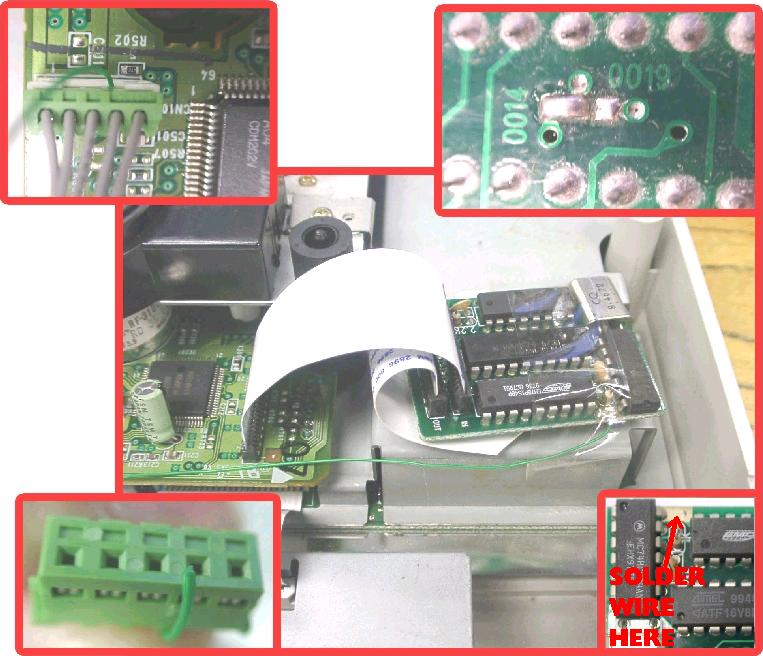
Here is where I have connected the power cable for the chip:
Image
in the green connector.

From here: http://www.robwebb1.plus.com/saturn/sat ... uide_2.htm
I am experiencing this: the machine boots up and the cubes are deformed in the CD player, which means the drive is not connected or not powered. Perhaps the power cable connecting the motherboard to the CD board is busted?
User avatar
Ziggy
Moderator
Posts: 14913
Joined: Mon Jun 09, 2008 5:12 pm
Location: NY

Re: Saturn Cd board fried?

Post by Ziggy »

sd_dracula wrote:I am experiencing this: the machine boots up and the cubes are deformed in the CD player, which means the drive is not connected or not powered. Perhaps the power cable connecting the motherboard to the CD board is busted?
No, it's probably those busted traces. The thicker traces are always gonna be voltage or ground, that's why they're thicker/fatter. Being that there's two thick traces right next to each other and they're not connected, they're probably one of each.

Repairing them should be relatively easy. I can think of two ways to go about repairing them, one might be easier to some while the other will be easier to others.

One, you can solder a jumper wires between vias. You have to scratch up the protective cover on them first. Use an X-acto knife or a small flat head. Use a medium gauge wire, nothing too thin. Maybe some where around 20AWG, no smaller. I illustrated your picture so you can get the idea:
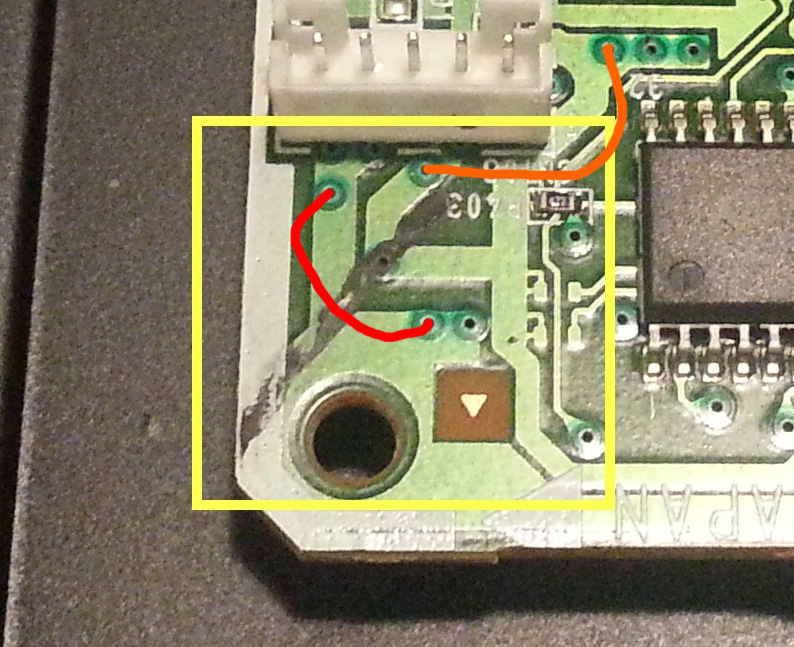
jumper wire.jpg
jumper wire.jpg (226.48 KiB) Viewed 1970 times
The red line would be one wire, the orange line would be the other wire.

Two, expose the copper in the traces and make a solder bridge between them. This one you might find easier to do. Just scratch the traces up, you wanna remove the protective layer and expose the copper. Be careful not to damage the trace. Expose enough of the copper to give the solder a good amount to cling to. Flux it, then go to town with solder. Another illustration so you can get the idea:
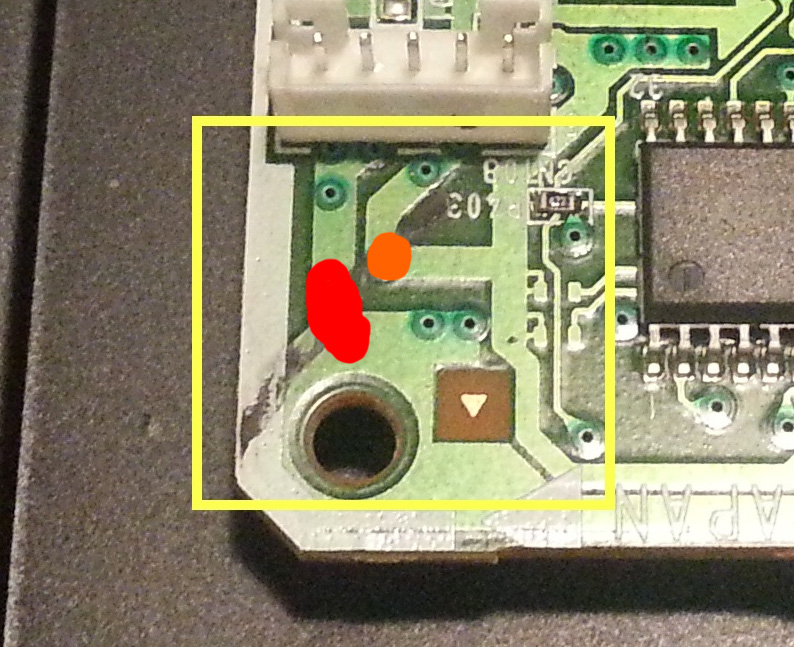
solder bridge.jpg
solder bridge.jpg (222.69 KiB) Viewed 1970 times
The red being one blob of solder, the orange being another.

You might find it hard to create a solder bridge between them, you could put a piece of stripped wire in there to make the bridge easier. Just be sure not to bridge one trace to the other (the wrong one). I would first scratch and solder one, tape it off, then do the second trace to avoid creating a bridge between them.
sd_dracula
8-bit
Posts: 19
Joined: Fri Jun 21, 2013 8:17 pm

Re: Saturn Cd board fried?

Post by sd_dracula »

Thanks for the detailed info.
I have a friend that does modding for pretty much everything so I'll bring this up to him at the weekend as I have more stuff to get done at the same time.
He'll have all the right tools :)
User avatar
Hobie-wan
Next-Gen
Posts: 21705
Joined: Sat Aug 15, 2009 8:28 pm
Location: Under a pile of retro stuff in H-town
Contact:

Re: Saturn Cd board fried?

Post by Hobie-wan »

Are you sure that's a burn? That just looks like some grease pencil mark that might have been someone's 'ok' mark on the board as it went down the production line. There's no component there to have burned and if it was your wire jammed in the green connector, the white socket would be burned too. I bet you just didn't notice the mark until you were worried you killed it. Try cleaning the black with a little alcohol on a q-tip or bit of paper towel.
User avatar
Ziggy
Moderator
Posts: 14913
Joined: Mon Jun 09, 2008 5:12 pm
Location: NY

Re: Saturn Cd board fried?

Post by Ziggy »

Good eye, Hobes. I read burn mark, so that's naturally what I see when I look at the picture. Now that you say marker, I can see that too. I was thinking, if it is a burn mark, that the voltage wire connected to that pin connector could have arced to the shield and cause the burn. But that's a pretty straight line, now that I'm thinking about it.
Post Reply