SOLVED: Which PS2 to PS3 controller adapter to get ?

Brawlers and Beatemups
User avatar
CRTGAMER
Next-Gen
Posts: 11933
Joined: Tue Jan 05, 2010 11:59 am
Location: Southern California

Re: Which PS2 to PS3 controller adapter to get ?

Post by CRTGAMER »

Ziggy587 wrote:From what I've read, MayFlash made a Saturn, PS, N64 adapter that works on the PS3. It was called Super Joy Box or Joy Box Plus, something like that, but definitely had "Joy Box" in it. They were blue. They stopped making them, and started making these...

http://www.ebay.com/itm/Mayflash-Sega-S ... 43ae540aab

But I haven't been able to find out if those newer ones work on the PS3.
Apologies for not updating yopu on the PSX to PS3 USB adaptor. It turns out the adapters I have are from Frys Electronics, made by Kiky X-Series for the PC, not the PS3. Only a couple games partially worked which were PS3 Soul Caliber and PS3 Warhawk. However, the direction controls not mapped correctly so maybe PC USB versions are not compatible with the PS3? I wonder if the adapters I have were designed for PS1, the port is grey, not black. Both PS1 and PS2 controllers work when plugged into a PC.

Has anyone tried a wired PS3 controller in a PC? I saw a USB PS3 Flightstick I am contemplating on buying, not sure if it would work in a PC.

A comparison of various USB adapters: http://www.stepmania.com/wiki/USB_Adapters
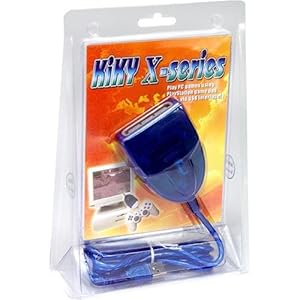
Image Image
Image
CRT vs LCD - Hardware Mods - HDAdvance - Custom Controllers - Game Storage - Wii Gamecube and other Guides:
CRTGAMER Guides in Board Guides Index: http://www.racketboy.com/forum/viewtopi ... 5#p1109425

Image
Image
AppleQueso

Re: Which PS2 to PS3 controller adapter to get ?

Post by AppleQueso »

I've used my wireless Ps3 controller on my PC before, plugged in with the normal USB cable used for charging. It requires special drivers you have to download.
User avatar
Weekend_Warrior
Next-Gen
Posts: 2152
Joined: Sun Aug 16, 2009 2:48 am
Location: Parts Unknown

Re: Which PS2 to PS3 controller adapter to get ?

Post by Weekend_Warrior »

The "inpin converter" has one of the best reputations. For a long time, it was commonly used at Street Fighter and Tekken tournaments. It's completely lagless, and supports analog & vibration.

Get it from this site: http://etokki.com/Playstation3/iNPiN-PS ... -Converter
"Welcome to the circus of values!"

Currently Playing: Crysis (360), Destiny demo (PS3), Roadblasters (MAME)
User avatar
flex wood
Next-Gen
Posts: 2695
Joined: Tue Jul 20, 2010 10:53 pm
Location: Minneapolis

Re: Which PS2 to PS3 controller adapter to get ?

Post by flex wood »

CRTGAMER wrote:Joybox sounds familar
Attachments
if-you-know-what-i-mean-420x250.png
if-you-know-what-i-mean-420x250.png (50.86 KiB) Viewed 2110 times
User avatar
Ziggy
Moderator
Posts: 14913
Joined: Mon Jun 09, 2008 5:12 pm
Location: NY

Re: Which PS2 to PS3 controller adapter to get ?

Post by Ziggy »

Just wanted to let the internet know, I got one of those Mayflash adapters and it works on the PS3.

http://www.ebay.com/itm/Mayflash-Sega-S ... 43ae540aab

^ That's the one that I got. I tested out three controllers so far: first party PS2, first party Saturn, and the NeoGeo PS2 controller. I haven't tested an N64 controller yet, but I assume it works just as well. As far as I can tell, there isn't any input lag. I played a few rounds of MKII against the computer using a PS2 controller. Seemed fine. Then I played a little SF2 HD Remix using the Saturn and NeoGeo controller. Aside from having to remap the buttons on the Saturn controller, the adapter seems to work perfectly.
User avatar
sabrage
Next-Gen
Posts: 2588
Joined: Fri Dec 30, 2011 5:47 pm
Location: GMT -7

Re: SOLVED: Which PS2 to PS3 controller adapter to get ?

Post by sabrage »

Do you only need to remap the buttons once, or every time you plug it in Zig? That's potentially very useful for me. It'd be cool if it supported X360 as well, but with Microsoft's standards i doubt that.
User avatar
Ziggy
Moderator
Posts: 14913
Joined: Mon Jun 09, 2008 5:12 pm
Location: NY

Re: SOLVED: Which PS2 to PS3 controller adapter to get ?

Post by Ziggy »

I remapped the buttons from within the game. In SF2 HD Remix, I believe it saves your controller config. So if you keep using the same controller, you would only have to map the buttons once. Some games have multiple mapping profiles, so you can easily switch between controllers if needed.

As far as the XMB goes... I don't believe there's any way to map the buttons. If you turn the PS3 on with only the one controller plugged in, you'll have to remember what button is X and what button is O (if needed). On the Saturn controller, I believe the C button was the X button, so it took a little trial an error to navigate into a game.

Also keep in mind that any controller you use like this doesn't have the PS button, so you can't exit games and whatnot. You can also use a PS3 controller as controller 2 and keep it close by, or use the PS3 remote if you have one.

As for using an Xbox controller, Mayflash also makes (made?) a newer adapter. It's GCN/PS2/Xbox to USB.

http://cgi.ebay.com/ws/eBayISAPI.dll?Vi ... ink:top:en

This adapter wouldn't be very useful to me since I no longer own an Xbox, and I don't find the Gamecube controller very useful for anything other than Gamecube games. I also have no clue if it works on the PS3. I would assume yes since the Mayflash adapter I bought works. As for the 360, I'm sure there's at least a few adapters out there.
User avatar
sabrage
Next-Gen
Posts: 2588
Joined: Fri Dec 30, 2011 5:47 pm
Location: GMT -7

Re: SOLVED: Which PS2 to PS3 controller adapter to get ?

Post by sabrage »

Yeah, I think I'd only really be using it for the Saturn and occasionally N64 ports. I'm not a huge fan of the Sony controller.
User avatar
Ziggy
Moderator
Posts: 14913
Joined: Mon Jun 09, 2008 5:12 pm
Location: NY

Re: SOLVED: Which PS2 to PS3 controller adapter to get ?

Post by Ziggy »

Ugh, Street Fighter IV is so fucking lame...

In SF2 HD Remix and MK Arcade Kollection, remapping buttons is easy. You scroll to the action you want to map a button to, so let's say for example it's Medium Punch, you scroll to it and press the button you want to use for that action. Easy as pie. In SF4, it gives you the action and then you have have to scroll to choose which button you want. The problem is, I have really no idea what button is which on the Saturn controller. Now I have to figure out a way to figure out what each button on the Saturn pad would really be on a PS3 controller. It was easy to figure out what X, O, triangle and square were. But since SF4 has those LP+MP+HP and LK+MK+HK buttons, I can't distinguish between those and the normal HP and HK buttons. Kinda hard to explain, but if any one know what I'm talking about, you must know how frustrating this is.

Is there an easy to to figure out what Saturn button is mapped to which PS button?

edit: Duh, I just realized. In MK Arcade Collection, when you map the buttons you get to press what button you want to use for the function. When you press the button, that PS button shows up on the screen. So all I had to do is press every button on the controller to figure out which PS button it is.

Now I can map the buttons correctly in SF4, but really, SF4 should have had a better button mapping system. What are we, in the 90's? :lol:
Post Reply
