How to hook up all consoles to two TV's at once?

Discuss Your Gaming Environments and AV Setups
Post Reply
dosercody
Newbie
Posts: 1
Joined: Wed Jul 29, 2015 12:13 pm

How to hook up all consoles to two TV's at once?

Post by dosercody »

Newb here! :) Basically I have all 12 of my systems (older and newer, all using component or HDMI) hooked up to a newer HDTV. Works great, but inspiration I've gathered from some of you guys on here has led me to want to create a system with an old tube TV next to my HDTV, where I can play the component systems off of either TV depending on my desire (old TV when just me, new TV when a group of people because its bigger). I know there is a way to do this, but I can't find anything online. So how can I connect the two televisions to do this? Is there a switch box? Or? Anything helps guys :)

On an added note, I basically want one of these for component...
http://www.monoprice.com/Product?c_id=1 ... 1&format=2
User avatar
bmoc
Next-Gen
Posts: 1910
Joined: Thu May 19, 2011 1:36 pm

Re: How to hook up all consoles to two TV's at once?

Post by bmoc »

You pretty much answered your own question. You want a component matrix switch. Here is one example.
User avatar
Fragems
Next-Gen
Posts: 5429
Joined: Sun Jan 27, 2013 1:01 am
Location: Proctorville, OH

Re: How to hook up all consoles to two TV's at once?

Post by Fragems »

I have a RadioShack 4-Way Component Video Distribution Amplifier model 15-311 it works great basically splits/amplifies one signal into 4. Been using it for a little over a year now and haven't noticed any lag issues. Cost me $28.85 shipped a little over a year back. Amazon still has a page for it but it looks like they are no longer being manufactured.


Looks like there is a guy selling one for $15 shipped on eBay.

http://www.ebay.com/itm/Radioshack-4-Wa ... 3cff60095c
Kidpanda
64-bit
Posts: 483
Joined: Fri Feb 15, 2013 9:52 pm
Location: Panda Island™

Re: How to hook up all consoles to two TV's at once?

Post by Kidpanda »

Fragems wrote:I have a RadioShack 4-Way Component Video Distribution Amplifier model 15-311 it works great basically splits/amplifies one signal into 4. Been using it for a little over a year now and haven't noticed any lag issues. Cost me $28.85 shipped a little over a year back. Amazon still has a page for it but it looks like they are no longer being manufactured.


Looks like there is a guy selling one for $15 shipped on eBay.

http://www.ebay.com/itm/Radioshack-4-Wa ... 3cff60095c
I have one of these, when I was streaming it worked great.
Image
User avatar
Anapan
Next-Gen
Posts: 3946
Joined: Mon Nov 17, 2008 11:15 am
Location: BC, Canada

Re: How to hook up all consoles to two TV's at once?

Post by Anapan »

Above answers are great, I used to y-split S-video to my computer's capture card and my display when recording. After that I used a cheap matrix splitter for VGA using XRGB3, and now I'm using a SCART splitter going to my XRGB Framemeister, with a cheap monoprice 2x1 HDMI splitter, then a HDMI switcher for my PC or my newer consoles going to 2 flat screens. Thanks for mentioning the Component matrix; If I get a SCART matrix, I can combine it with that Component matrix and a transcoder to make many more screens work simultaneously. Wall of awesome upgrade is coming. I can probably even loop back some video downsamplers that have been sitting in the cupboard at the right points for best clarity and resolution at any point.
I hope I don't start any fires... There's already 30+ plugs going into a single wall outlet.
ImageImageImageImage
User avatar
Ziggy
Moderator
Posts: 14913
Joined: Mon Jun 09, 2008 5:12 pm
Location: NY

Re: How to hook up all consoles to two TV's at once?

Post by Ziggy »

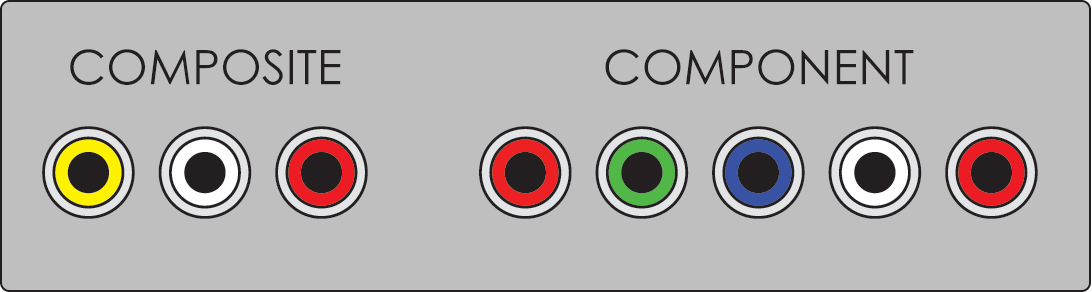
dosercody, are you confusing component video with composite video?
Image
Sixth generation consoles (specifically the PS2, Xbox, GCN) could output component video, but anything before that did not. That's why I ask, as you said you have 12 consoles.


I got annoyed using various switch boxes, and finding ways to have ~12 consoles hooked up at once. I know my solution isn't for everyone, but here's what I do...

HDTV: Everything is plugged into an AV receiver, or the XRGB mini (which outputs to the receiver).

CRT: No consoles are connected to the TV. When I want to play a console, I plug it in using the TV's front AV inputs. This might seem like a hassle to some, but I find it to be less of a hassle. No tangled mess of wires, ever. No switch box mess. No power bricks plugged in 24/7. And since you generally play only one console at a time anyway, no big deal. I know not all TVs have front AV inputs, but this can be remedied. For example, my CRT only has composite input on the front, and S-Video inputs are only in the back. I just run an S-Video extension AV cable around to the front of the TV.
Post Reply