Neo Geo MVS-2 mini 13 arcade monitor swap... HELP! :)

Neo-Geo, Arcade, Portable, & Every Other Platform
User avatar
CRTGAMER
Next-Gen
Posts: 11933
Joined: Tue Jan 05, 2010 11:59 am
Location: Southern California

Re: Neo Geo MVS-2 mini 13 arcade monitor swap... HELP! :)

Post by CRTGAMER »

Limewater wrote:
CRTGAMER wrote:You can go with a bigger monitor, as "fastbilly1" points out check for clearance. The facing does seem it could easily fit a 19".
If I had to guess, I'd bet that the limiting factor on fitting a larger monitor in there will be depth. I mean, your tag is "CRTGAMER", so I'm sure you know all about that, but I just wanted to mention it. The cabinet doesn't look too deep, and I bet that's the real reason for the small monitor in there in the first place.

But I could be completely off-base.
Very good point, the back of the cabinet could be a limiting factor as well. LCD an easier fit, but for me a CRT, personal preference for the Arcade Pic quality.
swirlee wrote:CRTGAMER -

WOW! thanks for the help. Unfortunately I am a n00b when it comes to JAMMA(heard this acronym for the first time a week ago) and arcade setups, so I think I might need a dumbed down explanation of exactly how this converter works.

What connects to what? I see a VGA cable, but the image says that connects to a motherboard? I would expect the VGA cable to connect to a monitor, no? And what is the parallel port for? All a bit confusing.

You also said "There are other boards for monitor conversion only." What is this board for, if its not for monitor conversion? If VGA isn't the standard way an arcade board connects to its monitor, then what is?

And when you are talking about LCDs are you talking about PC LCDs or the application specific ones sold on Happ?

THANKS!
The pic on my previous reply is one example if you are going to hookup a PC for a start of total conversion "Mame" setup. But it would use the original Arcade monitor.

Jamma Connector has all the game controls and video on one connector.
Image
Image

For Video look at pins 12, 13, 14, N and P.

To keep the original Neo Geo Arcade board intact, there are boards to go the other direction Jamma to VGA monitor.

"swirlee", take a look at my signature link. I did a comparison of LCD vs CRT and video input quality. Hope it is of help in deciding on your monitor choice.
Image
CRT vs LCD - Hardware Mods - HDAdvance - Custom Controllers - Game Storage - Wii Gamecube and other Guides:
CRTGAMER Guides in Board Guides Index: http://www.racketboy.com/forum/viewtopi ... 5#p1109425

Image
Image
User avatar
CRTGAMER
Next-Gen
Posts: 11933
Joined: Tue Jan 05, 2010 11:59 am
Location: Southern California

Re: Neo Geo MVS-2 mini 13 arcade monitor swap... HELP! :)

Post by CRTGAMER »

Try these guys.
http://www.jammaboards.com/store/cga/eg ... d_291.html

Soldering required when you do this conversion.
Last edited by CRTGAMER on Tue Mar 16, 2010 6:32 pm, edited 1 time in total.
Image
CRT vs LCD - Hardware Mods - HDAdvance - Custom Controllers - Game Storage - Wii Gamecube and other Guides:
CRTGAMER Guides in Board Guides Index: http://www.racketboy.com/forum/viewtopi ... 5#p1109425

Image
Image
fastbilly1
Site Admin
Posts: 13775
Joined: Tue Apr 17, 2007 7:08 pm

Re: Neo Geo MVS-2 mini 13 arcade monitor swap... HELP! :)

Post by fastbilly1 »

Ill ask my buddies that have NeoGeos for you tonight. Off the top of my head, I think the their is a sync issue from doing it directly - 60hz to 31hz. But I have to run.
sharp3D
16-bit
Posts: 81
Joined: Tue Mar 16, 2010 10:08 am

Re: Neo Geo MVS-2 mini 13 arcade monitor swap... HELP! :)

Post by sharp3D »

fastbilly1 -

sure... lemme know! :)

CRTGAMER -

wow.. I just found that converter right before I refreshed to see if anyone replied. So that is exactly what I need then right??? The guy even left a comment on that page saying he used this on his Neo Geo MVS cab to swap out the stock CRT for an LCD.

What do you mean soldering required for this a conversion? It doesn't mention that anywhere.

Here is a PDF install guide

http://www.jammaboards.com/faq/assets/g ... r_rev1.pdf

I read their "basic setup guide". It isn't very basic. I want it to say, plug your arcade into here and connect your pc here.. thats basic. Haha
User avatar
CRTGAMER
Next-Gen
Posts: 11933
Joined: Tue Jan 05, 2010 11:59 am
Location: Southern California

Re: Neo Geo MVS-2 mini 13 arcade monitor swap... HELP! :)

Post by CRTGAMER »

swirlee wrote:fastbilly1 -

sure... lemme know! :)

CRTGAMER -

wow.. I just found that converter right before I refreshed to see if anyone replied. So that is exactly what I need then right??? The guy even left a comment on that page saying he used this on his Neo Geo MVS cab to swap out the stock CRT for an LCD.

What do you mean soldering required for this a conversion? It doesn't mention that anywhere.

Here is a PDF install guide

http://www.jammaboards.com/faq/assets/g ... r_rev1.pdf

I read their "basic setup guide". It isn't very basic. I want it to say, plug your arcade into here and connect your pc here.. thats basic. Haha
Good manual, Look at page III. Mentions about the video connector. See If you have that 5 pin connector to the original monitor. If not, not too hard, follow the different video wires from the Jamma connector one at a time to solder up a new smaller connector. Be careful, you still need to maintain that Jamma connector for you player control connection.

Take your time, you have a great arcade cabinet. I think the mounting of the replacement monitor will be your biggest obstacle. Really not too difficult either with the right brackets and built supports.

"fastbilly1" mentioned he is checking a friends setup, maybe wait and see what he finds out for the both of us to learn.
Last edited by CRTGAMER on Tue Mar 16, 2010 7:46 pm, edited 1 time in total.
Image
CRT vs LCD - Hardware Mods - HDAdvance - Custom Controllers - Game Storage - Wii Gamecube and other Guides:
CRTGAMER Guides in Board Guides Index: http://www.racketboy.com/forum/viewtopi ... 5#p1109425

Image
Image
sharp3D
16-bit
Posts: 81
Joined: Tue Mar 16, 2010 10:08 am

Re: Neo Geo MVS-2 mini 13 arcade monitor swap... HELP! :)

Post by sharp3D »

CRTGAMER -

I am still having a bit of trouble understanding this based on your explanation.

From what I gather... a RBG cable comes out of my arcades motherboard... I would then connect that cable to the converter. Then I would connect a VGA cable to the VGA out on the converter to my monitor. Then the converter needs power, so I plug it into the arcades power supply.

This must not be correct since you say there is soldering involved. I think the whole 5V cable is the most confusing thing for me. Am I going to have a spot to connect this 5V cable up to the stock power supply? Kind of like how a PC power supply has several seperate molex connectors to connect things like video cards, cd-rom drives?
User avatar
CRTGAMER
Next-Gen
Posts: 11933
Joined: Tue Jan 05, 2010 11:59 am
Location: Southern California

Re: Neo Geo MVS-2 mini 13 arcade monitor swap... HELP! :)

Post by CRTGAMER »

swirlee wrote:CRTGAMER -
I am still having a bit of trouble understanding this based on your explanation.

From what I gather... a RBG cable comes out of my arcades motherboard... I would then connect that cable to the converter. Then I would connect a VGA cable to the VGA out on the converter to my monitor. Then the converter needs power, so I plug it into the arcades power supply.

This must not be correct since you say there is soldering involved. I think the whole 5V cable is the most confusing thing for me. Am I going to have a spot to connect this 5V cable up to the stock power supply? Kind of like how a PC power supply has several seperate molex connectors to connect things like video cards, cd-rom drives?
You just answered it better then I could guess it. Honest! That would be the Jamma connector you would look for, again not a straight plug in though. You could run power for the video adaptor from the pinouts of that Jamma diagram. An electrical tester (and soldering) is a must, you don't want the wrong lead frying something. If worry of that risk, you could also give the adaptor its own dedicated power supply.

Before you order anything 2 things.

1. Does you Neo Arcade have a small 5 pin connector (for the video) going to the old monitor? Wouldn't it be nice if it was the original arcade Pong setup with an RF cable? Long shot, maybe already has a composite connection? Okay sorry, gotta give a tease, but check it out so you know where you are at on the video feed.

BE CAREFUL! High voltage (even unplugged) at that Arcade CRT monitor!

2. Maybe see what "fastbilly1" finds out from his buddies setup. probably has been through all these obstacles already. Especially the voltage pinouts of that Jamma connector.
Image
CRT vs LCD - Hardware Mods - HDAdvance - Custom Controllers - Game Storage - Wii Gamecube and other Guides:
CRTGAMER Guides in Board Guides Index: http://www.racketboy.com/forum/viewtopi ... 5#p1109425

Image
Image
sharp3D
16-bit
Posts: 81
Joined: Tue Mar 16, 2010 10:08 am

Re: Neo Geo MVS-2 mini 13 arcade monitor swap... HELP! :)

Post by sharp3D »

CRTGAMER -

The more I look into it the more I think it will be that simple.

Again I would like to point out what some random guy commented about the converter on the product site.

"
I used one of these to replace a 25 inch monitor in my Neo MVS cabinet. I'm using this board with a 24 inch LCD PC monitor and it looks amazing! The board worked the first time i powered it up and have had NO issues! this is a great product and is an easy and cheap fix for old games giving you the ability to add an off the shelf PC monitor in the cabinet instead of buying very expensive arcade monitors! It was VERY easy to navigate the menu's (first in chinese but finding the english option was easy!).

"

Sounds like plug in play with Neo Geo cabs. *Fingers crossed*

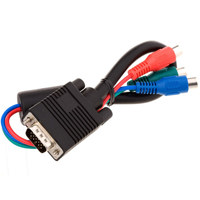
I know one of the primary purpose of this converter to is upscale images, but whats to keep me from using something as simple as this adapter cable to connect the MVS board with an LCD monitor?

Image

But yes lets also see what fastbilly1's friends have to say!

Thanks guys!
User avatar
CRTGAMER
Next-Gen
Posts: 11933
Joined: Tue Jan 05, 2010 11:59 am
Location: Southern California

Re: Neo Geo MVS-2 mini 13 arcade monitor swap... HELP! :)

Post by CRTGAMER »

swirlee wrote:CRTGAMER - The more I look into it the more I think it will be that simple.

Again I would like to point out what some random guy commented about the converter on the product site.

I used one of these to replace a 25 inch monitor in my Neo MVS cabinet. I'm using this board with a 24 inch LCD PC monitor and it looks amazing! The board worked the first time i powered it up and have had NO issues! this is a great product and is an easy and cheap fix for old games giving you the ability to add an off the shelf PC monitor in the cabinet instead of buying very expensive arcade monitors! It was VERY easy to navigate the menu's (first in chinese but finding the english option was easy!).

Sounds like plug in play with Neo Geo cabs. *Fingers crossed*

I know one of the primary purpose of this converter to is upscale images, but whats to keep me from using something as simple as this adapter cable to connect the MVS board with an LCD monitor?

Image

But yes lets also see what fastbilly1's friends have to say!

Thanks guys!
You and me both. I tried the same, going from Dreamcast VGA to Component with that cable you have pictured. DOES NOT WORK. Thats where a transcoder come in not only in upscale, but also to get the right signal for Sync, Chroma, Luma, whatever other term you want to throw in to make it work right. Little bit of headache to solder but just go one wire at a time. You only have the five for video and two for power, I don't believe that board needs an earth ground.

Go ahead and pop that back off you Cabinet and check that video connector. Doesn't cost anything to look. Just might get lucky and already have that 5 pin connector. Again BE CAREFUL around that CRT, there are High Voltages even when unplugged. Then all you would have to solder up is the power for that adaptor. Or just get a dedicated power supply for it. While you are there, you can also check the clearances for replacement monitor as well. give you a better ballpark of what's involved on this upgrade. The harder it is, the more satisfied you'll be at the end.

Did you get a chance to read my monitor comparison at my signature link?
Image
CRT vs LCD - Hardware Mods - HDAdvance - Custom Controllers - Game Storage - Wii Gamecube and other Guides:
CRTGAMER Guides in Board Guides Index: http://www.racketboy.com/forum/viewtopi ... 5#p1109425

Image
Image
sharp3D
16-bit
Posts: 81
Joined: Tue Mar 16, 2010 10:08 am

Re: Neo Geo MVS-2 mini 13 arcade monitor swap... HELP! :)

Post by sharp3D »

Yeah I had the opportunity to check out your writeup. Good stuff. Your knowledge on the subject is impressive.

I found this image of a guy using the VGA converter to hook up his Amiga to an LCD.

Image

I am still not seeing anything that would need to be soldered as you mentioned. I see he has some resistors in line of those RGB connections. I don't think I will have to do anything like that(I hope).

I am really just hoping my MVS board does component out, so I connect the RGB cables into the converter, then output to VGA connected to an LCD. Then power the thing off an existing power connector from the arcades power supply. You mentioned before that I explained it better than you. But I never mentioned soldering, but you keep bringing it up.

Sorry its so hard for me to figure out just what you are talking about. What exact cables get soldered and where do they connect specifically?
Post Reply