The MetalJesus Video Thread

Post game-related video clips here
User avatar
Metal Jesus
128-bit
Posts: 702
Joined: Sat Feb 05, 2011 11:48 am
Location: Seattle
Contact:

Re: The MetalJesus Video Thread

Post by Metal Jesus »

PS2 Buying Guide & Great Games

Are you thinking of getting into PS2 collecting? This video explains the different models of Playstation 2, what to look for that tends to fail, some different controllers and 10 games we highly recommend to get you started!

What are the 10 PS2 Games a new collector should buy Day 1?

Image

https://youtu.be/2ed2VudL2YM <<--YouTube
User avatar
flojocabron
Next-Gen
Posts: 4155
Joined: Thu Aug 19, 2010 2:15 am
Location: on the border

Re: The MetalJesus Video Thread

Post by flojocabron »

Nice informative video, metal jesus!

I'd like to point out that there are also lots of versions of PS2 slims.

There are some that have the yellow tipped plug that takes the 8.5v adapter and some that take a normal plug. Like the ones you put into the classic playstation.

It's just that the yellow tipped ones are more common. I think that the latest console revision before sony retired the PS2 is the one that switched out to normal plugs.

I find the slim systems all the time at the fleamarket. But they usually have the 8.5v plug missing. Look up a picture online to get an idea on how they look like. You can get lucky and find just the ps2 slim console for just a few bucks.

Also there's plenty of variants on fatty ps2 too. Some remove the little tiny port next to the USB's in the front. I guess very little things used it. There's also I believe hardware changes inside of them too. Some later fatties have less parts inside of them.

There are some PS2 fat that dont really like hard drives put in them. Well not exactly that. If you ever plan on hacking your ps2 with a hard drive and HD loader to play copied games. Some early console versions dont accept the hack. So be careful when you decide on hacking your ps2 with a hard drive.

Also there are two types of ps2 modems. One is more common than the other. There are different serial ports for the hard drives that attach to the modem. I believe there's a list of compatible hard drives. But if you have more modern hard drives, they may not be compatible with the modem. That is unless you find the second revision that can take newer style hard drives. But that's the version that gets expensive.
2600 and jr,5200,nes/top loader, master system, intellivision, TG-16, genesis 1,2,3, SNES, snesJR, CDX, 3DOfz10, gamegear, gameboy and pocket, GBC, sega saturn, PSOne w/screen, Virtual Boy, N64, NGPC, Gameboy Advance sp, Dreamcast, Black Dreamcast, oXBOX, Playstation 2, PStwo, Gamecube, gameboy player, DS lite,DSi XL, PSP1000/3000,Wii,PS3 120gb,3DSXL, xbox 360, PSvita, PS4
User avatar
darsparx
Next-Gen
Posts: 4394
Joined: Mon Mar 17, 2014 10:24 pm

Re: The MetalJesus Video Thread

Post by darsparx »

Man the one system it seems the easiest to collect for, just not with the first party well known ones in thrift shops(seriously a good chunk of my ps2 games have come from goodwill to the point of being sad how big that section of my library is). I still need to really power mine up again and play it some more. I'm having that weird itch to break out my copy of Ratchet now, though I need to find a can of compressed air again especially since I have the fat :lol:
My gameroom
My systems: NES, SNES, N64, Gamecube, Wii, original gba, gba sp(001), ds lite, 3ds, vita, psp, PSone(101 model) ps2, ps3(320gb model), ps4, retron 5, and Dreamcast.
Image
bogusmeatfactory wrote:Ever feel like a wild gazelle in the wilderness?
User avatar
Metal Jesus
128-bit
Posts: 702
Joined: Sat Feb 05, 2011 11:48 am
Location: Seattle
Contact:

Re: The MetalJesus Video Thread

Post by Metal Jesus »

flojocabron wrote: I'd like to point out that there are also lots of versions of PS2 slims.
This is great, detailed information!! Thanks for adding that... I'll have to look at my Slim to see which one I have as well..
User avatar
CRTGAMER
Next-Gen
Posts: 11933
Joined: Tue Jan 05, 2010 11:59 am
Location: Southern California

Re: The MetalJesus Video Thread

Post by CRTGAMER »

Nice review! Love the Katamari series on the PS2, the 2nd release is even better! So many games on the PS2 to discover with many many hidden gems including many exclusives.

I have a preference for the PS2 Fat simply because of the great option of HDAdvance/HDLoader. The internal IDE Hard Drive (Maxtors have the highest compatibility) runs so much faster then an external USB connection of the Slim. Get the version 10 fat console which has a more reliable disc drive that can read all the blue CD game discs just fine as well as the regular DVD games and the dual layer gold DVDs such as God Of War.

Add a flip top to the Fat PS2 and install import games, no mod chip needed! This, I think is the greatest "Hidden Gem" of the PS2 (especially the fat); installing your games to an internal menu driven hard drive without need of solder mods. Put the disc away after the install for very fast game loads. With the network adapter expansion bay layout, the hard drive can easily be swapped out and also be placed in another fat PS2! :mrgreen:

The Component cables allow 480p on select games that require a bootup of holding a face button combo such as Triangle and X or circle and Square. A few games can go all the way up to 1080i such as Gran Turismo 4. This even works if the games are installed in the hard drive. :idea:

Image
flojocabron wrote:Also there's plenty of variants on fatty ps2 too. Some remove the little tiny port next to the USB's in the front. I guess very little things used it. There's also I believe hardware changes inside of them too. Some later fatties have less parts inside of them.

There are some PS2 fat that don't really like hard drives put in them. Well not exactly that. If you ever plan on hacking your ps2 with a hard drive and HD loader to play copied games. Some early console versions don't accept the hack. So be careful when you decide on hacking your ps2 with a hard drive.

Also there are two types of ps2 modems. One is more common than the other. There are different serial ports for the hard drives that attach to the modem. I believe there's a list of compatible hard drives. But if you have more modern hard drives, they may not be compatible with the modem. That is unless you find the second revision that can take newer style hard drives. But that's the version that gets expensive.
The port removed was the Firewire connector, in its day a faster then USB 1.1 connection. Only the very 1st fat PS2 models have the hard drive compatibility issues, though the firewire port remained for a few revisions.

The Network adapter have a standard IDE connector inside. There is a dial up adapter as well though not very common. The most common would be the Ethernet Network adapter, no issues hooking up the old PATA hard drives. The power and IDE connectors inside can slide around to accommodate most IDE drives with the Maxtors having the best success.

I have an older PS2 fat (with the firewire port) as well as the newest fat, both are reliable with even the blue CD games. Perhaps part of the reason is most gaming is done AFTER the game is fully installed to keep the total disc reader runtime low. Definitely never play a movie and add to the mileage of the reader.

@ Metal Jesus - Surprised you have not mentioned the hard drive game install (not just Final Fantasy, but almost ALL the games) option for the PS2. Not for bootlegs that will wear out the disc reader, I use my PS2s to install pressed discs simply because the hard drive is so convenient and loads the games so much faster disc free.

I have a PS2 Hard Drive Guide linked in my signature.
Image

Image
Image
CRT vs LCD - Hardware Mods - HDAdvance - Custom Controllers - Game Storage - Wii Gamecube and other Guides:
CRTGAMER Guides in Board Guides Index: http://www.racketboy.com/forum/viewtopi ... 5#p1109425

Image
Image
User avatar
Ziggy
Moderator
Posts: 14913
Joined: Mon Jun 09, 2008 5:12 pm
Location: NY

Re: The MetalJesus Video Thread

Post by Ziggy »

Metal Jesus wrote:PS2 Buying Guide & Great Games
You mentioned that the PS2 can output HD, but you would need the component cables. Then you said that it would output 480i/480p. This isn't wrong, but it's not the whole story.

As far as I know, not all PS2 games can output 480p, and they'll output 480i by default. However, there's actually a few games that'll output 1080i (HD). For 480p or 1080i, component cables are required. Wikipedia states that a lot of games require you to hold down X and triangle while booting the game to activate progressive mode, and that those particular games have no option in the game's menus.

If you're using an HDTV, you definitely want to grab component cables. Even if the game only supports 4:3 480i, it'll still look better. And a lot of games support 16:9 widescreen, which you'll ALWAYS want to use if you're using an HDTV. Always be sure to check.

https://en.wikipedia.org/wiki/List_of_P ... HD_support
^ Note this list is probably not complete, it's always best to check in-game for widescreen options.
User avatar
Ziggy
Moderator
Posts: 14913
Joined: Mon Jun 09, 2008 5:12 pm
Location: NY

Re: The MetalJesus Video Thread

Post by Ziggy »

@ Metal Jesus: Have you ever heard of Free McBoot (FMCB)? A lot of people like it because it allows them to play games that they downloaded, but there's a lot of benefits to it. Every PS2 owner should have it.

It's a small app that you install on a memory card, it boots when you start the console. It makes no permanent changes to the console. If you ever want to start the console without FMCB, just remove the memory card. You can even format the memory card to remove FMCB permanently if you wanted.

FMCB opens your PS2 up so you can do things that you'd otherwise be restricted from doing, like loading homebrew apps.

As CRT mentioned, one of the most popular apps is HD Loader (which has been replaced with the updated Open PS2 Loader). This app allows you to play games from a HDD, which has a lot of benefits. One, most games load faster from the HDD. Two, keeps wear and tear off the optical drive. And three, you can have dozens of games installed on a HDD and not have to worry about switching discs. Personally, I don't mind switching discs, but the first two reasons are why I play games from a HDD. OPL has other benefits like being able to install games to the HDD from a PC over a network cable. Or creating virtual memory cards on the HDD.

One of the most powerful apps you can have is uLaunchELF. It's basically just a file browser for the PS2, but with that you can do things that would otherwise be impossible. For example, you can put some apps on a USB stick and use uLaunchELF to launch them or install them on a memory card. You can copy and paste game saves to/from your memory cards, which is a great way to back up your saves. When I got Sonic Mega Collection, I didn't feel like doing all the nonsense to unlock all the games, so I just downloaded a save file from GameFAQs and installed it on my memory card.

Those are the most useful apps. There's a lot more. Like ESR, which allows your to boot PS2 games from a DVD-R. There's a media player (not sure how relavant that is today). There's some emulators (development never really took off because of emulation on the oXbox, and the Wii is a much better emulation machine). There might be some more useful stuff that I'm not aware of.

But really, being able to backup or move your saves files around and being able to boot games from a HDD if your optical drive ever dies should be reason enough for any PS2 owner to have FMCB.
CRTGAMER wrote:The Network adapter have a standard IDE connector inside. There is a dial up adapter as well though not very common. The most common would be the Ethernet Network adapter
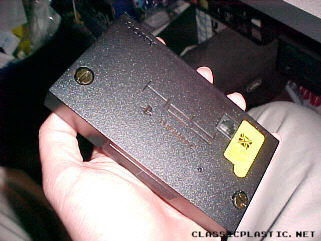
Actually, the most common (from what I've seen) network adapter had both RJ11 (phone line) and RJ45 (ethernet) ports on it. This is the one that I have. They came with a yellow sticker covering one of the ports (a live phone line can damage a device if you try to plug it into an ethernet port).
Image
Image
CRT wrote:@ Metal Jesus - Surprised you have not mentioned the hard drive game install (not just Final Fantasy, but almost ALL the games) option for the PS2. Not for bootlegs that will wear out the disc reader, I use my PS2s to install pressed discs simply because the hard drive is so convenient and loads the games so much faster disc free.
CRT, you're still using HDL/HDA? Seriously, why not switch to Open PS2 Loader? HDL is no longer being developed, and hasn't been for years. OPL has better compatibility and more features (like virtual memory cards on the HDD).
User avatar
CRTGAMER
Next-Gen
Posts: 11933
Joined: Tue Jan 05, 2010 11:59 am
Location: Southern California

Re: The MetalJesus Video Thread

Post by CRTGAMER »

Ziggy587 wrote:CRT, you're still using HDL/HDA? Seriously, why not switch to Open PS2 Loader? HDL is no longer being developed, and hasn't been for years. OPL has better compatibility and more features (like virtual memory cards on the HDD).
Prefer HDAdvance for a direct load. I posted an expanded reason along with questions back in the PS2 Hard Drive Guide.
Image
CRT vs LCD - Hardware Mods - HDAdvance - Custom Controllers - Game Storage - Wii Gamecube and other Guides:
CRTGAMER Guides in Board Guides Index: http://www.racketboy.com/forum/viewtopi ... 5#p1109425

Image
Image
User avatar
Metal Jesus
128-bit
Posts: 702
Joined: Sat Feb 05, 2011 11:48 am
Location: Seattle
Contact:

Re: The MetalJesus Video Thread

Post by Metal Jesus »

Image

ULTIMA Series - A Look Back + Memories

The ULTIMA series consisted of 9 main games released from 1981 to 1999 and was an extremely influential Computer RPG series that is still remembered fondly today. Metal Jesus & Carlos cover the 3 Ages or Trilogies as well as some of the side games and even the MMORPG. It’s a fun trip down memory lane as we reminisce about why the Ultima series was one of our all-time favorites!

https://youtu.be/0ru57c1HlV8 <<-- YouTube
User avatar
BogusMeatFactory
Next-Gen
Posts: 6770
Joined: Mon Jan 26, 2009 3:16 pm
Location: Farmington Hills, MI
Contact:

Re: The MetalJesus Video Thread

Post by BogusMeatFactory »

Loved the ultima episode. I feel like this is a series that a lot of people forget about when talking about true classics and people seem to never acknowledge the work games like Ultima IV and VII have done for modern game design and storytelling.

I am so happy to see that you gave it merit it deserves. For me, I was introduced to the real awesomeness of Ultima by a friend in middle school. He had VII the complete edition and activated cheat codes and just showed me all the things you could do and the NPCs working on their schedules and their behavior and it blew my mind! It was many years after the games initial release and I was really into Elder Scrolls Arena and Daggerfall and they can't even COMPARE to Ultima VII. 1992 had no game that even compared.

I am also really happy to hear the love for Ultima Online. It really was the wild west. I mean, I remember coming across these guys who would be bandits demanding a toll to cross a bridge and the battles that ensued over this bridge. The battlefield would be littered with loot, but you would run the risk that one of the two sides would come back. For me, I was always the pacifist. I just enjoyed being a craftsman, chopping down trees and fishing. It was very cathartic.

Another great Ultima Memory for me was Ultima: Runes of Virtue for the Gameboy. The game isn't really the best, but it was a sandbox game on the original Gameboy. The gameplay was fun and you got to pick a class to play and the dungeons were a lot of fun. It was a blast and I loved the music, but of course, what Gameboy game had bad music?
Ack wrote:I don't know, chief, the haunting feeling of lust I feel whenever I look at your avatar makes me think it's real.
-I am the idiot that likes to have fun and be happy.
Post Reply