The MetalJesus Video Thread

Post game-related video clips here
User avatar
CRTGAMER
Next-Gen
Posts: 11933
Joined: Tue Jan 05, 2010 11:59 am
Location: Southern California

Re: The MetalJesus Video Thread

Post by CRTGAMER »

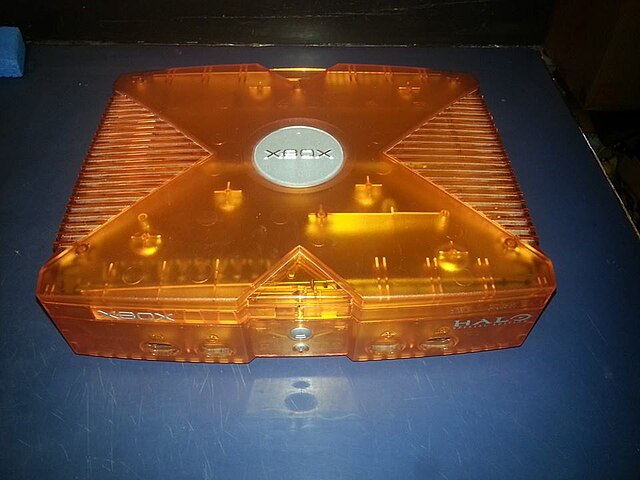
It is nuts what collectors will pay for stamps, baseball cards, Barbie dolls or video games. The console does have bragging rights as an unreleased prototype, though the only thing special is just the orange see thru case with that Halo logo. For the owner, I would save any pictures and posts from Microsoft workers along with Metal Jesus's Video for preserving the story.

If it was different physically other then just color, that for me would carry more value. Even so, a nice score; congrats to Emilio for the rare find for fifty bucks! It would be interesting to find out more of who was selling the console for such a low price and how they acquired it. Weird the the seller know anything about the potential value. This is a rare circumstance that a video game related product can help contribute to the 401k. If you are going to sell and max out the "investment" do it while you have all the advertising! I suspect a year from now the excitement will die off.

Already on Wiki, wild guess who added it.

Image
Image
CRT vs LCD - Hardware Mods - HDAdvance - Custom Controllers - Game Storage - Wii Gamecube and other Guides:
CRTGAMER Guides in Board Guides Index: http://www.racketboy.com/forum/viewtopi ... 5#p1109425

Image
Image
User avatar
Metal Jesus
128-bit
Posts: 702
Joined: Sat Feb 05, 2011 11:48 am
Location: Seattle
Contact:

Re: The MetalJesus Video Thread

Post by Metal Jesus »

CRTGAMER wrote:For the owner, I would save any pictures and posts from Microsoft workers along with Metal Jesus's Video for preserving the story.

That was kinda my hope for this video, was simply to document it incase it goes into a collection and is never seen from again. Emilio is very tempted to sell it since some of the offers to buy it are outrageous.
User avatar
dogman91
128-bit
Posts: 595
Joined: Sun Jun 19, 2011 12:54 pm
Location: Boston

Re: The MetalJesus Video Thread

Post by dogman91 »

I would sell that in a heartbeat... there's plenty of other cool stuff to collect beyond a see-through colored casing of a Xbox. I would consider that as trading that single item for funds to collect many more unique things, if I were him.
Image
User avatar
Metal Jesus
128-bit
Posts: 702
Joined: Sat Feb 05, 2011 11:48 am
Location: Seattle
Contact:

Re: The MetalJesus Video Thread

Post by Metal Jesus »

How to CONNECT Your GAME CONSOLES to HDTVs

I have 40 years worth of game consoles connected to two televisions in my Game Room, one is a new HDTV & the other an older tube CRT TV. Here is how I connect them in detail.

Image

http://youtu.be/sCPyuesrSNI <<-- YouTube

Equipment I Use:
Monoprice 103027 4-Port Component Video Switch with IR Learning
Gigaware Universal Gaming Component Cable With Switch 26-1542
Monoprice 6FT 4 in 1 Component Cable for Xbox 360, Wii, PS3 and PS2
Enko Mini Composite RCA CVBS AV to HDMI Converter (Input: AV; Output: HDMI)
VGA S-Video Adapter [RETROBIT] for Dreamcast
User avatar
CRTGAMER
Next-Gen
Posts: 11933
Joined: Tue Jan 05, 2010 11:59 am
Location: Southern California

Re: The MetalJesus Video Thread

Post by CRTGAMER »

Nice video. I recommend getting an SVideo input upscaler to get the Chroma Luma separation for the N64 and SNES. Maybe hook it them up to the CRT for the direct SVideo connection? Not sure if any of the other consoles listed supports SVideo over composite without modding, but worth researching. I am guessing you have the rare expensive Component cabe for the Gamecube, if not it also supports SVideo. Good to post the Upscaler which looks great and good information for many who do not own a CRT.

I still prefer an HD CRT over a regular Tube or newer LCD or LED TV. A one size fits all supporting all the systems. Though I lose out on the Lightgun and Scanlines, consoles from the Atari 5200 to Wii 480p to Xbox 720p or even PS2 1080i (2 games do this) all are crystal clear with no upscale needed.

Good idea getting VGA for the Dreamcast. You mentioned love of Lightgun games yet Dreamcast House Of The Dead will not work with that HDTV. If you have the room, add an old VGA CRT and get the Lightgun back for the Dreamcast in VGA! I did this with a second DC console since the primary is hooked up to the DH CRT. Another option is run the SVideo from that Dreamcast VGA box over to the tube TV; then you can auto fire (Dreamcast Lightguns can do this) blasting away the Zombies!

Also recommending tossing out that vintage switchbox that comes with the console and just pick up a direct RCA to RF adapter for better shielding.
Image
CRT vs LCD - Hardware Mods - HDAdvance - Custom Controllers - Game Storage - Wii Gamecube and other Guides:
CRTGAMER Guides in Board Guides Index: http://www.racketboy.com/forum/viewtopi ... 5#p1109425

Image
Image
User avatar
Ziggy
Moderator
Posts: 14913
Joined: Mon Jun 09, 2008 5:12 pm
Location: NY

Re: The MetalJesus Video Thread

Post by Ziggy »

Metal Jesus wrote:How to CONNECT Your GAME CONSOLES to HDTVs
I love the goatee. You look like a pirate!

You might find my set up interesting...

A while back I decided to split my set up. I have my HDTV upstairs, with more current stuff. And then I have my the basement man cave with a CRT and all the retro consoles.

For my HDTV, I have everything running through an AVR. I don't have to deal with different switchers and changing the TV input constantly. The TV stays on one HDMI input, and I just have to hit a button on my AVR remote to switch between consoles and whatnot. And also, audio is outputted through proper speakers (instead of the crappy TV speakers).

The HDTV setup is mostly for current gen stuff. I have my Wii U, PS3, cable box and DVD player all going through HDMI. But there's a couple of consoles I like to have in both rooms, so I also have a Wii, PS2, SNES and N64 there too. I had a few different ways of hooking those up in the past, but I finally settled on the XRGB Framemeister. It really helps simplify the setup. I modified my N64 for RGB output, so my SNES and N64 share the same AV cable. Then I run my Wii and PS2 through the component input on the XRGB. So the XRGB also kinda works as a switcher.

In the man cave I have a CRT. I decided long ago that I wont bother trying to find a way to have everything hooked up at once anymore. I got tired of dealing with switchers and and a mess of cables. I came up with a system that works well for me. My CRT is currently sitting on top of dresser with pretty large drawers. Above the TV are two pretty long shelves that I built, and all the retro consoles sit on there. But none of them are ever hooked up. In the bottom drawer I have all the AV cables and power adapters. It might seem like the drawer would become a tangled mess of cables, but some how I managed to keep it well organized. And my most often used cables are always on top. The other two drawers house all my controllers and other video game stuff.

Whenever I wanna play a console, I take it down off the shelf and get the AV cables and power adapter out of the drawer. I have a surge protector right under the dresser for easy access, and I utilize the TV's front AV inputs. I know you've said a few times in your videos that you like being able to play any console in a moments notice. Well, I can do the same with my system. It takes me about 30 seconds to hook a console up and start playing. Maybe 60 seconds for console that I haven't used in a while and have to fish the cables out from the bottom of the drawer.

To simplify my setup, I have a number of consoles share the same cables. I have one of those multi AV cables that gives me S-Video for SNES, N64, GCN, PS1 and PS2. What's more, I've been modifying some consoles for standard AV output instead of buying crappy cables. The NES already has standard RCA AV output. I've modified my Saturn and Genesis for S-Video output and my Famicom for composite (the Dreamcast is probably next) so I can use the same set of standard AV cables for all of those consoles. Having less cables to deal with means less hassle.

Like you, I have some pro audio equipment in my man cave. I have a PA with two loudspeakers. For a few years now, I've been thinking about rearranging my setup slightly so that I can have a speaker on either side of the TV, and then run all the audio through my mixer. In addition to improved sound quality, you also get better stereo separation this way.

Anyway, that's my setup in a nutshell. Just thought you might be interested to hear. We have couple of similarities, but a few key differences. Speaking of similarities, I also have a turntable (hooked up to my AVR). And I've seen in your other videos that you cover your consoles with cloths when you're not using them. For my consoles in the basement, I do this too.
User avatar
Sano
Next-Gen
Posts: 1491
Joined: Sun Jun 02, 2013 8:11 am
Location: Colorado, USA

Re: The MetalJesus Video Thread

Post by Sano »

Great informative video man. Don't have that many consoles to connect, but this video shows a good setup if I ever do happen to have a larger collection.
Image
Redifer
128-bit
Posts: 608
Joined: Tue Aug 09, 2011 1:51 am
Location: Denver, CO
Contact:

Re: The MetalJesus Video Thread

Post by Redifer »

CRTGAMER wrote: or even PS2 1080i (2 games do this)
4 games actually. GT3, Valkyrie Profile 2, Tourist Trophy and Jackass the Game.
CRTGAMER wrote:all are crystal clear with no upscale needed.
Your TV does the upscaling. Even CRT HDTVs upscale. The only thing it will display natively is 1080i and 480p which is actually 540p just overscanned. I used to have the Sony KVXBR960 and it did it this way. It was an OK TV. I am glad to be rid of it, honestly.
User avatar
Metal Jesus
128-bit
Posts: 702
Joined: Sat Feb 05, 2011 11:48 am
Location: Seattle
Contact:

Re: The MetalJesus Video Thread

Post by Metal Jesus »

Image

Wacky & Weird Pinball Games from the PS2, TurboGrafx-16, Sega Saturn, iOS & more!

https://youtu.be/OlCIxbvSFac <<-- YouTube

Games Shown:
Flipnic (PS2)
Metroid Pinball (DS)
The Pinball of the Dead (GBA)
Necronomicon (Saturn)
Last Gladiator (Saturn)
Galactic Pinball (Virtual Boy)
Odama (GC)
Devil's Crush (TG16)
Zen Pinball Deadpool (iOS)
Ivo
Next-Gen
Posts: 3627
Joined: Tue Mar 28, 2006 11:24 am
Location: Portugal

Re: The MetalJesus Video Thread

Post by Ivo »

Nice video on the Pinball games that aren't just physical tables. I like this sort of game. Metroid Pinball is really good, with very solid physics and table design but still having quite a bit of "Metroid" in it.

A game that you may miss, given that it was on the N-Gage, is Mile High Pinball. The physics and table design aren't great, but the concept is nice because it is many small, simple tables in a row and you just have to keep going up. You basically never lose because even if you drain you just go down 1 or several "tables" and then start climbing again. It is a good game with a lot of secret rooms (based on other N-gage games) and I really wish someone would make another one with the same concept of stitching together hundreds of tables but with great physics and maybe slightly better table design.

I guess Flipnic is a bit like that and I will see if I can try it.
Post Reply