Suggest me a new wireless router

Re: Suggest me a new wireless router
Do it!!!
Let strength be granted, so the world might be mended...so the world might be mended.

Re: Suggest me a new wireless router
noiseredux wrote:Nah no issues like that. But the router is on one side, and needs to be cuz my gaming pc has to be wired son
But assuming this Linksys would have better range than my cheap Dynex G, I should be good. I get a weak signal in my kitchen on the other end of the house now, but a signal nonetheless.

One router in the dining room, the other in the entertainment room.CRTGAMER wrote:I use two wireless routers tied by Ethernet cable. This gives two separate hot points depending where you are at anywhere in the house or patio. Locked out with passwords too to keep the wireless signal to just my connections.
Any system that does not have to be moved around gets an ethernet cable for the fastest connection.

CRT vs LCD - Hardware Mods - HDAdvance - Custom Controllers - Game Storage - Wii Gamecube and other Guides:
CRTGAMER Guides in Board Guides Index: http://www.racketboy.com/forum/viewtopi ... 5#p1109425
-
s1mplehumar

- Next-Gen
- Posts: 5143
- Joined: Fri May 16, 2008 2:26 pm
- Location: Ragol (FORREST 1)
- Contact:
Re: Suggest me a new wireless router
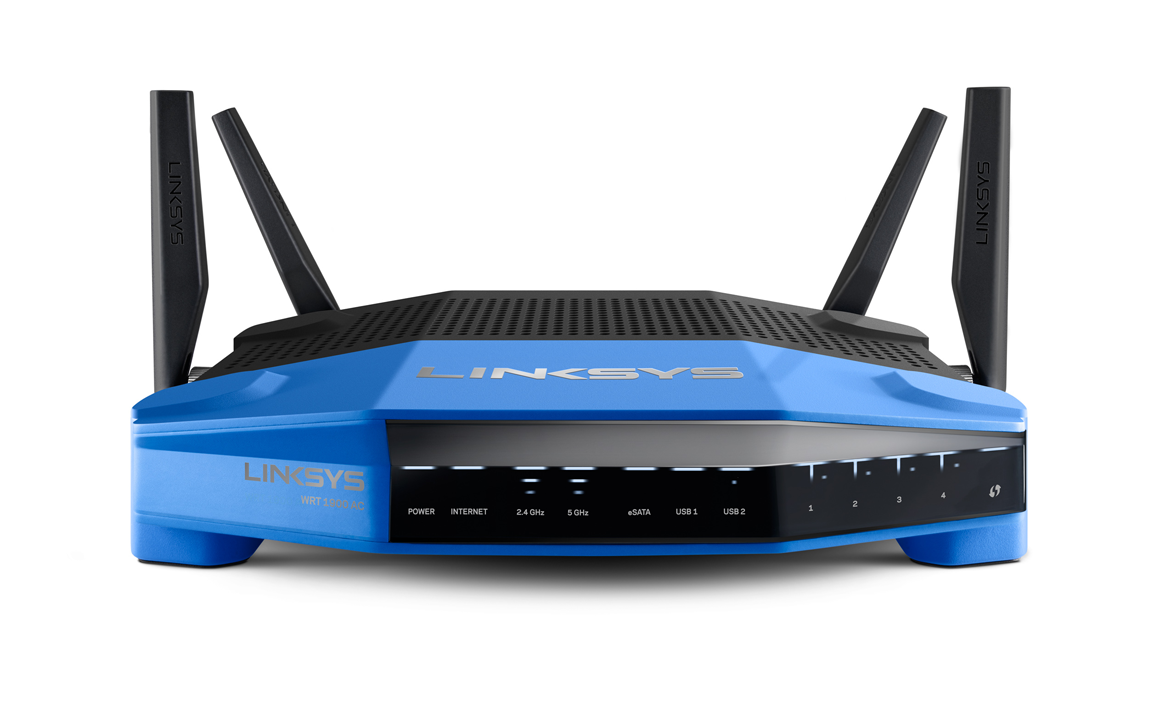
I got to tool around with one at the Linksys booth at Interop this year. This one was ginormous though.fastbilly1 wrote:Linksys WRT1900AC
Though if you want something in the sub $200 realm - Linksys e2500 is a workhorse:
And can be bought certified refurb for $36:

https://www.dropbox.com/s/z5rvoqtenoq4b ... .44.19.jpg
I have the Asus RT-N66U, noise. It's a solid contender with great range. It isn't AC compliant though. I've seen them sell for as low as $65, which might get you a bit closer to your needs.
Nintendo ID, PSN, XBL: Eronnicus * Steam ID: s1mplehumar * Switch Friend Code: SW-3270-7921-5525
-
noiseredux

- Next-Gen
- Posts: 38148
- Joined: Fri Nov 14, 2008 1:09 pm
- Contact:
Re: Suggest me a new wireless router
I'm not really sure what your'e suggesting? My cable modem is in the game room. So that's where the router is plugged in. What would I be plugging a router into in another room?CRTGAMER wrote: One router in the dining room, the other in the entertainment room.
I know you can get extenders. I actually have one, but it's cheap and weak.



Re: Suggest me a new wireless router
He's saying to use TWO routers, each one in an ideal spot so you can get two locations to connect to which would really limit deadzones. You'd have to tether one router to the other, which means you'd have to run internet cable from the first router to the second. That shouldn't be a problem if you have a basement or attic.
But, I wouldn't suggest using two routers. I've never used signal repeaters (never had to) but I'd imagine you can get a better one if the one you have now sucks.
I didn't read the entire thread, just skipped through, but, is your router at one end of the house? Why not move it to a more central spot? I know you said you have the router in the room with your modem (like most people) but there's no reason why you can't move it. That is, unless you have no earthly way of running internet cable (again, basement or attic). Moving the router to a more central location would be more ideal and probably even easier than trying to set up a second router or signal repeater.
Another thing, I'm sure there's plenty of guides out there for picking the best spot in your house for a wireless router. But I think the most important fact to know is that you always get a much better signal BELOW the router, as oppose to above it, or some times even on the same plane as it. For example, the router in my house is on the first floor. I always get a better WiFi signal in the basement than I do on the second floor. Luckily, I don't have any deadspots, so I never had to consider moving it. But, I think this fact is the most important to know when choosing a location.
But, I wouldn't suggest using two routers. I've never used signal repeaters (never had to) but I'd imagine you can get a better one if the one you have now sucks.
I didn't read the entire thread, just skipped through, but, is your router at one end of the house? Why not move it to a more central spot? I know you said you have the router in the room with your modem (like most people) but there's no reason why you can't move it. That is, unless you have no earthly way of running internet cable (again, basement or attic). Moving the router to a more central location would be more ideal and probably even easier than trying to set up a second router or signal repeater.
Another thing, I'm sure there's plenty of guides out there for picking the best spot in your house for a wireless router. But I think the most important fact to know is that you always get a much better signal BELOW the router, as oppose to above it, or some times even on the same plane as it. For example, the router in my house is on the first floor. I always get a better WiFi signal in the basement than I do on the second floor. Luckily, I don't have any deadspots, so I never had to consider moving it. But, I think this fact is the most important to know when choosing a location.
-
noiseredux
- Next-Gen
- Posts: 38148
- Joined: Fri Nov 14, 2008 1:09 pm
- Contact:
Re: Suggest me a new wireless router
Ziggy, yeah it's at one end of my house in my game room. This is because my PC is the one thing I absolutely want a wired connection on. I could of course run wires up through the attic... but I'm not going to right now haha. For now I'm just looking for a cheap/easy upgrade so that if I want to read my tablet in the kitchen the signal doesn't drop or get weak.
Re: Suggest me a new wireless router
I can appreciate that. Running cables isn't for every one. I HATE going up in the attic (yet I some how find myself up there way too often).
So your options are getting a new router, with the idea that it would be a better router with better range. Or, get a better signal repeater.
I didn't see it in your first post, did you say which router you have right now? If it's a decent router, than maybe just try and get a better signal repeater / range extender rather than replacing the router. Again, I've never messed with signal repeaters, but I'm sure there are some available that do their job well.
So your options are getting a new router, with the idea that it would be a better router with better range. Or, get a better signal repeater.
I didn't see it in your first post, did you say which router you have right now? If it's a decent router, than maybe just try and get a better signal repeater / range extender rather than replacing the router. Again, I've never messed with signal repeaters, but I'm sure there are some available that do their job well.
Re: Suggest me a new wireless router
noiseredux wrote:I'm not really sure what your'e suggesting? My cable modem is in the game room. So that's where the router is plugged in. What would I be plugging a router into in another room?CRTGAMER wrote:I use two wireless routers tied by Ethernet cable. This gives two separate hot points depending where you are at anywhere in the house or patio. Locked out with passwords too to keep the wireless signal to just my connections.
Any system that does not have to be moved around gets an ethernet cable for the fastest connection.
One router in the dining room, the other in the entertainment room.
I know you can get extenders. I actually have one, but it's cheap and weak.
THIS. The extender noise used I think is a wireless repeater which already has a diminished wireless signal. The second router I use located in a different part of the house simply plugs into the main Cable Modem via Ethernet Cable. Both have wireless and Ethernet outputs.Ziggy587 wrote:He's saying to use TWO routers, each one in an ideal spot so you can get two locations to connect to which would really limit deadzones. You'd have to tether one router to the other, which means you'd have to run internet cable from the first router to the second. That shouldn't be a problem if you have a basement or attic.
Ziggy587 wrote:Moving the router to a more central location would be more ideal and probably even easier than trying to set up a second router or signal repeater.
If your server is Cable TV, you could plug the cable modem into a more centralized outlet. Anywhere a TV Cable comes out of the wall. Same goes if you use DSL, anywhere there is a line coming out of the wall.noiseredux wrote:Ziggy, yeah it's at one end of my house in my game room. This is because my PC is the one thing I absolutely want a wired connection on. I could of course run wires up through the attic... but I'm not going to right now haha. For now I'm just looking for a cheap/easy upgrade so that if I want to read my tablet in the kitchen the signal doesn't drop or get weak.
After sorting out where to place the main modem, the Ethernet cable (which is faster over wireless) can then be strung out to the PC. If too much hassle running the wire say to another room then a wireless adapter can be added to the desktop or tower. If close by you should still get a five bar connection.
Whole house internet wiring thru the Attic would have been a nightmare for me, not much room up there to crawl the length of the house. I ran Ethernet cable around each room using the baseboards as cable covers, the thin Ethernet cable easily hides behind it. When I hit a door, notched out the bottom at the hinge side. You actually have to stoop down and look to notice its there. Adjacent bedroom closets also allowed easy access by drilling a hole between them. The cable run was not that hard, but now the entertainment room and both kids have solid wire fast reliable connection. In addition, with two hot spots (one wireless tied by Ethernet cable to the main cable modem with wireless as well), this allows the 5 bar connection anywhere in the house as well as using a laptop in the patio. Anywhere there is an Ethernet connection, another router with wireless output can be added if needed.
CRT vs LCD - Hardware Mods - HDAdvance - Custom Controllers - Game Storage - Wii Gamecube and other Guides:
CRTGAMER Guides in Board Guides Index: http://www.racketboy.com/forum/viewtopi ... 5#p1109425