Best Video Connections

Need help with your PC or Modding Projects?
User avatar
Mad_Hatter
128-bit
Posts: 817
Joined: Thu Jul 25, 2013 8:28 am

Re: Best Video Connections

Post by Mad_Hatter »

Ziggy587 wrote: Yes, that's component. Also known as YPbPr and probably other names as well. It's all all the color info minus green. Apparently green is the most used color, so taking it out saves a lot of space. This is why DVDs are stored like this (digitally, YCbCr).

The "Y" in YPbPr is the same exact Y you'll find in S-Video. S-video is Y/C, where the Y is luma (the brightness, more or less) and C is chroma, all the color info. But instead of just having one color channel, component breaks it up into two, Pb (blue difference) and Pr (red difference). The "difference" is because it's missing green entirely. When YPbPr hits your TV or monitor, the green is added back into the picture. Whether or not green is added back correctly is what I argue, and why I question if component video is as good as real RGB. It's equivalent, but only if your TV doesn't fuck it up. You can Google laserdisc versus DVD debates to see how much different the greens look. It's also why I question if YPbPr is an actual upgrade to S-Video for retro consoles. People go out of their way to convert RGB to YPbPr, but I feel like it's not a big enough improvement over S-Video.
Thank you, as always, Ziggy.

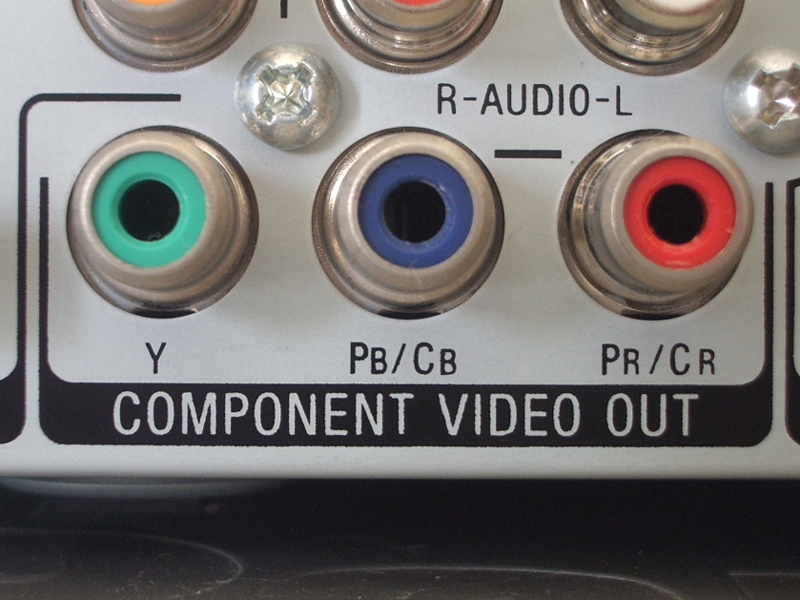
So what does the Green Cable on a component cable actually handle?

Can you give me an example of true RGB?

Ziggy587 wrote:SCART is the European/French one.

SCART can be tricky. There's PAL SCART and well as JPN SCART (21-pin). SCART can carry RGB, but it can also carry other signals like composite.

Sync is another thing that can be tricky. Some monitors and devices can use composite video for sync, while others need a dedicated sync. You can also have sync of green. Then there's different types of sync (15kHz, 30kHz). VGA uses separate horizontal and vertical sync signals.

More info: http://www.racketboy.com/forum/viewtopi ... 52&t=37931
Thanks for this thread link. VERY helpful.


Ziggy587 wrote:It's also why I question if YPbPr is an actual upgrade to S-Video for retro consoles. People go out of their way to convert RGB to YPbPr, but I feel like it's not a big enough improvement over S-Video.
Yea. This is how I felt too. Given I don't know much about video connections, I saw a few screenshots and videos comparing S-Video and RGB on a Genesis and Sega Saturn and saw NO DIFFERENCE. But I am probably going to end up using RGB for my Genesis just so I don't have to mod it for S-Video. But I still plan on keeping my Saturn with S-Video and not even bother getting RGB on that.
theclaw wrote:Basically when you see SCART used without qualifiers expect RGB, between 240p to 576i, using joined H/V sync and European type wiring.

If looking for info from Japan, note their different-wired RGB cables are not named SCART in Japanese.

Component has a significant technical benefit. Like RGB it doesn't involve NTSC/PAL color encoding.
Yea, this SCART stuff is a little more confusing for me lol.

Which would you prefer for a Sega Genesis (PAL or Japan SCART)? I'm planning on updating my Genesis from composite to RGB.
Old Username: sp957

Systems: Genesis, Super Nintendo, Saturn, Dreamcast, Playstation 2, Xbox 360, and Windows PC
Handhelds: Gameboy Advance SP, Nintendo DSi, and New Nintendo 3DS

My Trade Thread
User avatar
Hobie-wan
Next-Gen
Posts: 21705
Joined: Sat Aug 15, 2009 8:28 pm
Location: Under a pile of retro stuff in H-town
Contact:

Re: Best Video Connections

Post by Hobie-wan »

sp957 wrote:So what does the Green Cable on a component cable actually handle?
Image
BitFaced
64-bit
Posts: 347
Joined: Sun Mar 17, 2013 6:35 pm

Re: Best Video Connections

Post by BitFaced »

...So, we're just going to look past the fact that they're now coming up with a cheaper alternative to getting 480/576p out of a GameCube, let alone in HDMI??? :p
N64/NES/FC/SNES/SFC/GB (SGB)/GBC (Black)(SGB)/FDS/Satellaview/Genesis/Mega Drive/Master System & maybe N64DD/GBC/GBA.
User avatar
theclaw
Next-Gen
Posts: 1351
Joined: Fri Jul 17, 2009 10:46 pm
Contact:

Re: Best Video Connections

Post by theclaw »

Ziggy587 wrote:The only benefit I find with component video and retro game consoles is that newer TVs and AVRs don't have S-Video anymore (and if any still do - it's super rare). Component is MUCH better than composite, so if those are your options, than component becomes a great choice. Otherwise, don't fall down the rabbit hole (coming from a guy that fell down and had to climb back out).
Well I meant component avoids the "NTSC50" problem.
Try out one of your consoles at 50hz.
sp957 wrote:Yea, this SCART stuff is a little more confusing for me lol.

Which would you prefer for a Sega Genesis (PAL or Japan SCART)? I'm planning on updating my Genesis from composite to RGB.
Typically PAL SCART is used here. Easier to find cables, adapters, and all that.
BitFaced wrote:...So, we're just going to look past the fact that they're now coming up with a cheaper alternative to getting 480/576p out of a GameCube, let alone in HDMI??? :p
That's pretty big. Of course won't help getting that last bit of quality from component CRT SDTVs (it's an American thing people find unusual in Europe).
Lum fan.
User avatar
Ziggy
Moderator
Posts: 14913
Joined: Mon Jun 09, 2008 5:12 pm
Location: NY

Re: Best Video Connections

Post by Ziggy »

sp957 wrote:So what does the Green Cable on a component cable actually handle?
The green cable is "Y" or "Luma" (luminance). It's basically the brightness levels (you'll get black and white video with this connection alone). The green cable also carries sync. It is the same Y found on S-Video.
sp957 wrote:Can you give me an example of true RGB?
Simply anything that uses RGB and doesn't convert it. If you use the RGB output from your Genesis, and plug that into the RGB input on a TV/monitor, that's "true RGB".
sp957 wrote:Which would you prefer for a Sega Genesis (PAL or Japan SCART)? I'm planning on updating my Genesis from composite to RGB.
theclaw wrote:Typically PAL SCART is used here. Easier to find cables, adapters, and all that.
Yeah, the only difference is the type of connection used. They're both the same RGB signal. Most cables and devices you'll find are gonna be PAL SCART. The XRGB, however, is JPN SCART (since it's a Japanese device and all).
theclaw wrote:Well I meant component avoids the "NTSC50" problem.
Try out one of your consoles at 50hz.
No, thank you. :lol:
User avatar
Mad_Hatter
128-bit
Posts: 817
Joined: Thu Jul 25, 2013 8:28 am

Re: Best Video Connections

Post by Mad_Hatter »

Ziggy587 wrote:
The green cable is "Y" or "Luma" (luminance). It's basically the brightness levels (you'll get black and white video with this connection alone). The green cable also carries sync. It is the same Y found on S-Video.

Simply anything that uses RGB and doesn't convert it. If you use the RGB output from your Genesis, and plug that into the RGB input on a TV/monitor, that's "true RGB".
Ah ok. After reading the posts again, and doing more research, I think I understand it better.

So on the first post of this thread when it lists the signal quality in ascending order like this:

Component
RGB
SCART/RGB
RGB/Component Sync Methods


Those are not actually cables? They are just the signals/inputs?

I think I was getting confused because I was thinking cables as opposed to signals.

So if I were to get a SCART RGB cable for my Genesis and a converter box so I can use it on component with my TV, the signal would be component?

Is SCART/RGB actually better than RGB like the first post says or are they the same?
Old Username: sp957

Systems: Genesis, Super Nintendo, Saturn, Dreamcast, Playstation 2, Xbox 360, and Windows PC
Handhelds: Gameboy Advance SP, Nintendo DSi, and New Nintendo 3DS

My Trade Thread
User avatar
Ziggy
Moderator
Posts: 14913
Joined: Mon Jun 09, 2008 5:12 pm
Location: NY

Re: Best Video Connections

Post by Ziggy »

sp957 wrote:Those are not actually cables? They are just the signals/inputs?
Meh, they're both. For example: If you have a DVD player with component video output, and a TV with component video input, and you want to connect the DVD player to the TV, you would use component cables.
sp957 wrote:So if I were to get a SCART RGB cable for my Genesis and a converter box so I can use it on component with my TV, the signal would be component?
Ultimately, yes, the signal would be component. Technically, the signal would be RGB up to the converter box, then it would be component the rest of the way to your TV.
sp957 wrote:Is SCART/RGB actually better than RGB like the first post says or are they the same?
You're confusing what SCART actually is. SCART can carry the RGB signal. It's just one method of how to input/output the RGB signal. RGB is RGB, whether it's transmitted over a SCART cable or over RCA cables.
User avatar
Ziggy
Moderator
Posts: 14913
Joined: Mon Jun 09, 2008 5:12 pm
Location: NY

Re: Best Video Connections

Post by Ziggy »

sp957 wrote:So if I were to get a SCART RGB cable for my Genesis and a converter box so I can use it on component with my TV, the signal would be component?
Depending on what type of converter you get, you might need a SCART cable that breaks out the audio.

Here's what I recommend doing: Create a thread titled something like "Help with my video connections" and use it for all things concerning your AV setup. You'll be able to get more detailed help this way, specific to your exact setup.
User avatar
Mad_Hatter
128-bit
Posts: 817
Joined: Thu Jul 25, 2013 8:28 am

Re: Best Video Connections

Post by Mad_Hatter »

Ziggy587 wrote:You're confusing what SCART actually is. SCART can carry the RGB signal. It's just one method of how to input/output the RGB signal. RGB is RGB, whether it's transmitted over a SCART cable or over RCA cables.
Yea. But I was just confused why "RGB" was listed before "SCART/RGB" on the first post of this thread.


Ziggy587 wrote:Depending on what type of converter you get, you might need a SCART cable that breaks out the audio.

Here's what I recommend doing: Create a thread titled something like "Help with my video connections" and use it for all things concerning your AV setup. You'll be able to get more detailed help this way, specific to your exact setup.
Yea, that's what I plan on doing soon on the Sega forum. I'll probably get a SCART Cable and Converter combination that someone here has already used and approved.
Old Username: sp957

Systems: Genesis, Super Nintendo, Saturn, Dreamcast, Playstation 2, Xbox 360, and Windows PC
Handhelds: Gameboy Advance SP, Nintendo DSi, and New Nintendo 3DS

My Trade Thread
BitFaced
64-bit
Posts: 347
Joined: Sun Mar 17, 2013 6:35 pm

Re: Best Video Connections

Post by BitFaced »

theclaw wrote:
BitFaced wrote:...So, we're just going to look past the fact that they're now coming up with a cheaper alternative to getting 480/576p out of a GameCube, let alone in HDMI??? :p
That's pretty big. Of course won't help getting that last bit of quality from component CRT SDTVs (it's an American thing people find unusual in Europe).
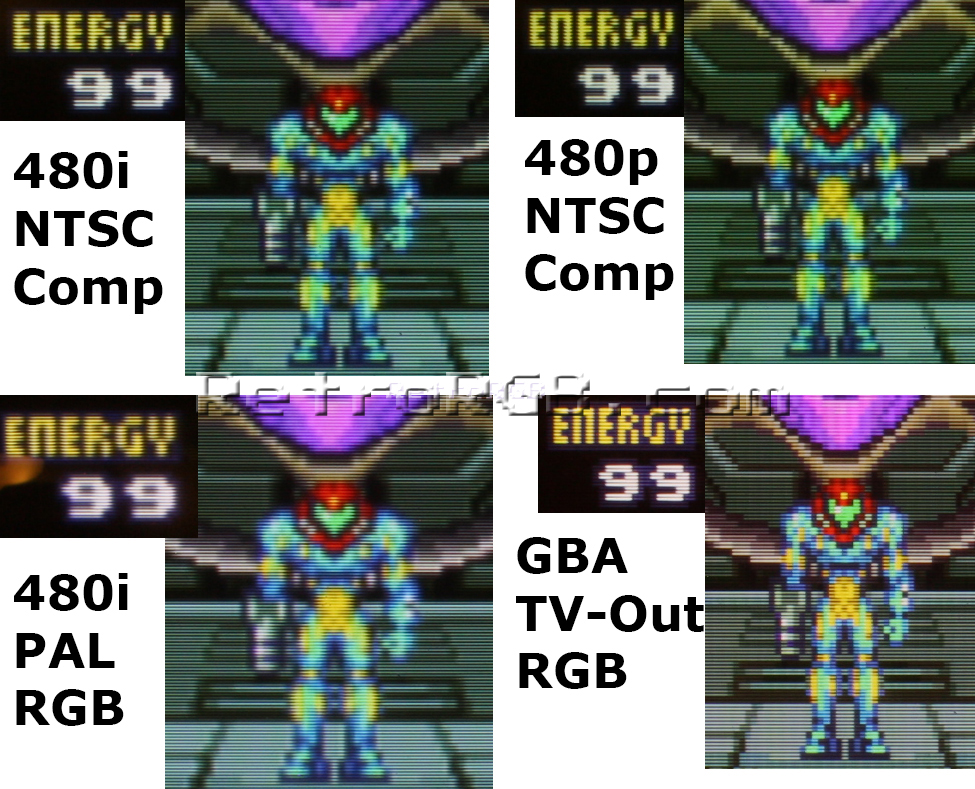
Speaking of Europe, I have a European GameCube and European Game Boy Player disc, and while it can probably be forced to do progressive with the Swiss program, I'm wondering if it will match the quality of non-forced progressive from an NTSC Game Boy Player disc. To wit:Image
N64/NES/FC/SNES/SFC/GB (SGB)/GBC (Black)(SGB)/FDS/Satellaview/Genesis/Mega Drive/Master System & maybe N64DD/GBC/GBA.
Post Reply