Adventures in hard drives for PS2

Discuss all hardware and software modifications
Post Reply
skate323k137
Next-Gen
Posts: 1271
Joined: Sun Sep 16, 2007 11:26 am
Location: Lansing, MI

Adventures in hard drives for PS2

Post by skate323k137 »

Not long ago I decided to stop being a wuss and tackle Free MC Boot (formerly FreeVast) so that I could back-up my games, and namely back-up and play my imports without having to physically modify my slim PS2 that is still under warranty. It took some reading, but really wasn't bad at all.

Well, I had to get greedy. I scored a great deal on a couple of Playstation 2's with the necessary network adapters for installing hard drives. I had an old 80GB drive sitting around (that i don't really trust much, I'll get to that later). So I added HDLoader in with my free MC boot install and went to town. It all went really smoothly, and was easier than getting free MC boot installed to begin with. I installed one game direct from the PS2's DVD drive to the HDD, but it took almost a half hour for the whole game (roughly 1 MB/s).

At that point I discovered WinHIIP, which allows you to hook up the PS2 formatted HDD to your PC (I use a IDE->USB2 adapter). Using my original discs, it copies roughly 3-6 MB/s, which is much better. It can install ISO files much faster (20+ MB/s), so my games which I had backed up to ISO installed much faster. There were a couple compatibility issues in HDLoader, but most games have worked without a hitch. After installing/testing/deleting/etc., I was pretty happy with the result. The 80GB drive I'm using has been through several PC's and a tour in my USB2 case, and I think it's on its last leg, so I picked up a 160GB Western Digital HDD to install. It required some minor modification to the network adapter to make it fit (Maxtor drives are recommended as they shouldn't require any "negotiation"). Using WinHIIP, I backed up all the images off of my old 80GB drive. WinHIIP allowed me to take the WD drive, and out of the box, format it for PS2 and install all the images. It even let me enable 48bit mode to get the patched HDloader to recognize more than 128 GB. I'm really happy with the end result as I can keep my collection of games in their cases, and play them with amazingly shorter load times.

Image
My PS2's, network adapters, New HDD.

Image
Pulling Images off of the 80GB using WinHIIP

Image
Copying Images to the new HDD

Image
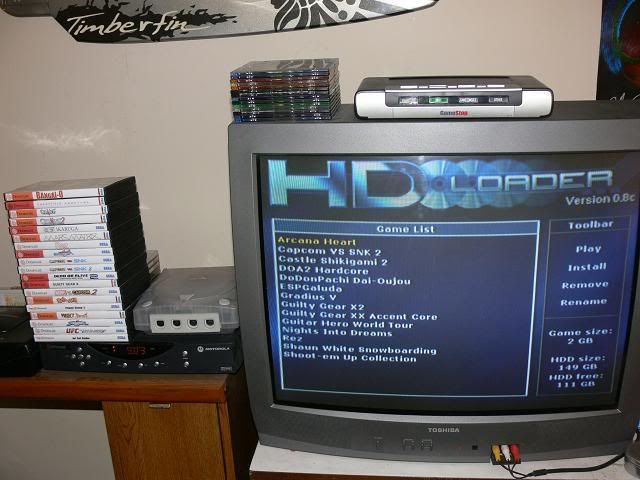
Up and running!

Some useful links:
HD Loader Game Compatibility database: http://www.absoluteanime.com/hdloader.html

Installing the HD, lots of other good info/apps including free MC boot tutorials:
http://sksapps.com/index.php?page=installhd.html

HDD compatibility chart (consult before buying/installing HDD): http://ps2drives.x-pec.com/?p=list
Image
Need FreeMCboot? I'll install it on your PS2 Memory Card for free if you cover postage both ways.
Consoles: I have too much stuff
Arcade: No seriously, I have too much stuff. Someone grab a shovel and dig me out of my basement.
User avatar
Mozgus
Next-Gen
Posts: 6624
Joined: Sat May 13, 2006 10:31 pm
Contact:

Re: Adventures in hard drives for PS2

Post by Mozgus »

Another game compatibility list: http://list.sksapps.com/
User avatar
BigTinz
128-bit
Posts: 972
Joined: Tue Jun 03, 2008 12:32 pm
Location: Alabama

Re: Adventures in hard drives for PS2

Post by BigTinz »

A friend of mine is looking to do this as well, using a Western Digital HDD...what modifications did you have to make to the adapter?
User avatar
noiseredux
Next-Gen
Posts: 38148
Joined: Fri Nov 14, 2008 1:09 pm
Contact:

Re: Adventures in hard drives for PS2

Post by noiseredux »

FreeMcBoot is great. I installed it, like you with HDLoader about 6 months ago, and it was very easy. I've never actually used my harddrive, though. It was more or less to see if I could actually do it, I guess. Y'know. Like a fun project. Most of the homebrew I run is off of a 1GB pen-drive.
Image
User avatar
executioner
Next-Gen
Posts: 1116
Joined: Wed Jul 19, 2006 7:54 pm
Location: Panama

Re: Adventures in hard drives for PS2

Post by executioner »

Good to read a successfull story like this. That's the best PS2 setup you can have.
Consoles: NES, Famicom, SNES, GC, GB DMG, GB Pocket, GBC, GBA, DSI XL, N64, VBoy, NDS, 3DSXL, Wii, SMS, GEN+CD+32X, GG, SAT, DC, WS, WS Color, NGPC, XBOX, 360, PS1, PSone, PS2, PSP, PS3, 3DO, CD-I, NGCD, Actionmax, TG16+CD, TE, PCE-DUO, Odyssey2, Playdia, 2600, Lynx & JAG.
skate323k137
Next-Gen
Posts: 1271
Joined: Sun Sep 16, 2007 11:26 am
Location: Lansing, MI

Re: Adventures in hard drives for PS2

Post by skate323k137 »

BigTinz wrote:A friend of mine is looking to do this as well, using a Western Digital HDD...what modifications did you have to make to the adapter?
The modification is very minor, the power and IDE interfaces have some side to side play, but the metal shielding stops them from moving far enough apart from each other. you have to remove the two screws adjacent to the connectors, and trim out the corners of the metal shield. If you look really closely at my first picture, the one i modified is on the left. It still takes some skill ("negotiation") to get the W.D. HDD to plug in, so If you're doing this, i recommend formatting and preloading all your games using an IDE->USB2 case and WinHIIP. I really didn't think I could get it to fit, but I plugged in the power pins first, pushed the IDE plug as far over as i could, and "rolled" the drive into place. If at all possible, find a Maxtor instead, but you can make it work if a W.D. is all you've got. I recommend consulting the HDD compatibility link in my first post just to be safe. I used a wd1600jbrt (wd1600jbrtl).
Image
Need FreeMCboot? I'll install it on your PS2 Memory Card for free if you cover postage both ways.
Consoles: I have too much stuff
Arcade: No seriously, I have too much stuff. Someone grab a shovel and dig me out of my basement.
Post Reply