PC build thread
-
s1mplehumar

- Next-Gen
- Posts: 5143
- Joined: Fri May 16, 2008 2:26 pm
- Location: Ragol (FORREST 1)
- Contact:
Re: PC build thread
Looks like a nice build, Erik. Fractal cases are nice and often quiet. Temperature headroom will always be challenging with a smaller case. Your cooler placement should be fine though.
Nintendo ID, PSN, XBL: Eronnicus * Steam ID: s1mplehumar * Switch Friend Code: SW-3270-7921-5525
Re: PC build thread
Is there a program I should use to monitor temps? Wouldn't mind knowing exactly how hot this thing gets. If cooling really were a problem, this case supports liquid cooling.
-
s1mplehumar
- Next-Gen
- Posts: 5143
- Joined: Fri May 16, 2008 2:26 pm
- Location: Ragol (FORREST 1)
- Contact:
Re: PC build thread
ZenErik wrote:Is there a program I should use to monitor temps? Wouldn't mind knowing exactly how hot this thing gets. If cooling really were a problem, this case supports liquid cooling.
Core Temp or CPU ID for CPU. Speedfan is also solid.
Nintendo ID, PSN, XBL: Eronnicus * Steam ID: s1mplehumar * Switch Friend Code: SW-3270-7921-5525
-
noiseredux

- Next-Gen
- Posts: 38148
- Joined: Fri Nov 14, 2008 1:09 pm
- Contact:
Re: PC build thread
Thanks. The one other thing I want to look int o is getting the chassis fans working when connected to the mobo. A friend suggested it may be a BIOS setting. But the system will not boot when the chassis fans are plugged in to the mobo. Luckily the case has its' own fan control so they don't need to be plugged in to the mobo. CPU and GPU fans working perfectly fine.s1mplehumar wrote:ZenErik wrote:Is there a program I should use to monitor temps? Wouldn't mind knowing exactly how hot this thing gets. If cooling really were a problem, this case supports liquid cooling.
Core Temp or CPU ID for CPU. Speedfan is also solid.
Any ideas? Browsing forums I've seen suggestions that it could be a bad mobo connector for the chassis fans or bad cable. Should I be worried?
I should also note that the way the PSU connector looks for the chassis fan to mobo is 4 pin, but doesn't quite look as I would expect it to. I sort of wonder if it's supposed to go the opposite way, but I am prevented from doing so with the way the notches are. I'll try to post a picture tonight. They just don't line up as naturally as all the other mobo connectors seem to. A bit weird.
Re: PC build thread
Hmm. From what I am reading, maybe it is ACTUALLY a floppy drive connector? What do you think? In that case, I am luckily it just didn't power on.
Looks like this.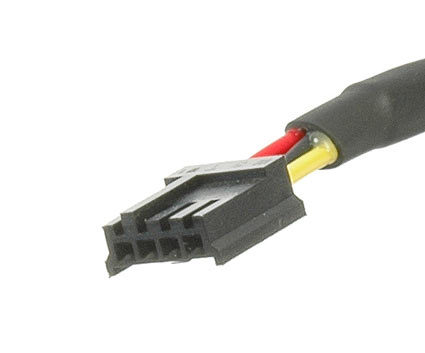
Did my PSU just not come with a cable to connect the chassis fans to the motherboard? Is it even worth getting a cable that does?

Looks like this.
Did my PSU just not come with a cable to connect the chassis fans to the motherboard? Is it even worth getting a cable that does?
-
noiseredux
- Next-Gen
- Posts: 38148
- Joined: Fri Nov 14, 2008 1:09 pm
- Contact:
Re: PC build thread
doesn't the PSU only come with cables to connect shit... to the PSU?ZenErik wrote:Did my PSU just not come with a cable to connect the chassis fans to the motherboard? Is it even worth getting a cable that does?

Re: PC build thread
Perhaps.noiseredux wrote:doesn't the PSU only come with cables to connect shit... to the PSU?ZenErik wrote:Did my PSU just not come with a cable to connect the chassis fans to the motherboard? Is it even worth getting a cable that does?
 Guess a separate cable is needed. One that I don't think was included with the chassis, mobo, or anything. But I'll double check tonight. In that case, guess I definitely am 100% up and running.
Few more questions for those in the know. Currently running W7 Home Premium x64 because I just happen to have a good half dozen licenses for it. Will W8 improve gaming performance much, if at all? And also, SSD suggestions? I was thinking Samsung 840 as I definitely trust their SSDs from prior experience.
Edit: found the cable I need.

Bingo. I'll try Microcenter today and see if they have one.
-
EvilRyu2099
- Next-Gen
- Posts: 2181
- Joined: Mon May 31, 2010 9:59 am
- Location: Street Fighter Alpha 2 and 3
Re: PC build thread
Just buy a bunch of tie-wraps.. All you need..ZenErik wrote:Together and working.Installing OS now! Pardon the lack of cable management. This is my first custom PC, it's mini ITX, and the case has no cable management system.. Soo uhh... Something to work on.
PSN: GoTigers9999
Live: Iori8000
Nintendo:Iori9999 3DS Friend Code: 4012-3366-0941
My Twitch stream channel!

Re: PC build thread
You can sometimes need to adjust BIOS settings for motherboard-connected fans due to the range of RPM. Lotta times larger fans are spinning at a lower RPM than the minimum threshold the BIOS expects, so it thinks there's a problem with the fan.ZenErik wrote: Thanks. The one other thing I want to look int o is getting the chassis fans working when connected to the mobo. A friend suggested it may be a BIOS setting. But the system will not boot when the chassis fans are plugged in to the mobo. Luckily the case has its' own fan control so they don't need to be plugged in to the mobo. CPU and GPU fans working perfectly fine.
Any ideas? Browsing forums I've seen suggestions that it could be a bad mobo connector for the chassis fans or bad cable. Should I be worried?
That said, yeah, that's a floppy connector from your PSU.
You may want to check to see if you have 3 or 4 pin connectors for the fans, so that any adapters you pick up match (or if it might be preferable to get different fans versus an adapter). 3 pin connectors can report RPM, 4 pin can be controlled by the motherboard (well, 3 pin can too, with voltage control). Often, only the CPU fan is 4 pin, but it may vary.
Windows 8 isn't much of an improvement performance-wise, if any...though it's certainly not a downgrade either. There are pros and cons for either IMO.
Samsung 840 series are good. The regular 840s have been replaced by the EVO series I think, Pros are still better (and more expensive).