I had a similar experience to noise a few years ago, only I was boneheaded and just kept removing/reinstalling the videocard everytime the system died down on me (happened every couple of days) and didn't bother replacing the PSU. It was a completely new experience because it was the first time I had a videocard that required an extra power (it's an AGP ATI radeon 2-something XT, the old one was an nVidia GeForce4 MX) and I had no idea that it was the PSU that's the cause.
A week of that and the PC started whistling and popping, initially thought there was a rat behind the computer table. The hard disk's SMART also started throwing out messages that my hard disk is dying and it needs to be replaced. And then the caps just blew. It's not loud or anything, just the PC refusing to start and a faint smell of smoke.
The videocard was still fine (worked on other PCs), but the motherboard's AGP slot no longer works no matter what videocard I use, one of the RAM modules is dead, and the hard disk developed bad sectors and eventually just stopped working even on the new PC.
Graphics card causing crash? Help/thoughts/advice?
-
tintinmayo
- 24-bit
- Posts: 121
- Joined: Fri Nov 09, 2012 8:28 pm
-
EvilRyu2099
- Next-Gen
- Posts: 2181
- Joined: Mon May 31, 2010 9:59 am
- Location: Street Fighter Alpha 2 and 3
Re: Graphics card causing crash? Help/thoughts/advice?
My old desktop PSU died recently, which is one of the reasons for the new rig.. Sucker lasted 6 years atleast  ... PSUs are meant to die, but if one lasts that long I figure it's good product..
... PSUs are meant to die, but if one lasts that long I figure it's good product..PSN: GoTigers9999
Live: Iori8000
Nintendo:Iori9999 3DS Friend Code: 4012-3366-0941
My Twitch stream channel!
-
noiseredux

- Next-Gen
- Posts: 38148
- Joined: Fri Nov 14, 2008 1:09 pm
- Contact:
Re: Graphics card causing crash? Help/thoughts/advice?
my Corsair CX500 arrived today. Never installed a PSU before. Wish me luck, dudes!

-
noiseredux
- Next-Gen
- Posts: 38148
- Joined: Fri Nov 14, 2008 1:09 pm
- Contact:
Re: Graphics card causing crash? Help/thoughts/advice?
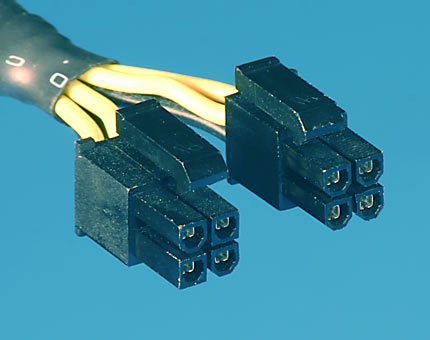
uh big snag... I got the new PSU in and everything connected, except my MB had a 4-pin ATX12V connected on the old PSU. This new one doesn't have a 4pin ATX12V connector.... what's going on???
EDIT: Nevermind, I'm a fucking n00b.
EDIT: Yeah, bitches, I did it! New PSU installed, got my GPU back in, and I am pleased.
EDIT: Nevermind, I'm a fucking n00b.
EDIT: Yeah, bitches, I did it! New PSU installed, got my GPU back in, and I am pleased.
-
s1mplehumar

- Next-Gen
- Posts: 5143
- Joined: Fri May 16, 2008 2:26 pm
- Location: Ragol (FORREST 1)
- Contact:
Re: Graphics card causing crash? Help/thoughts/advice?
Welcome back. PM me know if you hit any more snags from bottlenecks. I'll hook you up.noiseredux wrote:uh big snag... I got the new PSU in and everything connected, except my MB had a 4-pin ATX12V connected on the old PSU. This new one doesn't have a 4pin ATX12V connector.... what's going on???
EDIT: Nevermind, I'm a fucking n00b.
EDIT: Yeah, bitches, I did it! New PSU installed, got my GPU back in, and I am pleased.
Nintendo ID, PSN, XBL: Eronnicus * Steam ID: s1mplehumar * Switch Friend Code: SW-3270-7921-5525

Re: Graphics card causing crash? Help/thoughts/advice?
I saw your post in Games Beaten 2013 and I realized I missed the resolution to this. What did you do to get around the 4-pin connector? I remember when I replaced my PSU I made sure the Silencer 310 I got had that (and hey, it's Tier II for quality!)noiseredux wrote:uh big snag... I got the new PSU in and everything connected, except my MB had a 4-pin ATX12V connected on the old PSU. This new one doesn't have a 4pin ATX12V connector.... what's going on???
EDIT: Nevermind, I'm a fucking n00b.
EDIT: Yeah, bitches, I did it! New PSU installed, got my GPU back in, and I am pleased.

Xeogred wrote:The obvious answer is that it's time for the Dreamcast 2.

Re: Graphics card causing crash? Help/thoughts/advice?
I'm assuming it was a 4+4 pin connector.
-
noiseredux
- Next-Gen
- Posts: 38148
- Joined: Fri Nov 14, 2008 1:09 pm
- Contact:
Re: Graphics card causing crash? Help/thoughts/advice?
So from what I see, if your PSU has 2 of those 4 pin connectors and the mobo only has one, it's ok to use just the 1 without any performance issue?
Xeogred wrote:The obvious answer is that it's time for the Dreamcast 2.
-
Jmustang1968

- Next-Gen
- Posts: 6530
- Joined: Fri Mar 11, 2011 6:51 pm
- Location: Houston, TX
Re: Graphics card causing crash? Help/thoughts/advice?
Yeah, that just means your psu can support a mobo that needs both, but current mobo only requires the 1.ExedExes wrote:So from what I see, if your PSU has 2 of those 4 pin connectors and the mobo only has one, it's ok to use just the 1 without any performance issue?
My Sales Thread
My Gameroom and Collection pics
Game Room Video Tour
RPGamer Previewer
Current Feedback: +266 Racketboy, +172 NintendoAge
My Gameroom and Collection pics
Game Room Video Tour
RPGamer Previewer
Current Feedback: +266 Racketboy, +172 NintendoAge