Hey guys,
I have decided that I would like to build a dedicated emulation PC. I'm going to use Hyperspin as the front end.
Here is the HS webpage for those that are unfamiliar with it:
http://www.hyperspin-fe.com/
This PC is going to boot directly into HS. It will never launch the windows desktop in order to give the system a more console like fee.
I am going to use a PS3 Dualshock as the only interface with the system, so you won't need a mouse and keyboard. I know some people are going to say that I should use one of each systems controllers with USB adapters for a more authentic feel. But, I feel that the PS3 controller is the best choice for emulation because it has the best Dpad and is the most comfortable. It also meets the requirements for all systems, both old and new in regard to buttons. It can even do N64 if you map the yellow C buttons to one of the analog sticks.
The systems I'm thinking of emulating are NES, SNES, N64, Gamecube, Wii, Gameboy, Gameboy Color, Gameboy Advance, Genesis, Master System, 32x, Sega CD, Sega Saturn, Dreamcast, Game Gear, Turbo Grafx 16, PS1, PS2, Mame, and other Arcade systems.
I plan on putting this all in a Lanbox and keep it next to my big screen TV. I am going to put a self contained water cooling system in it along with all gaming quality parts.
I've already got most of the parts I need because most of my friends are huge computer nerds like myself and they all had parts lying around that they were willing to donate.
I do have a question regarding PS2, Wii and other disk based systems. Have there been japan only games that have been patched by people similar to ROMs on SNES. Like, I would love to play the Japan version of Final Fantasy X with the dark Aeons and the other added content. Also, I would like to play Fatal Frame IV for the Wii, but don't know how to read japanese.
Anyway, what do you all think? Would you all like me to keep a build diary and show you all the progress. Or would no one on here be interested in something like this? I mean, I understand that this isn't a hardcore PC website, but it's my favorite community so I thought I would share.
I'm building a dedicated emulation PC
-
Frag Mortuus
- Next-Gen
- Posts: 1110
- Joined: Sun Aug 30, 2009 8:39 pm
- Location: Princeton, WV
-
AppleQueso
Re: I'm building a dedicated emulation PC
Thought I posted in here already. I'd take a look at stuff like XMBC and whatnot, which can also be configured for emulators. That way this little box of yours can be a full blown HTPC as opposed to just an emulation box.
Personally, I find that Hyperspin looks really cool, but quickly becomes more trouble than its worth. It's all up to you though. XMBC could keep things looking slick and eye pleasing without needing as much maintenance as Hyperspin (what with the per-game themes, how to handle games without themes, etc etc etc).
By the way, yes there are fan translations for Ps2 and Wii games. Fatal Frame IV in particular has had a fan translation patch for a while now, and several Ps2 games as well (one of which iirc is Namco X Capcom).
Personally, I find that Hyperspin looks really cool, but quickly becomes more trouble than its worth. It's all up to you though. XMBC could keep things looking slick and eye pleasing without needing as much maintenance as Hyperspin (what with the per-game themes, how to handle games without themes, etc etc etc).
By the way, yes there are fan translations for Ps2 and Wii games. Fatal Frame IV in particular has had a fan translation patch for a while now, and several Ps2 games as well (one of which iirc is Namco X Capcom).
-
Cronozilla

- Next-Gen
- Posts: 2609
- Joined: Wed Mar 14, 2012 8:15 pm
- Location: Oregon, USA.
Re: I'm building a dedicated emulation PC
There have been fan translations ... but generally speaking, if you want to play a game from another region on an emulator, you just need the BIOS from that region.
This would be a lot easier if the emulator you're using accepts BIOS designation in the launch arguments. If not ... you might have to install more than once and just configure each of them.
Also setting up a Dual Shock 3 ... especially wireless ... is not so simple. It requires hex editing to get the address and spoofing it on your BlueTooth adapter and potentially a custom BT driver. So ... that's something to keep in mind. Not that you can't do it.
This would be a lot easier if the emulator you're using accepts BIOS designation in the launch arguments. If not ... you might have to install more than once and just configure each of them.
Also setting up a Dual Shock 3 ... especially wireless ... is not so simple. It requires hex editing to get the address and spoofing it on your BlueTooth adapter and potentially a custom BT driver. So ... that's something to keep in mind. Not that you can't do it.
-
noiseredux

- Next-Gen
- Posts: 38148
- Joined: Fri Nov 14, 2008 1:09 pm
- Contact:
Re: I'm building a dedicated emulation PC
360 controllers may be a better idea if you want wireless.Cronozilla wrote:Also setting up a Dual Shock 3 ... especially wireless ... is not so simple. It requires hex editing to get the address and spoofing it on your BlueTooth adapter and potentially a custom BT driver. So ... that's something to keep in mind. Not that you can't do it.

-
Frag Mortuus
- Next-Gen
- Posts: 1110
- Joined: Sun Aug 30, 2009 8:39 pm
- Location: Princeton, WV
Re: I'm building a dedicated emulation PC
Doing a quick Google search, it seems like there are tons of tutorials on how to do it. So, I'm going to start out with this the PS3 controller in mind. If I can't get it, I will go to another controller.Cronozilla wrote:There have been fan translations ... but generally speaking, if you want to play a game from another region on an emulator, you just need the BIOS from that region.
This would be a lot easier if the emulator you're using accepts BIOS designation in the launch arguments. If not ... you might have to install more than once and just configure each of them.
Also setting up a Dual Shock 3 ... especially wireless ... is not so simple. It requires hex editing to get the address and spoofing it on your BlueTooth adapter and potentially a custom BT driver. So ... that's something to keep in mind. Not that you can't do it.
The bad thing about the 360 controller is that the dpad is absolutely terrible. IMO, the PS3 controller is comfortable for all games. I only think the 360 controller is comfortable for modern games (except fighting games).noiseredux wrote: 360 controllers may be a better idea if you want wireless.
The whole thing is in the concept phase right now. I have a Thermaltake Lanbox that my friend gave me. The paint is in bad shape because he used to tote it around to people's houses for LAN parties. So, I'm going to take it to work this weekend and use our bead blaster to remove the paint. Then, I plan on buying some really nice spray paint (actually thinking of that ceramic paint that people paint engine blocks and brake calipers with) and a can of clear coat and repainting the thing.
I'm going to use the free parts I've received for now. But, they won't handle the newer systems. They just aren't powerful enough. This will allow me to get familiar with XBMC and Hyperspin.
But over time I plan on replacing the parts with higher quality gaming parts. Like probably an oct-core AMD cpu (AMD should provide enough power for all the systems, Intel costs too much even though they provide far more power), a motherboard with good OC'ing options, about 16gb of RAM (since RAM is so cheap right now), and a Bluray disk drive. Then I plan on either taking one of my GTX560 Ti's from my PC and using it in this new project or just buying a new card for it. I'm not sure. I technically don't need two graphics cards in my PC because I have only been using one for a while now that I have had to RMA the other and I haven't noticed a performance drop at all.
Anyway, I'm excited to start this project

-
noiseredux
- Next-Gen
- Posts: 38148
- Joined: Fri Nov 14, 2008 1:09 pm
- Contact:
Re: I'm building a dedicated emulation PC
I really think this is a misconception. Or at least just a preference thing. I always heard how bad the 360 dpad was. But honestly, I have no issues with it, and in fact find the shape of the 360 controller itself far more comfortable than well... pretty much any other pack-in console controller.Frag Mortuus wrote: The bad thing about the 360 controller is that the dpad is absolutely terrible.
BUT really I was just recommending the 360 pad for ease of use with PC. If you have a wired one then you're all set. If not, then it's easy to just buy a USB receiver. It seems like pretty much all recent PC games (including Steam and GOG stuff) assumes you're using a 360 controller. And as such, it seems many emulators work just as well with it. Plus setting up joy2key to work with it is a breeze.
But then again, if you don't like the controller, then you don't like it.
If you don't care about wireless then I'd suggest this Logitec pad:
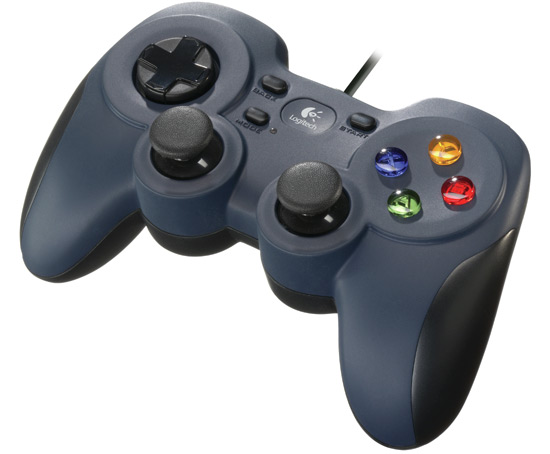
^standard USB pad (so easy to setup with just about any emulator), feels a lot like a PSX controller. Of course if you've figured out a way to easily use the PS3 dualshock3, then I guess I'm giving you suggestions for nothing. Haha.
-
Frag Mortuus
- Next-Gen
- Posts: 1110
- Joined: Sun Aug 30, 2009 8:39 pm
- Location: Princeton, WV
Re: I'm building a dedicated emulation PC
No way man, I appreciate all input. I agree that the 360 controller is the most comfortable over all. But I really hate the dpad. I think the PS3 controller feels more accurate than any other though. That's why I think it would work best with the emulators. Especially for games that require speed and accuracy like most platformers and fighting games. I've actually been using the 360 controller for emulators lately and I really don't like the way it feels. But I do use if for all of my Steam stuff.
-
BoneSnapDeez

- Next-Gen
- Posts: 20148
- Joined: Mon May 02, 2011 1:08 pm
- Location: Maine
Re: I'm building a dedicated emulation PC
If you're going get serious at all about N64 emulation I would recommend using an actual N64 controller with a USB adapter. Yes, it works better than you think.
-
tintinmayo
- 24-bit
- Posts: 121
- Joined: Fri Nov 09, 2012 8:28 pm
Re: I'm building a dedicated emulation PC
I think mapping the N64's C-buttons on the right analog stick is going to be problematic, since aside from being used as camera controls, they are also frequently used as action buttons (blocking, crouching, etc), requiring you to push two at the same time. If you map it to the analog controls (at least from experience with N64rage and Jabo's input plugin), you won't be able to press two buttons at the same time (U/L does not translate to pushing two buttons. It's either U or L).
What I do is I map A and B to the face buttons (X and Square on a PS pad), and then map the C-Up to Triangle, C-Down to Circle, C-Left to L1, C-Right to R1. That way they're still buttons and you still preserve the cross-position. I then map the L trigger to L2, R-trigger to R2.
The Z-trigger is what I map to one of the directions in the Right analog stick, since you need to be able to use the Z-trigger while pressing the shoulder and face buttons. The rest is easy, digital pad to digital pad, analog stick to left analog stick, and start to start. You still have a bunch of free buttons (the select, and L3 and R3).
As for the AMD Octocore, wouldn't it be more cost-effective to just go for one of the high end dual cores or I3/I5? I don't know any emulator that would benefit from more than 4 cores over a faster speed per core. Even PCSX2's multi-threaded VU starts to become ineffective after 4 additional threads. Intels are still faster than their AMD counterparts clock per clock. Also, most of the newer emulators (Dolphin and PCSX2) take advantage of Intel extended instructions sets, like SSE4, SSE4.1, and AVX.
There's also the thing about less cores - less power needed, both from your PSU and from the wall. Less electricity = savings.
What I do is I map A and B to the face buttons (X and Square on a PS pad), and then map the C-Up to Triangle, C-Down to Circle, C-Left to L1, C-Right to R1. That way they're still buttons and you still preserve the cross-position. I then map the L trigger to L2, R-trigger to R2.
The Z-trigger is what I map to one of the directions in the Right analog stick, since you need to be able to use the Z-trigger while pressing the shoulder and face buttons. The rest is easy, digital pad to digital pad, analog stick to left analog stick, and start to start. You still have a bunch of free buttons (the select, and L3 and R3).
As for the AMD Octocore, wouldn't it be more cost-effective to just go for one of the high end dual cores or I3/I5? I don't know any emulator that would benefit from more than 4 cores over a faster speed per core. Even PCSX2's multi-threaded VU starts to become ineffective after 4 additional threads. Intels are still faster than their AMD counterparts clock per clock. Also, most of the newer emulators (Dolphin and PCSX2) take advantage of Intel extended instructions sets, like SSE4, SSE4.1, and AVX.
There's also the thing about less cores - less power needed, both from your PSU and from the wall. Less electricity = savings.
-
Frag Mortuus
- Next-Gen
- Posts: 1110
- Joined: Sun Aug 30, 2009 8:39 pm
- Location: Princeton, WV
Re: I'm building a dedicated emulation PC
I think it would be optimal to use original controllers with all the games, but I'm trying to make this machine as simple as possible. I've been using an Xbox 360 Controller for the N64 emulation and it feels really good. I've never been a fan of the N64 controller at all.BoneSnapDeez wrote:If you're going get serious at all about N64 emulation I would recommend using an actual N64 controller with a USB adapter. Yes, it works better than you think.
tintinmayo wrote:I think mapping the N64's C-buttons on the right analog stick is going to be problematic, since aside from being used as camera controls, they are also frequently used as action buttons (blocking, crouching, etc), requiring you to push two at the same time. If you map it to the analog controls (at least from experience with N64rage and Jabo's input plugin), you won't be able to press two buttons at the same time (U/L does not translate to pushing two buttons. It's either U or L).
What I do is I map A and B to the face buttons (X and Square on a PS pad), and then map the C-Up to Triangle, C-Down to Circle, C-Left to L1, C-Right to R1. That way they're still buttons and you still preserve the cross-position. I then map the L trigger to L2, R-trigger to R2.
The Z-trigger is what I map to one of the directions in the Right analog stick, since you need to be able to use the Z-trigger while pressing the shoulder and face buttons. The rest is easy, digital pad to digital pad, analog stick to left analog stick, and start to start. You still have a bunch of free buttons (the select, and L3 and R3).
As for the AMD Octocore, wouldn't it be more cost-effective to just go for one of the high end dual cores or I3/I5? I don't know any emulator that would benefit from more than 4 cores over a faster speed per core. Even PCSX2's multi-threaded VU starts to become ineffective after 4 additional threads. Intels are still faster than their AMD counterparts clock per clock. Also, most of the newer emulators (Dolphin and PCSX2) take advantage of Intel extended instructions sets, like SSE4, SSE4.1, and AVX.
There's also the thing about less cores - less power needed, both from your PSU and from the wall. Less electricity = savings.
I haven't tried a game yet that uses the C buttons for anything except the camera, with which it works perfectly on the right analog stick. It makes it feel like a modern game that way. But, I have yet to try one that doesn't use it as a camera. I was never a big N64 guy, I got away from Nintendo after the SNES. So, I'm not that well versed in its games outside of Mario64 and Shadows of the Empire. So, I will have to try your configuration on other games to see how I like it.
I'm not 100% sure of what my PC will contain once I start actually buying parts. Knowing myself, I will probably just bite the bullet and eventually go with an i7. That is what I have in my desktop and it is a first gen i7-920, which I've had for about four years now, but I have yet to find a game I can't run maxed out. Ideally I'd like to find a micro-ATX motherboard for it and basically rebuild my desktop
