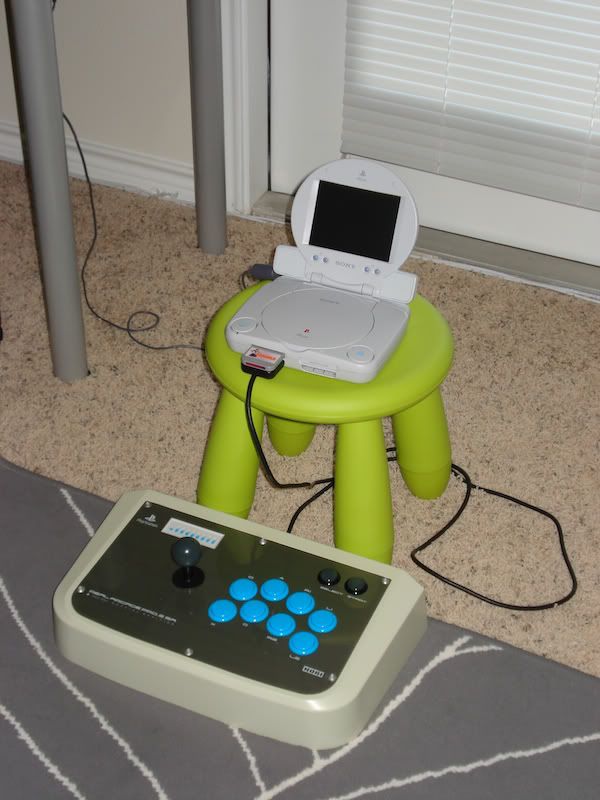

PSone official LCD display
Re: PSOne official LCD display
That's seriously one fine ghetto cab!

Re: PSOne official LCD display
Get Assault Rigs, a link cable and a second PS1.
CRT vs LCD - Hardware Mods - HDAdvance - Custom Controllers - Game Storage - Wii Gamecube and other Guides:
CRTGAMER Guides in Board Guides Index: http://www.racketboy.com/forum/viewtopi ... 5#p1109425
-
wip3outguy7

- Next-Gen
- Posts: 2805
- Joined: Tue Jan 13, 2009 12:03 am
- Location: Austin
Re: PSOne official LCD display
Eh... unfortunately, there is no link port on the PSone.CRTGAMER wrote:Get Assault Rigs, a link cable and a second PS1.
A complicated fix would be to hook up an old PS1 using this:
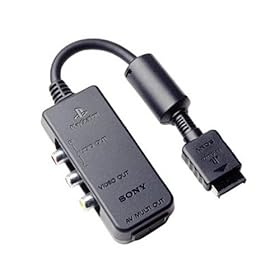
...and link up.
Re: PSOne official LCD display
Oh crap, that sucks on the drop of the Link Port on the PSOne. Instead of that adapter, does the LCD take an AUX Composite input? A PSX for the LCD and another PSX for the HDTV and a Link cable.wip3outguy7 wrote:Eh... unfortunately, there is no link port on the PSone.CRTGAMER wrote:Get Assault Rigs, a link cable and a second PS1.
A complicated fix would be to hook up an old PS1 using this:
<img> Guncon Adapter </img>
...and link up.
At least with the PSOne arrangement, a great 12 volt car transportable for the long drives; as a passenger that is. Its just the right size to easily pack and still have a decent sized screen while on the road.
CRT vs LCD - Hardware Mods - HDAdvance - Custom Controllers - Game Storage - Wii Gamecube and other Guides:
CRTGAMER Guides in Board Guides Index: http://www.racketboy.com/forum/viewtopi ... 5#p1109425
Re: PSOne official LCD display
Just saw the video. Made me cry because I felt like that was a little arcade with nothing more of great fighting games. Man i miss my local arcade. My arcade had most of those at one time before it shut downSlyPeacH wrote:Here is a video of mine I put up some time ago. Hope you like it.
-
wip3outguy7
- Next-Gen
- Posts: 2805
- Joined: Tue Jan 13, 2009 12:03 am
- Location: Austin
Re: PSone official LCD display
Figured out some cool stuff with the PSone itself today that some of you might want to try out. I skimmed through the PDF manual for the system on Sony's site and thought some of this was kind of interesting.
The boot menu (system on, no disc) is fully Playstation Mouse compatible. The cursor turns into a + and you can freely move it around. You can navigate the memory card and CD music menus.
The system's music menu also has kind of a hidden visualizer. I am not sure how you access it with the regular PS controller, but you can switch it on by clicking the right mouse button. From here you can do some other nifty tricks:
-the left mouse button randomly cycles through about 8 to 10 different visualizers
-moving the mouse left and right changes the color of the visualizer
-moving the mouse up and down speeds up and slows down the visualizer
The boot menu (system on, no disc) is fully Playstation Mouse compatible. The cursor turns into a + and you can freely move it around. You can navigate the memory card and CD music menus.
The system's music menu also has kind of a hidden visualizer. I am not sure how you access it with the regular PS controller, but you can switch it on by clicking the right mouse button. From here you can do some other nifty tricks:
-the left mouse button randomly cycles through about 8 to 10 different visualizers
-moving the mouse left and right changes the color of the visualizer
-moving the mouse up and down speeds up and slows down the visualizer
Re: PSone official LCD display
Soundscopewip3outguy7 wrote:Figured out some cool stuff with the PSone itself today that some of you might want to try out. I skimmed through the PDF manual for the system on Sony's site and thought some of this was kind of cool.
The boot menu (system on, no disc) is fully Playstation Mouse compatible. The cursor turns into a + and you can freely move it around. You can navigate the memory card and CD music menus.
The system also has kind of a hidden visualizer. I am not sure how you access it with the regular PS controller, but you can switch it on by clicking the right mouse button. From here you can do some other nifty tricks:
-the left mouse button randomly cycles through about 8 to 10 different visualizers
-moving the mouse left and right changes the color of the visualizer
-moving the mouse up and down speeds up and slows down the visualizer
I knew the mouse could select stuff, nice discovery on changing the draw speed and color change by moving the PS1 Mouse or Nyco PS1 Trakball. The PS1 controller can also access it. Been a while since , play around with the different buttons while a music CD is playing.
CRT vs LCD - Hardware Mods - HDAdvance - Custom Controllers - Game Storage - Wii Gamecube and other Guides:
CRTGAMER Guides in Board Guides Index: http://www.racketboy.com/forum/viewtopi ... 5#p1109425
Re: PSone official LCD display
I'm happy with mine. I play it when the kids are playing the ps3. I also notice that games look better on it the screen due to it's size. Also check the speakers. I had a couple that it woukld take a little bit of time before I can get any real sound from them. The lcd screenn I have now works great but in the past I always had to fiddle with it.
Re: PSone official LCD display
How much did you pay for that stick? wip3outguy7
-
cookie monster
- Next-Gen
- Posts: 1045
- Joined: Wed Nov 03, 2010 4:20 pm
- Location: In your closet hiding
Re: PSOne official LCD display
wow that is awesome.wip3outguy7 wrote:Hehehe, PSone ghetto cab.