I have the newest version of mame, off the official website. I was wondering if I could mAke it look, well not so dull looking on the startup screen. I will post pics if the attachment part is working, if not I don't know, I don't want to make it look like complete shit.
tl;dr: I want MAME to look spiffy.
Question on how to make newest version of MAME nice n spiffy
-
SamuraiMegas

- Next-Gen
- Posts: 3551
- Joined: Sun Aug 12, 2012 10:42 pm
- Location: ಠ‿ಠ
Question on how to make newest version of MAME nice n spiffy
My BST ThreadHobie-wan wrote:Milk the banana for all it's worth.

Re: Question on how to make newest version of MAME nice n sp
I'll take the built in "boring" Mame Front End over an add on. The Front End is not very pretty but it is very powerful and functional in the various list options. Search by year, genre, controller, vector, manufacturer, etc. You can at least adjust the Font and the background colors.
Even Mame32 has a decent front end, left column various list options.
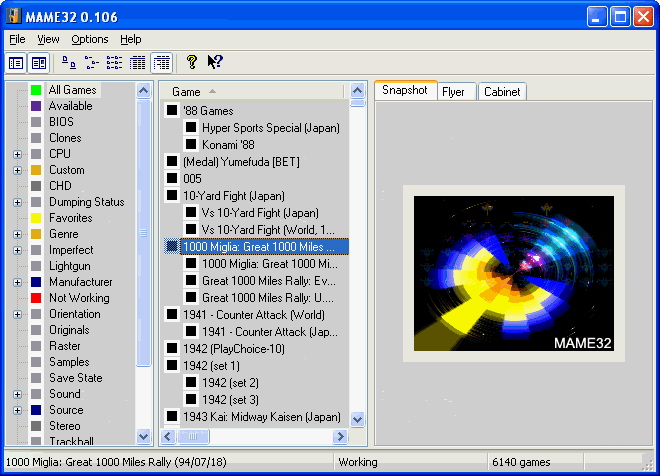
Even Mame32 has a decent front end, left column various list options.
CRT vs LCD - Hardware Mods - HDAdvance - Custom Controllers - Game Storage - Wii Gamecube and other Guides:
CRTGAMER Guides in Board Guides Index: http://www.racketboy.com/forum/viewtopi ... 5#p1109425
-
SamuraiMegas
- Next-Gen
- Posts: 3551
- Joined: Sun Aug 12, 2012 10:42 pm
- Location: ಠ‿ಠ
Re: Question on how to make newest version of MAME nice n sp
If you are talking about the picture you are posting, it isn't that it's full screen.
I am a dumbass when it comes to mame (took 30 min to figure out how to "extract" it but I learned what it meant and stuff)
I am a dumbass when it comes to mame (took 30 min to figure out how to "extract" it but I learned what it meant and stuff)
My BST ThreadHobie-wan wrote:Milk the banana for all it's worth.

Re: Question on how to make newest version of MAME nice n sp
I've always used Mame32 and played with the backgrounds and what not. If you have the time and patience however, the front end Hyperspin looks amazing.
-
SamuraiMegas
- Next-Gen
- Posts: 3551
- Joined: Sun Aug 12, 2012 10:42 pm
- Location: ಠ‿ಠ
Re: Question on how to make newest version of MAME nice n sp
Let me link the download (legal) so you know what I'm using.
The first one, I THINK
http://mamedev.org/release.html
The first one, I THINK
http://mamedev.org/release.html
My BST ThreadHobie-wan wrote:Milk the banana for all it's worth.
-
fastbilly1
- Site Admin
- Posts: 13775
- Joined: Tue Apr 17, 2007 7:08 pm
Re: Question on how to make newest version of MAME nice n sp
That is the newest official version of Mame, and your right its not pretty. Most people I know use MameUI, formally named Mame32 - aka what CRT posted. There is a guide on how to use it on the main page somewhere.
http://www.mameui.info/
As for making Mame itself pretty, good luck. I gave up and swapped to Mame32 a long long time ago.
http://www.mameui.info/
As for making Mame itself pretty, good luck. I gave up and swapped to Mame32 a long long time ago.
Re: Question on how to make newest version of MAME nice n sp
I couldn't find the Mame Guide that you published, but did find the Thread that talked about it. No link to the Published Article in the other Thread though. The article is too important to be buried and forgotten. Maybe a sticky link of the Published Article in the Emulation Section or edit the link into the OP of the Mame Article Thread tease and sticky it?fastbilly1 wrote:That is the newest official version of Mame, and your right its not pretty. Most people I know use MameUI, formally named Mame32 - aka what CRT posted. There is a guide on how to use it on the main page somewhere.
http://www.mameui.info/
As for making Mame itself pretty, good luck. I gave up and swapped to Mame32 a long long time ago.
MAME article on the front page of RB - http://www.racketboy.com/forum/viewtopi ... 98#p562998
@ Samura - That is a command line Mame, it has no Front End. As fastbilly pointed out, go with MAMEUI or MAME32 which has the built in Front End. Also, a retort to your signature, I like Pawn Stars.
EDIT
@ fastbilly - Found it, a nice intro! Clears up the Graphic User Interface option and legal stance.
I almost missed the details since the MameUI.info link was above the FireFox image file. Maybe move that link to the bottom of the article?
http://www.racketboy.com/retro/emulatio ... me32mameui
CRT vs LCD - Hardware Mods - HDAdvance - Custom Controllers - Game Storage - Wii Gamecube and other Guides:
CRTGAMER Guides in Board Guides Index: http://www.racketboy.com/forum/viewtopi ... 5#p1109425