I just bought the Tomb Raider trilogy pack from gog.com, and while I love the games (or at least the first one which I've played so far), the control scheme is just baaaaaaaaad.
It used the arrow keys and every button around them. I tried switching to WASD plus mouse for Action and Drawing Weapons, but the game doesn't recognize the mouse as a method of input. I put something on the right side of the keyboard for those actions instead, and I am still finding it very uncomfortable to play.
Any tips, so my hands won't hurt anymore?
Help me find a control scheme for Tomb Raider
-
ZeroAX

- Next-Gen
- Posts: 7469
- Joined: Sun Aug 03, 2008 9:20 am
- Location: Current: Amsterdam. From Greece
- Contact:
Help me find a control scheme for Tomb Raider

BoneSnapDeez wrote:The success of a console is determined by how much I enjoy it.

Re: Help me find a control scheme for Tomb Raider
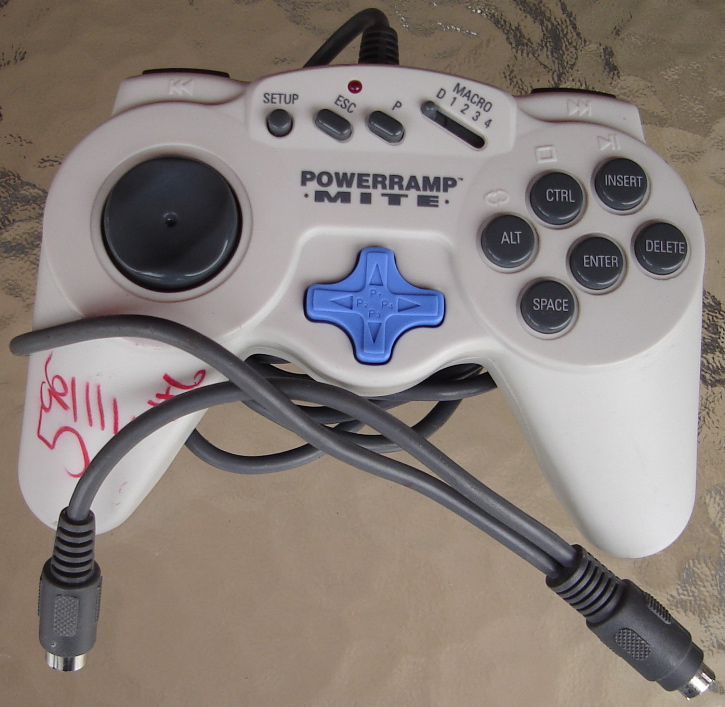
Maybe a gamepad? There are drivers to make a gamepad emulate a keyboard. You can also either mod a gamepad with a keyboard encoder or buy a dedicated gamepad that already acts as a keyboard.
CRT vs LCD - Hardware Mods - HDAdvance - Custom Controllers - Game Storage - Wii Gamecube and other Guides:
CRTGAMER Guides in Board Guides Index: http://www.racketboy.com/forum/viewtopi ... 5#p1109425
-
ZeroAX
- Next-Gen
- Posts: 7469
- Joined: Sun Aug 03, 2008 9:20 am
- Location: Current: Amsterdam. From Greece
- Contact:
Re: Help me find a control scheme for Tomb Raider
I was more looking into any ideas on how to configure the buttons for a 3rd person action platformer. Though I did have an idea just now, so I'll try it out later and see if it works 
BoneSnapDeez wrote:The success of a console is determined by how much I enjoy it.

Re: Help me find a control scheme for Tomb Raider
Maybe map the numpad for it, in part. Some games have used it for directional controls, but if you're used to WSAD it might be easier to just map actions to there. I'm very used to using the numpad for movement and arrow keys (via my thumb) for camera controls in FFXI.
With that style of game, I'd be more inclined to go with a gamepad as well.
With that style of game, I'd be more inclined to go with a gamepad as well.
-
ZeroAX
- Next-Gen
- Posts: 7469
- Joined: Sun Aug 03, 2008 9:20 am
- Location: Current: Amsterdam. From Greece
- Contact:
Re: Help me find a control scheme for Tomb Raider
I don't own oneisiolia wrote: With that style of game, I'd be more inclined to go with a gamepad as well.
 . I could connect a Dual Shock 3 which would be amazing, but the drivers are kind of so-so
 BoneSnapDeez wrote:The success of a console is determined by how much I enjoy it.

Re: Help me find a control scheme for Tomb Raider
You could try the dual shock and Joy2Key
http://www-en.jtksoft.net/
http://www-en.jtksoft.net/
-
ZeroAX
- Next-Gen
- Posts: 7469
- Joined: Sun Aug 03, 2008 9:20 am
- Location: Current: Amsterdam. From Greece
- Contact:
Re: Help me find a control scheme for Tomb Raider
Ok I found the perfect solution
Keys for moving, A for jumping, X for action (shooting) S for drawing the weapon, Left Shift for slow walking, Z for roll (what is even the use of this move?) Numpad 0 for looking around, and the game plays like a charm .
.
Later I'll post my thoughts on a Tomb Raider thread (I'm sure if I search I will find one to bring it back from the dead )
)
Keys for moving, A for jumping, X for action (shooting) S for drawing the weapon, Left Shift for slow walking, Z for roll (what is even the use of this move?) Numpad 0 for looking around, and the game plays like a charm
.Later I'll post my thoughts on a Tomb Raider thread (I'm sure if I search I will find one to bring it back from the dead
) BoneSnapDeez wrote:The success of a console is determined by how much I enjoy it.

Re: Help me find a control scheme for Tomb Raider
Rolling is very useful to dodge and quickly look the other way during fights. Tomb Raider played very awkwardly until the introduction of dual analogs, so rolling was necessary.
Re: Help me find a control scheme for Tomb Raider
You just reminded me of something. That walk hold button is a lifesaver to keep from falling off ledges.ZeroAX wrote:Ok I found the perfect solution
Keys for moving, A for jumping, X for action (shooting) S for drawing the weapon, Left Shift for slow walking, Z for roll (what is even the use of this move?) Numpad 0 for looking around, and the game plays like a charm
Later I'll post my thoughts on a Tomb Raider thread (I'm sure if I search I will find one to bring it back from the dead
CRT vs LCD - Hardware Mods - HDAdvance - Custom Controllers - Game Storage - Wii Gamecube and other Guides:
CRTGAMER Guides in Board Guides Index: http://www.racketboy.com/forum/viewtopi ... 5#p1109425