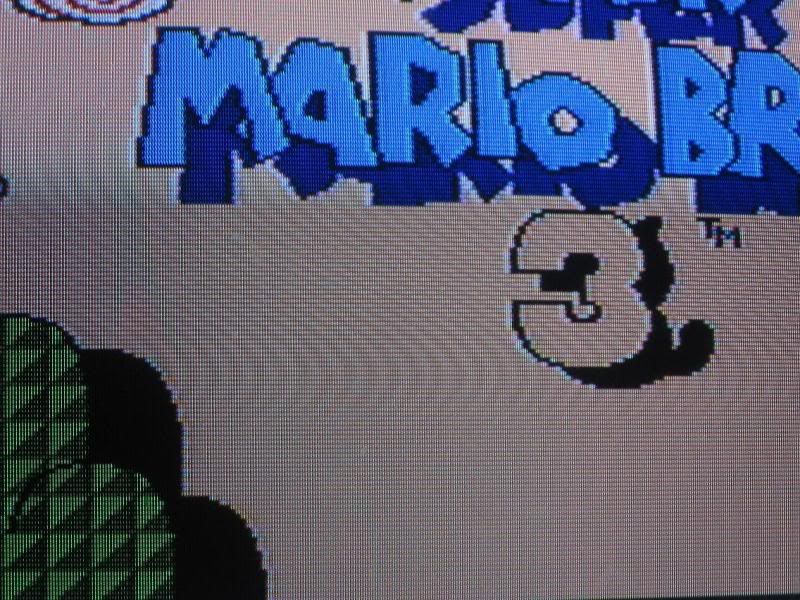
So I got out my NES for good ol' Legend of Zelda, and as soon as I started playing, I noticed my whole screen was covered in these wavy lines. They look EXACTLY like this (http://i114.photobucket.com/albums/n248 ... 3887-1.jpg) only MUCH more noticeable.
I don't know what could be causing this... I'm using AV cables instead of an RF switch, an official Nintendo AC adapter instead of a random one, and the cartridge-slot contacts work perfectly fine. This problem shows up with every game I have, and even shows up when there are no games in the NES. I would understand if this were happening on a flat-screen or something, but I'm playing on standard def TV. I've even taken the NES apart & cleaned the dust out of possible crevice and the lines are still there! If anyone could help me sort out this problem I'd be REALLY grateful!
How can I fix my "wavy line" NES video problems?
-
vic-viper-001
- Newbie
- Posts: 4
- Joined: Wed May 23, 2012 12:13 am
-
BoringSupreez

- Next-Gen
- Posts: 9738
- Joined: Wed Feb 11, 2009 10:09 pm
- Location: Tokyo
Re: How can I fix my "wavy line" NES video problems?
Maybe you have a nearby source of interference? Try moving the cables.
prfsnl_gmr wrote:There is nothing feigned about it. What I wrote is a display of actual moral superiority.
-
s1mplehumar

- Next-Gen
- Posts: 5143
- Joined: Fri May 16, 2008 2:26 pm
- Location: Ragol (FORREST 1)
- Contact:
Re: How can I fix my "wavy line" NES video problems?
Lack of shielding from nearby components? Got a center channel sitting on top of your TV or something?
Nintendo ID, PSN, XBL: Eronnicus * Steam ID: s1mplehumar * Switch Friend Code: SW-3270-7921-5525
-
vic-viper-001
- Newbie
- Posts: 4
- Joined: Wed May 23, 2012 12:13 am
Re: How can I fix my "wavy line" NES video problems?
A center channel?s1mplehumar wrote:Lack of shielding from nearby components? Got a center channel sitting on top of your TV or something?
-
vic-viper-001
- Newbie
- Posts: 4
- Joined: Wed May 23, 2012 12:13 am
Re: How can I fix my "wavy line" NES video problems?
Hmm... I DO have a WII hooked up also, but I've had this same arrangement before with no problems.BoringSupreez wrote:Maybe you have a nearby source of interference? Try moving the cables.

Re: How can I fix my "wavy line" NES video problems?
The actual graphics do not appear distorted. Does this moire appear with your Wii? I assume not. Maybe it is unique to that input on the TV. Try connecting your Wii to that video input and see if the screen looks the same.
Selling half my NES/SNES/PS1 collection (ending Dec 1):
http://tinyurl.com/zingebay
http://tinyurl.com/zingebay

Re: How can I fix my "wavy line" NES video problems?
Did you buy the NES used? Maybe the metal shielding inside is missing. If the PC is nearby try turning it off. To eliminate guesswork, turn off any other devices as well. Doubt this is the issue, but be sure the polarized plug on the TV is plugged in the right way.
CRT vs LCD - Hardware Mods - HDAdvance - Custom Controllers - Game Storage - Wii Gamecube and other Guides:
CRTGAMER Guides in Board Guides Index: http://www.racketboy.com/forum/viewtopi ... 5#p1109425

Re: How can I fix my "wavy line" NES video problems?
I concur with the other respondents. It looks like interference of some kind. Try a different set of inputs, or even a different television, and that may help you isolate the problem.
-
vic-viper-001
- Newbie
- Posts: 4
- Joined: Wed May 23, 2012 12:13 am
Re: How can I fix my "wavy line" NES video problems?
Well; I've tried switching av ports, I've tried using another set of AV cables, I've turned off every other electronic item in the room. I also tried using a different TV, and checked to see if the metal shielding was inside my NES... it's there. No matter what I do though, nothing can get rid of the lines!
I think the only thing left to do, is to try out an RF switch or just get rid of this NES, buy a toploader, and hope for the best... so thanks for all your suggestions!
I think the only thing left to do, is to try out an RF switch or just get rid of this NES, buy a toploader, and hope for the best... so thanks for all your suggestions!
-
Cronozilla

- Next-Gen
- Posts: 2609
- Joined: Wed Mar 14, 2012 8:15 pm
- Location: Oregon, USA.
Re: How can I fix my "wavy line" NES video problems?
What kind of shielding are on the A/V cables you're using?
Also, are you using an A/V switch box?
It might make sense taking a photo of the NES contacts, the TV contacts, and the A/V cable being used, to make sure it's none of those.
Also, are you using an A/V switch box?
It might make sense taking a photo of the NES contacts, the TV contacts, and the A/V cable being used, to make sure it's none of those.