Need help connecting MacBook to CRT TV
Re: Need help connecting MacBook to CRT TV
just FYI, those VGA -> component cables won't do what you want them to do, they really only seem to work with projectors (i have no clue why, but I use one to connect my Wii to my projector via it's VGA port) You would need an actual convertor box to go from VGA->component if connecting to an actual TV.

Re: Need help connecting MacBook to CRT TV
I didn't read the thread, but it seems you still don't have a solution. The answer, and only answer, is to use a mini-displayport to VGA adapter, then use a video transcoder to the format you need.
If you had a digital display, you could use DVI or HDMI, of course.
If you had a digital display, you could use DVI or HDMI, of course.
Selling half my NES/SNES/PS1 collection (ending Dec 1):
http://tinyurl.com/zingebay
http://tinyurl.com/zingebay
-
EllertMichael
- Next-Gen
- Posts: 1380
- Joined: Mon Apr 05, 2010 5:03 pm
- Location: Massachusetts
Re: Need help connecting MacBook to CRT TV
IT WORKS!
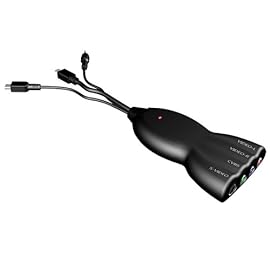
I'm happy to say this BrainyTrade device actually works pretty well right out of the box and keeps me from having to purchase multiple adapters. I'm still having a heck of a time setting up the emulators for my TATE televisions (some games refuse to rotate the correct way with MacMAME and SDLMAME just flat out won't load games with the extra monitor connected) but it's fine as far as watching videos on the big screen.
The device is lightweight and tends to get pretty warm so I'm just hoping it doesn't crap out on me. I still don't understand why Apple doesn't just make their own minidisplay to s-video adapter since it obviously can be done...
I'm happy to say this BrainyTrade device actually works pretty well right out of the box and keeps me from having to purchase multiple adapters. I'm still having a heck of a time setting up the emulators for my TATE televisions (some games refuse to rotate the correct way with MacMAME and SDLMAME just flat out won't load games with the extra monitor connected) but it's fine as far as watching videos on the big screen.
The device is lightweight and tends to get pretty warm so I'm just hoping it doesn't crap out on me. I still don't understand why Apple doesn't just make their own minidisplay to s-video adapter since it obviously can be done...


Re: Need help connecting MacBook to CRT TV
Because it's Apple. Modern displays have digital inputs. Keep up or be left behindEllertMichael wrote: The device is lightweight and tends to get pretty warm so I'm just hoping it doesn't crap out on me. I still don't understand why Apple doesn't just make their own minidisplay to s-video adapter since it obviously can be done...

-
EllertMichael
- Next-Gen
- Posts: 1380
- Joined: Mon Apr 05, 2010 5:03 pm
- Location: Massachusetts
Re: Need help connecting MacBook to CRT TV
Nailed it.isiolia wrote:Because it's Apple. Modern displays have digital inputs. Keep up or be left behind

Re: Need help connecting MacBook to CRT TV
I checked your earlier link. the pic is misleading, it looks like it has Component output with the green and blue jacks. Is this really only SVideo and Composite? Definitely choose SVideo over Composite. Good it works, but there must be an inexpensive Mac to Component Transcoder output though. That is if your CRT has Component input.EllertMichael wrote:IT WORKS!
I'm happy to say this BrainyTrade device actually works pretty well right out of the box and keeps me from having to purchase multiple adapters. I'm still having a heck of a time setting up the emulators for my TATE televisions (some games refuse to rotate the correct way with MacMAME and SDLMAME just flat out won't load games with the extra monitor connected) but it's fine as far as watching videos on the big screen.
The device is lightweight and tends to get pretty warm so I'm just hoping it doesn't crap out on me. I still don't understand why Apple doesn't just make their own minidisplay to s-video adapter since it obviously can be done...
CRT vs LCD - Hardware Mods - HDAdvance - Custom Controllers - Game Storage - Wii Gamecube and other Guides:
CRTGAMER Guides in Board Guides Index: http://www.racketboy.com/forum/viewtopi ... 5#p1109425
-
EllertMichael
- Next-Gen
- Posts: 1380
- Joined: Mon Apr 05, 2010 5:03 pm
- Location: Massachusetts
Re: Need help connecting MacBook to CRT TV
WOW! Good eyes, CRTGAMER! haha I didn't even notice that in the picture, but you're right. It was, however, correctly titled "Mini DisplayPort to Composite Video and S-Video Converter with LED for HDTV DVD" so I was never under the assumption it would be Component. But yeah that is totally misleading. I'm using it mainly for the S-Video connection on my Sony PVM 20N2U which is kept in TATE (and for watching movies with 1channel on the Sony Trinitron, also through S-Video.) It does the trick.CRTGAMER wrote:I checked your earlier link. the pic is misleading, it looks like it has Component output with the green and blue jacks. Is this really only SVideo and Composite? Definitely choose SVideo over Composite. Good it works, but there must be an inexpensive Mac to Component Transcoder output though. That is if your CRT has Component input.