Ps2 component/s-video comparison
-
Hobie-wan

- Next-Gen
- Posts: 21705
- Joined: Sat Aug 15, 2009 8:28 pm
- Location: Under a pile of retro stuff in H-town
- Contact:
Re: Ps2 component/s-video comparison
The composite might be more colorful in your first example because the TV might keep different adjustments for each input. Maybe the color is cranked up on composite.
I've never met a pun I didn't like. - Stark
My trade, sale and services - Rough want list - Shipping weight reference chart - AC Power Adapter reference list
My trade, sale and services - Rough want list - Shipping weight reference chart - AC Power Adapter reference list
Re: Ps2 component/s-video comparison
Monster Cable, even at $3, are a waste of money. They are probably the most overrated brand ever. Their ruler and overlord, Noel Lee, is an idiot whom I've had the pleasure of talking with a few times.
Anyway, Component will always beat out s-video. If component looks "fuzzy" to you, then you either have crap cables or your TV is out-of-whack. Some TVs have independent color/brightness/etc settings for each and every input. As for you not knowing if the extra color in composite was due to your TV or your camera, weren't you able to tell while looking at the TV while taking the pictures?
S-video is great and should be the bare minimum anyone uses. Component mostly clears up the reds (they still bleed in s-video, though not as badly as in composite).
I wrote this article at Sega-16 about video connections: Seeing is Believing
Anyway, Component will always beat out s-video. If component looks "fuzzy" to you, then you either have crap cables or your TV is out-of-whack. Some TVs have independent color/brightness/etc settings for each and every input. As for you not knowing if the extra color in composite was due to your TV or your camera, weren't you able to tell while looking at the TV while taking the pictures?
S-video is great and should be the bare minimum anyone uses. Component mostly clears up the reds (they still bleed in s-video, though not as badly as in composite).
I wrote this article at Sega-16 about video connections: Seeing is Believing

Re: Ps2 component/s-video comparison
While switching back and forth between inputs I didnt take too much notice without looking though the camera, so I didnt take note of the colors. I updated my post with the HD tv testing, and I honestly think the s-video looks much better, not in terms of colors, but sharpness and clarity.
My trade thread, updated 7/14
http://www.racketboy.com/forum/viewtopi ... 48#p421248
http://www.racketboy.com/forum/viewtopi ... 48#p421248
-
Hobie-wan
- Next-Gen
- Posts: 21705
- Joined: Sat Aug 15, 2009 8:28 pm
- Location: Under a pile of retro stuff in H-town
- Contact:
Re: Ps2 component/s-video comparison
Your TV is doing some nasty scaling and pixel doubling to the component images.jay_red wrote:I updated my post with the HD tv testing, and I honestly think the s-video looks much better, not in terms of colors, but sharpness and clarity.
 That's the fault of the TV, not the console or connection method.
I've never met a pun I didn't like. - Stark
My trade, sale and services - Rough want list - Shipping weight reference chart - AC Power Adapter reference list
My trade, sale and services - Rough want list - Shipping weight reference chart - AC Power Adapter reference list
Re: Ps2 component/s-video comparison
I have my Wii hooked up to the same component jacks and it looks great, with nice smooth lines.
My trade thread, updated 7/14
http://www.racketboy.com/forum/viewtopi ... 48#p421248
http://www.racketboy.com/forum/viewtopi ... 48#p421248

Re: Ps2 component/s-video comparison
There is definitely something wrong in all three CRT connectionsjay_red wrote:I have since decided to take the advise and go for the component cables on my ps2, I picked up a nice Monster set at my local used record/game store for a cool $3, so I couldnt lose anyway. I wanted to do a personal comparison between the 3 different methods, composite (the one that most people use, red, white, yellow) s-video, and component. You might be surprised at some of the results.
My testing is not very scientific, switching inputs and taking pictures with my camera to try to capture the differences, but I feel you can see a distinct difference with each input, and I have to say, that they look MUCH better in motion. My test TV's will consist of a 36" Toshiba CRT that is set up in my game room, and a 42" LCD Toshiba that is in my living room.
First off, the CRT, I tried my best to get decent pictures, and ended up having to take them in the dark to get the best quality. I will list pictures in order of Component, S-Video, and Composite.
Once again, I think s-video takes this one. The colors seem more vibrant and sharper. The composite is a very ugly way to play this game.
That concludes the CRT testing, I feel with these shots the s-video is the way to go in terms of sharpness and colors. I am working on the HDTV testing currently, and will update this post as soon as I get the shots. I think the component may make a comeback yet!
There appears to be a herringbone ridge affect rippling across the screen, more pronounced in SVideo and Component. The entire screen also does not seem that bright as if a washed out. Perhaps the cable connection is bad, you should not have that kind of interference.
Curious how does a DVD in a regular DVD player with component comes out?
480p should look crystal clear
I think you do have the component cables attached right and the PS2 console internal menu set to Component. The colors though dull do seem to look right and the RGB setting would not work. But double check it just in case.
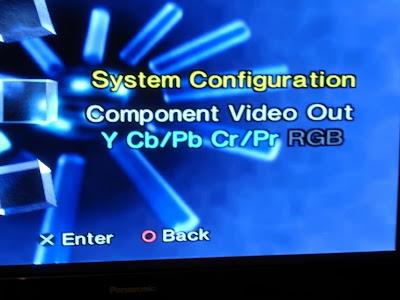
With the component hookup, did you load the games in 480p mode?
Keep in mind some games have different hold button press during a game load, refer to the Wiki link.Wiki wrote:http://en.wikipedia.org/wiki/List_of_Pl ... HD_support[/b]
Generally, progressive scan mode is activated by holding the Triangle and Cross, or "X," buttons down after the PlayStation 2 logo appears. When this is done, the game will typically load a screen with instructions on how to enable progressive scan. Many games only offer progressive scan through this method, offering no related options in the game's options menu.
The Shadow of the Colossus pic does not look like it is displayed in 480p.
Model number of each TV?
Maybe your Toshiba CRT is an SD and only 480i capable? Some Sony TVs have component hookups but are non HD. The TV then has to clean the signal up for a 480i screen.
CRT vs LCD - Hardware Mods - HDAdvance - Custom Controllers - Game Storage - Wii Gamecube and other Guides:
CRTGAMER Guides in Board Guides Index: http://www.racketboy.com/forum/viewtopi ... 5#p1109425
Re: Ps2 component/s-video comparison
Those lines were only visible through the camera, on the screen it was all clear and nice. Its like in movies where there is a crt and you see that line scrolling vertically the whole time. And I checked the settings, it was correct.
Edit:
I did not load the games into 480p mode, didnt catch that! I will check again asap.
Edit:
I did not load the games into 480p mode, didnt catch that! I will check again asap.
My trade thread, updated 7/14
http://www.racketboy.com/forum/viewtopi ... 48#p421248
http://www.racketboy.com/forum/viewtopi ... 48#p421248
Re: Ps2 component/s-video comparison
Ok first off, after setting SoC to progressive scan mode, the difference is HUGE. I will post the shots here, but I was just unaware that it needed to be enabled.
standard:

Progressive scan


As for my TV's the HDTV is 40rv525v and the CRT is cz36v61, I know that the CRT isnt HD, it just happens to have the component inputs and I figured it might look better that way.
I have never had anything but game consoles hooked up to the CRT, so I do not know about the DVD question.
standard:
Progressive scan
As for my TV's the HDTV is 40rv525v and the CRT is cz36v61, I know that the CRT isnt HD, it just happens to have the component inputs and I figured it might look better that way.
I have never had anything but game consoles hooked up to the CRT, so I do not know about the DVD question.
My trade thread, updated 7/14
http://www.racketboy.com/forum/viewtopi ... 48#p421248
http://www.racketboy.com/forum/viewtopi ... 48#p421248
Re: Ps2 component/s-video comparison
Mystery solved! Are the screenshots from the CRT or LCD? I can never figure out why TVs have Component hookups and a non HD 480i CRT. At least they should have a matched ED 480p tube.jay_red wrote:Ok first off, after setting SoC to progressive scan mode, the difference is HUGE. I will post the shots here, but I was just unaware that it needed to be enabled.
As for my TV's the HDTV is 40rv525v and the CRT is cz36v61, I know that the CRT isnt HD, it just happens to have the component inputs and I figured it might look better that way.
I have never had anything but game consoles hooked up to the CRT, so I do not know about the DVD question.
EDIT
On the plus all the Retro Lightgun games will work!
Last edited by CRTGAMER on Sat Nov 19, 2011 11:32 pm, edited 1 time in total.
CRT vs LCD - Hardware Mods - HDAdvance - Custom Controllers - Game Storage - Wii Gamecube and other Guides:
CRTGAMER Guides in Board Guides Index: http://www.racketboy.com/forum/viewtopi ... 5#p1109425
Re: Ps2 component/s-video comparison
Updated the first post with proper progressive scan shots for the HDTV, holy crap we have a winner there! the closeup is amazing. The colors are soooo much more vibrant also. The shots I posted just now were taken from the HDTV.
So looks like I will keep a set of those components for my living room, and keep the game room s-video and all will be right in the gaming world.
So looks like I will keep a set of those components for my living room, and keep the game room s-video and all will be right in the gaming world.
My trade thread, updated 7/14
http://www.racketboy.com/forum/viewtopi ... 48#p421248
http://www.racketboy.com/forum/viewtopi ... 48#p421248