How to tell the difference between CRT and LCD?
-
ReddMcKnight
- 128-bit
- Posts: 833
- Joined: Fri Jan 08, 2010 7:30 pm
- Location: USA
- Contact:
How to tell the difference between CRT and LCD?
Hey all. I have a big screen TV in my basement with a flat screen, but it's kind of old. As such, I was wondering if I could play NES Light Gun Games on it. The problem is, I don't know how to tell the difference between CRT and LCD. Can anyone help me?

Made by the extremely talented MrAfterFx!
My Blog, Hardcore Old-School: http://www.rfgeneration.com/blogs/ReddMcKnight/
Re: How to tell the difference between CRT and LCD?
crt is a cathode ray tube. they are old, big, heavy, and work by firing electrons towards the glass to produce your picture. lcd's are liquid crystal displays and are generally thinner and less bulky and work by manipulating light through the liquid crystals. If your tv is as big as you make it sound, it's probably a projection screen. You could always simply hook it up and try. Don't know if that was much help...
Found this a few days ago and you may find it interesting
http://www.todayifoundout.com/index.php ... me-worked/
Found this a few days ago and you may find it interesting
http://www.todayifoundout.com/index.php ... me-worked/


Re: How to tell the difference between CRT and LCD?
So we don't guesstimate, Make and Model Number?
Also are there any digital connections in the back to tell if its an HD?
Also are there any digital connections in the back to tell if its an HD?
CRT vs LCD - Hardware Mods - HDAdvance - Custom Controllers - Game Storage - Wii Gamecube and other Guides:
CRTGAMER Guides in Board Guides Index: http://www.racketboy.com/forum/viewtopi ... 5#p1109425
-
Hobie-wan

- Next-Gen
- Posts: 21705
- Joined: Sat Aug 15, 2009 8:28 pm
- Location: Under a pile of retro stuff in H-town
- Contact:
Re: How to tell the difference between CRT and LCD?
If you can't tell from looking at a TV, can't check the model number, or meet a strange TV stuck in a cabinet or wall you can't check, do this. Carefully, so you don't scratch it or any anti glare coating, hold your finger more or less parallel to the screen and tap it with your fingernail or use some rounded piece of plastic or wood. If if makes a *tink* sound, that's leaded glass and it is a CRT. LCDs and at least my plasma will make a dull thud.
I've never met a pun I didn't like. - Stark
My trade, sale and services - Rough want list - Shipping weight reference chart - AC Power Adapter reference list
My trade, sale and services - Rough want list - Shipping weight reference chart - AC Power Adapter reference list
Re: How to tell the difference between CRT and LCD?
ok, if your tv is approximately 40", this is how you measure. bend your knees and lift. If it weighs about 50 lb's its LCD, if it weights "OH DEAR GOD I BROKE SOMETHING" then its a CRT. =D
--
Gennss
--

Gennss
--
-
AppleQueso
Re: How to tell the difference between CRT and LCD?
crt:

lcd:
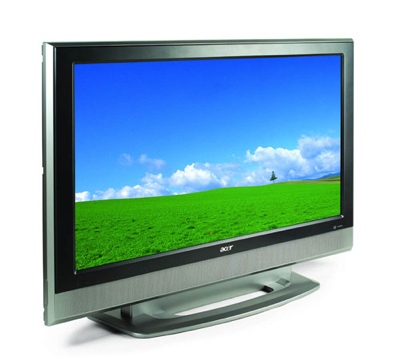
there's a third possibility that it's a rear projection. These will be kinda bulky looking like a CRT but have a cloth-like screen.
lcd:
there's a third possibility that it's a rear projection. These will be kinda bulky looking like a CRT but have a cloth-like screen.
-
D.D.D.

- Next-Gen
- Posts: 3326
- Joined: Tue Oct 16, 2007 11:33 am
- Location: of the Estrecho de Gibraltar is where now?
- Contact:
Re: How to tell the difference between CRT and LCD?
Absolutely true~gennss wrote:ok, if your tv is approximately 40", this is how you measure. bend your knees and lift. If it weighs about 50 lb's its LCD, if it weights "OH DEAR GOD I BROKE SOMETHING" then its a CRT. =D

(FC, AVFC, NES, SFC x2, SNES, N64, GC x2, Wii x2)*(G&W x7, GB, GBpocket, GBASP, DS-L x2)
(GEN, SS x3, DC x3)*(PCE-Duo)*(Xbox:500GB)*(NGCDZ, NGPC)*(PS1, PStwo, PS3:160GB, PSP.3K)
(GEN, SS x3, DC x3)*(PCE-Duo)*(Xbox:500GB)*(NGCDZ, NGPC)*(PS1, PStwo, PS3:160GB, PSP.3K)

Re: How to tell the difference between CRT and LCD?
from you're description I'd say its a rear projection TV, so it will not play video games, nor should you really play videos on them anyway as they're notorious for burn in and video games, especially older ones tend to have the same stuff up all the time like the score.
-
Mod_Man_Extreme
- Next-Gen
- Posts: 6845
- Joined: Sat Mar 01, 2008 12:05 am
- Location: Statesville, North Carolina
- Contact:
Re: How to tell the difference between CRT and LCD?
Jamisonia wrote:from you're description I'd say its a rear projection TV, so it will not play video games, nor should you really play videos on them anyway as they're notorious for burn in and video games, especially older ones tend to have the same stuff up all the time like the score.
 Myths and complete lies.
I own a 65'' 1983 Mitsubishi projection set in my living room. Still looks and works great too. It works with all manner of SD games and lightguns without a hitch and never burns in.
The projection burn in rumors were because while projection CRT's tend to burn in more easily than a standard direct view set it's still on the order of HOURS and HOURS. You would basically have to pause your game and leave it on for about a day or two to see any burn in.
So, just make sure to watch some TV or something after playing a bit and you'll be fine. Just be sure not to leave things paused for an extended and ridiculous period of time without turning off your set or switching it to the cable input.
EDIT!: This is a CRT Projection set:
Also, keep in mind that if it is an HD CRT projection set you won't be able to play your lightgun games on it as it will be running at either 100hz or 120hz.
You can however play certain PS2 Guncon 2 games as the Guncon 2 has a 100hz mode.

My Consoles:
Genesis - Nomad - SegaCD - GameGear - Sega Saturn - Dreamcast - NES - SNES - N64 - Gamecube - Wii - Playstation - PSone & LCD - PS2 - PS3 - Xbox - 3DS
http://www.racketboy.com/forum/viewtopi ... 22&t=11366
Genesis - Nomad - SegaCD - GameGear - Sega Saturn - Dreamcast - NES - SNES - N64 - Gamecube - Wii - Playstation - PSone & LCD - PS2 - PS3 - Xbox - 3DS
Check out my sale thread below, NeoGeo MVS carts & Arcade gear wanted!:Niode wrote:Send him a dodgy cheque. Make it out to Scammy McScammerson.
http://www.racketboy.com/forum/viewtopi ... 22&t=11366
Re: How to tell the difference between CRT and LCD?
My b, everything I heard about rear projection was that burn in was a real issue.Mod_Man_Extreme wrote:Jamisonia wrote:from you're description I'd say its a rear projection TV, so it will not play video games, nor should you really play videos on them anyway as they're notorious for burn in and video games, especially older ones tend to have the same stuff up all the time like the score.
I own a 65'' 1983 Mitsubishi projection set in my living room. Still looks and works great too. It works with all manner of SD games and lightguns without a hitch and never burns in.
The projection burn in rumors were because while projection CRT's tend to burn in more easily than a standard direct view set it's still on the order of HOURS and HOURS. You would basically have to pause your game and leave it on for about a day or two to see any burn in.
So, just make sure to watch some TV or something after playing a bit and you'll be fine. Just be sure not to leave things paused for an extended and ridiculous period of time without turning off your set or switching it to the cable input.
EDIT!: This is a CRT Projection set:
Also, keep in mind that if it is an HD CRT projection set you won't be able to play your lightgun games on it as it will be running at either 100hz or 120hz.
You can however play certain PS2 Guncon 2 games as the Guncon 2 has a 100hz mode.