Video Input on a Portable DVD Player
-
lisalover1
- Next-Gen
- Posts: 4960
- Joined: Tue Jul 08, 2008 10:50 am
- Location: Redmond, WA
- Contact:
Video Input on a Portable DVD Player
I'm trying to get my PS2 to output audio/video to my portable DVD player, but am having some trouble. I have a Sony DVP-FX930 portable DVD player, which has separate ports for video and audio input, both of which use a 1/8 [headphone jack]-type connection. I haven't been able to find exactly what I'm looking for yet, but I've almost managed to put something together, but it doesn't work. What I did was use a 1/8 audio to stereo audio ports converter, to plug the red and white audio cables into the player. That part worked fine; I am able to get audio playing on the player. The trouble came when I tried to get the video connection working; I tried using an old iPod composite output cable [that used a 1/8 connection], and plugged it into the player, and then used a double female-ended composite connector to connect the two cables. This is probably the problem, but I haven't found a better solution. No video shows on the screen, only audio. Is there a simple 1/8-to-composite [or better yet, component] converter that I can buy to fix this problem? Or better yet, something that I'm doing wrong that has a simple solution?

~My name's Vicky, by the way!~ ^_^
-
Mod_Man_Extreme
- Next-Gen
- Posts: 6845
- Joined: Sat Mar 01, 2008 12:05 am
- Location: Statesville, North Carolina
- Contact:
Re: Video Input on a Portable DVD Player
OK, did that Sony player come with video out cables?
If so, just plug them into the video input ports and use a simple coupler to connect the system. Note that if any of your PS2 games have a wide screen mode you can actually feel free to turn it on and the DVD player will display the proper anamorphic signal instead of a stretched out 4:3 one.
Here's that coupler for only $1.99
http://www.sears.com/shc/s/p_10153_1260 ... 314596000P
Unfortunately there's probably no way to connect component if your DVD player doesn't output it either, plus don't you think that would be a tad overkill for just taking your PS2 on the road?
If so, just plug them into the video input ports and use a simple coupler to connect the system. Note that if any of your PS2 games have a wide screen mode you can actually feel free to turn it on and the DVD player will display the proper anamorphic signal instead of a stretched out 4:3 one.
Here's that coupler for only $1.99
http://www.sears.com/shc/s/p_10153_1260 ... 314596000P
Unfortunately there's probably no way to connect component if your DVD player doesn't output it either, plus don't you think that would be a tad overkill for just taking your PS2 on the road?
My Consoles:
Genesis - Nomad - SegaCD - GameGear - Sega Saturn - Dreamcast - NES - SNES - N64 - Gamecube - Wii - Playstation - PSone & LCD - PS2 - PS3 - Xbox - 3DS
http://www.racketboy.com/forum/viewtopi ... 22&t=11366
Genesis - Nomad - SegaCD - GameGear - Sega Saturn - Dreamcast - NES - SNES - N64 - Gamecube - Wii - Playstation - PSone & LCD - PS2 - PS3 - Xbox - 3DS
Check out my sale thread below, NeoGeo MVS carts & Arcade gear wanted!:Niode wrote:Send him a dodgy cheque. Make it out to Scammy McScammerson.
http://www.racketboy.com/forum/viewtopi ... 22&t=11366
-
lisalover1
- Next-Gen
- Posts: 4960
- Joined: Tue Jul 08, 2008 10:50 am
- Location: Redmond, WA
- Contact:
Re: Video Input on a Portable DVD Player
No, the player didn't come with a video cable. As I said, I tried a composite-only coupler, but it didn't work. Is this one different?
~My name's Vicky, by the way!~ ^_^
-
Hobie-wan

- Next-Gen
- Posts: 21705
- Joined: Sat Aug 15, 2009 8:28 pm
- Location: Under a pile of retro stuff in H-town
- Contact:
Re: Video Input on a Portable DVD Player
Is there only 1 video connector? Maybe you have to change a setting for it to be in versus out?Input(s) : A/V Line in (Shared with Line out but switchable)
I've never met a pun I didn't like. - Stark
My trade, sale and services - Rough want list - Shipping weight reference chart - AC Power Adapter reference list
My trade, sale and services - Rough want list - Shipping weight reference chart - AC Power Adapter reference list
-
lisalover1
- Next-Gen
- Posts: 4960
- Joined: Tue Jul 08, 2008 10:50 am
- Location: Redmond, WA
- Contact:
Re: Video Input on a Portable DVD Player
Well, when I turn the player and PS2 on, I do hear audio, and the screen says "Line In", so I assume the settings are correct. Doesn't anybody know a converter like this?Hobie-wan wrote:Is there only 1 video connector? Maybe you have to change a setting for it to be in versus out?Input(s) : A/V Line in (Shared with Line out but switchable)
~My name's Vicky, by the way!~ ^_^

Re: Video Input on a Portable DVD Player
Is the cable coming from the PS2 a component or composite cable? Should be composite.lisalover1 wrote:I'm trying to get my PS2 to output audio/video to my portable DVD player, but am having some trouble. I have a Sony DVP-FX930 portable DVD player, which has separate ports for video and audio input, both of which use a 1/8 [headphone jack]-type connection. I haven't been able to find exactly what I'm looking for yet, but I've almost managed to put something together, but it doesn't work. What I did was use a 1/8 audio to stereo audio ports converter, to plug the red and white audio cables into the player. That part worked fine; I am able to get audio playing on the player. The trouble came when I tried to get the video connection working; I tried using an old iPod composite output cable [that used a 1/8 connection], and plugged it into the player, and then used a double female-ended composite connector to connect the two cables. This is probably the problem, but I haven't found a better solution. No video shows on the screen, only audio. Is there a simple 1/8-to-composite [or better yet, component] converter that I can buy to fix this problem? Or better yet, something that I'm doing wrong that has a simple solution?
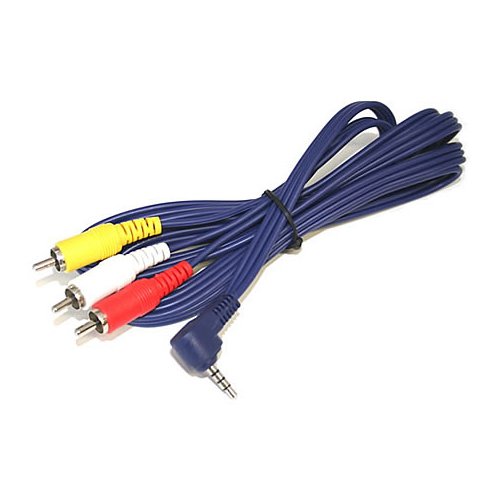
Does the DVD player need something like this? (Female adaptor RCAs Modman linked for your PS2 cable though.)
Note the four contact points on that phono plug. Maybe the separate video is a different plug?
CRT vs LCD - Hardware Mods - HDAdvance - Custom Controllers - Game Storage - Wii Gamecube and other Guides:
CRTGAMER Guides in Board Guides Index: http://www.racketboy.com/forum/viewtopi ... 5#p1109425
-
lisalover1
- Next-Gen
- Posts: 4960
- Joined: Tue Jul 08, 2008 10:50 am
- Location: Redmond, WA
- Contact:
Re: Video Input on a Portable DVD Player
Yes, that's what it needs, but I would preferably like those to be input instead of output; that way, I don't need another coupler that may or may not work. I'm using this for mine, though:
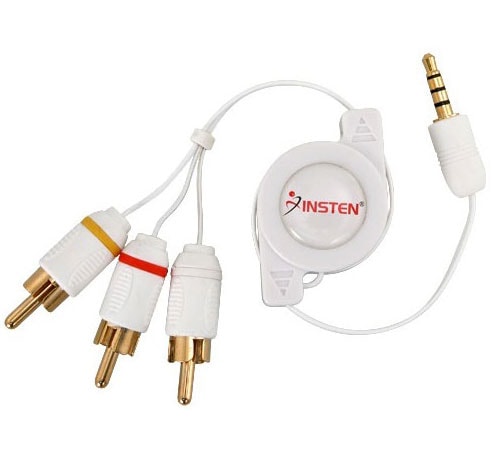
I'm not quite sure I understand what you're saying. Could you explain it, please?Note the four contact points on that phono plug. Maybe the separate video is a different plug?
~My name's Vicky, by the way!~ ^_^
Re: Video Input on a Portable DVD Player
You mentioned there is a separate audio and video jack. Maybe the video plug is only two contacts for composite or unlikely a four contact plug if S-Video. Normally there is only one jack for video and audio. The Sony single jack is either a four or three contact ⅛ plug depending if the unit is stereo or mono, but only for output signal. Suspect your player is output only.lisalover1 wrote:Yes, that's what it needs, but I would preferably like those to be input instead of output; that way, I don't need another coupler that may or may not work. I'm using this for mine, though:
I'm not quite sure I understand what you're saying. Could you explain it, please?Note the four contact points on that phono plug. Maybe the separate video is a different plug?
Model number of portable DVD player?
CRT vs LCD - Hardware Mods - HDAdvance - Custom Controllers - Game Storage - Wii Gamecube and other Guides:
CRTGAMER Guides in Board Guides Index: http://www.racketboy.com/forum/viewtopi ... 5#p1109425
-
lisalover1
- Next-Gen
- Posts: 4960
- Joined: Tue Jul 08, 2008 10:50 am
- Location: Redmond, WA
- Contact:
Re: Video Input on a Portable DVD Player
So, what you're saying is that I need to find a 1-contact, composite-only cable for this setup?
The model number of my player is: DVP-FX930.
Also, it says right on the player that it supports video input.
The model number of my player is: DVP-FX930.
Also, it says right on the player that it supports video input.
~My name's Vicky, by the way!~ ^_^
Re: Video Input on a Portable DVD Player
Sorry was gone a while at barbecue grill. Increased my cholesterol by a few points just now.lisalover1 wrote:So, what you're saying is that I need to find a 1-contact, composite-only cable for this setup?
The model number of my player is: DVP-FX930.
Also, it says right on the player that it supports video input.

According to the manual, there is a Video and an Audio input-output shared jacks. Looks like the audio is a ⅛ stereo plug and the video is a ⅛ mono plug. There is a input select switch above the input-output video audio jacks. Hit that switch.
Be sure to use a double female RCA coupler such as the one Modman pointed out5 earlier. Also the PS2 cable has to be the Composite one not Component.
Inside tease to Modman, I still love OSX can readily grab PDF pages and convert to JPGs on the fly.

Your owners manual.
http://www.docs.sony.com/release/DVPFX930_US_ES.pdf
- Attachments
-
- DVD Player Input.jpg (124.84 KiB) Viewed 3294 times
CRT vs LCD - Hardware Mods - HDAdvance - Custom Controllers - Game Storage - Wii Gamecube and other Guides:
CRTGAMER Guides in Board Guides Index: http://www.racketboy.com/forum/viewtopi ... 5#p1109425