DREAMCAST VGA QUESTIONS! come here for everything VGA w/ DC.

SMS, Genesis, 32X, Sega CD, Saturn, Dreamcast
User avatar
CRTGAMER
Next-Gen
Posts: 11933
Joined: Tue Jan 05, 2010 11:59 am
Location: Southern California

temp

Post by CRTGAMER »

Mod_Man_Extreme wrote:I was thinking and then realized, don't both VGA and DVI plugs have interchangeable Analog or Digital input/outputs unless it's a DVI-D connector?
Assman wrote:Actual dot for dot 480 without any zooming/stretching only takes up maybe 50% of the screen at best (native resolution for my LCD is 1080). It's tiny. I guess it'll depend on the resolution of your CRT, but if it doesn't automatically stretch the image to fit the screen, yeah, that'd suck pretty hard.

Since you mentioned having an analog DVI input in your CRT, though, I'm pretty sure that you can just buy an ordinary passive VGA to DVI cable to get things running as the poster above theorized. I don't know this from experience, but I have read on other retro gaming sites that it does indeed work that way. Honestly, for the priced of a cable, I'd try that before anything else.
I wish it were the older uncommon DVI-A, but alas its DVI-D which is digital video. I use a HDMI to DVI adaptor cable. Also run separate RCA cables for analog Audio channels. I guess good at least to the fact that I do have a digital input to support HDMI. You brought up a good point, your default resolution being 1080. I know my DVD, Gamecube and PS2 through the Component Cable all put out 480p full screen. I have two PS2 games Gran Turismo 4 and Tourist Trophy that can go to 1080i. Either way on my HD 4:3 CRT the display will stay at full screen. So maybe might get lucky with the Dreamcast VGA 640x480 which I believe comes out to a full screen size similar to 480p. The trick is if my TV will stay at 480p when going the digital route. From what I have been reading, 640x480 VGA mode is a rarity on HD LCDs, but common on HD CRT that is at least the ones that have VGA input. All my consoles are on the table in front of me wired up as Component, S-Video and Composite. Hate thought of running yet another set of cables. (HDMI and extra RCA for Audio convert to DVI) Dreamcast VGA not a pressing immediate issue since S-Video looks fine, eventually I'll get to this to enjoy that full 640x480.

Justification of cost of that VGA to Component transcoder, I may still go this cheaper route.
Still more costly compared to that VGA to HDMI box you purchased.
http://racketboy.com/forum/viewtopic.ph ... 57#p231657
Image
CRT vs LCD - Hardware Mods - HDAdvance - Custom Controllers - Game Storage - Wii Gamecube and other Guides:
CRTGAMER Guides in Board Guides Index: http://www.racketboy.com/forum/viewtopi ... 5#p1109425

Image
Image
Nico87
8-bit
Posts: 20
Joined: Thu Jun 24, 2010 9:53 am

Re: DREAMCAST VGA QUESTIONS! come here for everything VGA w/ DC.

Post by Nico87 »

I just bought the Dreamcast VGA Cable (box) from Racketboy, and recieved it yesterday. I get full sound with the VGA cable, but no audio. I bought some cables I believed would work (http://www.nintendorepairshop.com/images/full/nesav.jpg) from Nintendorepairshop.com, but the cable doesn't really fit in neither the VGA cable box or the TV Audio input on my TV. Inserted in the VGA cable box, it's really, REALLY loose, like it falls out if you even look at it.

I tried plugging my headphones in the TV Audio input and they fitted perfectly in both borts. I left the Audio input on the VGA cable box alone, but still no sound. Could anyone point me in the right direction to exactly which cables you use for audio?

Thanks!

**edit**

Okay, the headphones just started working.. somehow. Anyway, I still want sound on my TV rather than using headphones!
User avatar
Hobie-wan
Next-Gen
Posts: 21705
Joined: Sat Aug 15, 2009 8:28 pm
Location: Under a pile of retro stuff in H-town
Contact:

Re: DREAMCAST VGA QUESTIONS! come here for everything VGA w/ DC.

Post by Hobie-wan »

Nico87 wrote:I just bought the Dreamcast VGA Cable (box) from Racketboy, and recieved it yesterday. I get full sound with the VGA cable, but no audio. I bought some cables I believed would work (http://www.nintendorepairshop.com/images/full/nesav.jpg) from Nintendorepairshop.com, but the cable doesn't really fit in neither the VGA cable box or the TV Audio input on my TV. Inserted in the VGA cable box, it's really, REALLY loose, like it falls out if you even look at it.

I tried plugging my headphones in the TV Audio input and they fitted perfectly in both borts. I left the Audio input on the VGA cable box alone, but still no sound. Could anyone point me in the right direction to exactly which cables you use for audio?

Thanks!

**edit**

Okay, the headphones just started working.. somehow. Anyway, I still want sound on my TV rather than using headphones!
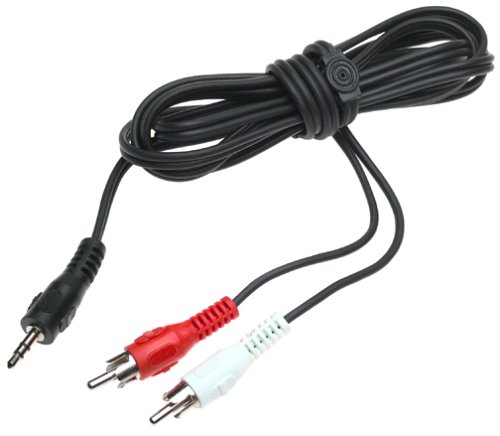
My DC VGA box has RCA jacks for the sound, but the one showing in the Racketboy store is smaller and I only see a headphone jack on it for piping out the audio. You're saying that heaphones plugged into the VGA box give you sound right? Then you'd want something like this:

http://www.monoprice.com/products/produ ... 1&format=2

Monoprice is cheap and awesome, but if you don't want to wait you might go to Goodwill/Radio Shack/Best Buy.
Nico87
8-bit
Posts: 20
Joined: Thu Jun 24, 2010 9:53 am

Re: DREAMCAST VGA QUESTIONS! come here for everything VGA w/ DC.

Post by Nico87 »

Yeah, got same advice from someone else. I live in Norway so I bought one online locally! Thanks though :)
User avatar
Hobie-wan
Next-Gen
Posts: 21705
Joined: Sat Aug 15, 2009 8:28 pm
Location: Under a pile of retro stuff in H-town
Contact:

Re: DREAMCAST VGA QUESTIONS! come here for everything VGA w/ DC.

Post by Hobie-wan »

Nico87 wrote:Yeah, got same advice from someone else. I live in Norway so I bought one online locally! Thanks though :)
Whoops, sorry assumed you were in the US since you don't have a location specified. Hope that cord sorts you out. :)
Nico87
8-bit
Posts: 20
Joined: Thu Jun 24, 2010 9:53 am

Re: DREAMCAST VGA QUESTIONS! come here for everything VGA w/ DC.

Post by Nico87 »

Yeah, I hope so too. It wasn't really that expensive, so if it doesn't work I'll just get used to using headphones!

Kinda blew me away. I didn't expect the Dreamcast to be able to do the stuff I'm looking at right now. Last time I had a Dreamcast I just used composite on my 24". Now I'm all set with the VGA box for my 32" LCD and the official RGB-cable to use for playing shmups on my 24" CRT.
Nico87
8-bit
Posts: 20
Joined: Thu Jun 24, 2010 9:53 am

Re: DREAMCAST VGA QUESTIONS! come here for everything VGA w/ DC.

Post by Nico87 »

I can't expect more than 640x480 60Hz right?
User avatar
CRTGAMER
Next-Gen
Posts: 11933
Joined: Tue Jan 05, 2010 11:59 am
Location: Southern California

Re: DREAMCAST VGA QUESTIONS! come here for everything VGA w/ DC.

Post by CRTGAMER »

Nico87 wrote:I can't expect more than 640x480 60Hz right?
Only resolution for Dreamcast VGA. The games that don't work simply flip the switch on the VGA box and your HD over to S-Video. Back to the audio jack. Your HD input for the VGA there should also be an analog audio input, usually two RCA jacks. headphone to RCA adaptor goes from VGA box to there. For the S-Video just run a splitter out from the audio, maybe right at both HD VGA and S-Video audio input.

VGA box Audio output to HD VGA Audio input:
Image

Two splitters for VGA and S-Video Audio input ........................... Run a spare set of RCA cbles to other jack.
ImageImage
Last edited by CRTGAMER on Fri Jun 25, 2010 12:21 pm, edited 1 time in total.
Image
CRT vs LCD - Hardware Mods - HDAdvance - Custom Controllers - Game Storage - Wii Gamecube and other Guides:
CRTGAMER Guides in Board Guides Index: http://www.racketboy.com/forum/viewtopi ... 5#p1109425

Image
Image
Mod_Man_Extreme
Next-Gen
Posts: 6845
Joined: Sat Mar 01, 2008 12:05 am
Location: Statesville, North Carolina
Contact:

Re: DREAMCAST VGA QUESTIONS! come here for everything VGA w/ DC.

Post by Mod_Man_Extreme »

CRTGAMER wrote:Splitter for VGA and S-Video Audio input ............................... Run a spare set of RCA cbles to other jack.
Image
NO, bad!

Never EVER use a Mono to Stereo adapter on natively Stereo games, it'll make them sound like crap. Just get two sets of audio cables, one for the S-Video and one for the VGA side of the box.
My Consoles:
Genesis - Nomad - SegaCD - GameGear - Sega Saturn - Dreamcast - NES - SNES - N64 - Gamecube - Wii - Playstation - PSone & LCD - PS2 - PS3 - Xbox - 3DS
Niode wrote:Send him a dodgy cheque. Make it out to Scammy McScammerson.
Check out my sale thread below, NeoGeo MVS carts & Arcade gear wanted!:
http://www.racketboy.com/forum/viewtopi ... 22&t=11366
User avatar
CRTGAMER
Next-Gen
Posts: 11933
Joined: Tue Jan 05, 2010 11:59 am
Location: Southern California

Re: DREAMCAST VGA QUESTIONS! come here for everything VGA w/ DC.

Post by CRTGAMER »

Mod_Man_Extreme wrote:NO, bad!

Never EVER use a Mono to Stereo adapter on natively Stereo games, it'll make them sound like crap. Just get two sets of audio cables, one for the S-Video and one for the VGA side of the box.
Misunderstood my meaning. The splitter is used to allow audio to work depending if VGA or S-Video is used, one for left and an additional one for right. Total of four female jacks hanging off the back of the HD. Only one audio mini jack coming out of VGA box so splitter or rather two splitters needed to support both VGA and S-Video depending on game. Stereo is maintained, I reworded previous reply to clarify.
Last edited by CRTGAMER on Fri Jun 25, 2010 12:26 pm, edited 1 time in total.
Image
CRT vs LCD - Hardware Mods - HDAdvance - Custom Controllers - Game Storage - Wii Gamecube and other Guides:
CRTGAMER Guides in Board Guides Index: http://www.racketboy.com/forum/viewtopi ... 5#p1109425

Image
Image
Post Reply