Neo Geo MVS-2 mini 13 arcade monitor swap... HELP! :)

Neo-Geo, Arcade, Portable, & Every Other Platform
deadpixels
16-bit
Posts: 76
Joined: Thu Apr 30, 2009 3:27 pm
Location: Newark, Delaware
Contact:

Re: Neo Geo MVS-2 mini 13 arcade monitor swap... HELP! :)

Post by deadpixels »

swirlee wrote:fastbilly1 -

Initially yes, I wanted to run a pc and stock mvs to a single new monitor. I have since simplified my pursuit.

Now I JUST want to replace the 13" with a larger PC monitor CRT/LCD.

This is ALL I need to know.

Here is how the perfect scenario goes in my head.

*I remove the 13" monitor, see that it was connected to the MVS via RGB. I then take the RGB cable, connect it to my LCD, turn everything on and DONE!*

This is what I need to find out. Is it this simple????? No one seems the be answering this question. How is the MVS connected to this little monitor? If its RGB, then I am set. I have like 3 LCD monitors laying around with RBG input I can use. If its some funky video connection I have never seen before, then I just want to know if a simple converter exists to go from MVS to my LCD.

Another simpler scenario. Lets say my arcade is a VCR. Can I connect my LCD to it or do I need a special cable/adapter?
All arcade CRT monitors that I know of use standard RGB connections. Typically, you'll find Wells Gardner 7000 series monitors in Neo cabinets.

It's pretty uncommon to see one of these with a larger monitor than what originally came with it, and frankly, the resolution isn't going to be any better with a 19'' monitor. If you do choose to upgrade though then this monitor could be the right one for you.

http://happcontrols.com/monitors/49045800.htm

Best of luck.

Image
User avatar
CRTGAMER
Next-Gen
Posts: 11933
Joined: Tue Jan 05, 2010 11:59 am
Location: Southern California

Re: Neo Geo MVS-2 mini 13 arcade monitor swap... HELP! :)

Post by CRTGAMER »

swirlee wrote:
CRTGAMER wrote:Not sure if I read how you are going to hookup that Dreamcast. If you go from say S-Video to a Component Convertor, won't be as good as a Dreamcast VGA box. You get 640x480 VGA if your Plasma supports that resolution. The VGA Box also allows S-Video out for DC games that don't support VGA.
I got this little guy.
http://www.racketboy.com/store/featured ... e-box.html
Image
Ouch, that Dreamcast VGA Cable you have won't allow Non-VGA games to work without switching cables. Might want to get the VGA box that also allows S-Video out bypass. Racketboy sells that one as well, maybe exchange/upgrade?

The VGA Box.
http://www.racketboy.com/store/featured ... eo-av.html
swirlee wrote:
CRTGAMER wrote:Bummer about the lexan cracking, usually durable stuff. That LCD on your arcade should look great, again bench test before yanking out old monitor to be sure. Good idea about utilizing Framing store.
So I couldn't wait till the weekend to work on her again.

There was a crappy black spray paint job on the control panel. I took it down to bare metal and sealed it with some clear rust preventative. Looks pretty good I think. Still waiting on a few new carriage bolts.

It plays 840,472,796 times better. I can pull off a "hadouken" about 99% of the time as opposed to about 80%. I didn't get much time to play though because I finished around 3:00 am

As soon as the converter gets here I will bench test. I think it might be a couple weeks before it gets here though. I don't think they keep any in stock and ship them out from China per order. We'll see.
That new base looks brand new beautiful, you really did a great job.
I think the games themselves run better with new paint, a placebo effect. :D
Image
CRT vs LCD - Hardware Mods - HDAdvance - Custom Controllers - Game Storage - Wii Gamecube and other Guides:
CRTGAMER Guides in Board Guides Index: http://www.racketboy.com/forum/viewtopi ... 5#p1109425

Image
Image
sharp3D
16-bit
Posts: 81
Joined: Tue Mar 16, 2010 10:08 am

Re: Neo Geo MVS-2 mini 13 arcade monitor swap... HELP! :)

Post by sharp3D »

CRTGAMER wrote:Ouch, that Dreamcast VGA Cable you have won't allow Non-VGA games to work without switching cables. Might want to get the VGA box that also allows S-Video out bypass. Racketboy sells that one as well, maybe exchange/upgrade?
Oops.. as soon as I read this I kicked myself! But then I found a list of games that are compatible with VGA versus non and the games that aren't, I would never play and wouldn't even be worth my time making an adapter exchange. Thanks as always for looking out though.
http://www.epforums.org/showthread.php?t=42182
CRTGAMER wrote:That new base looks brand new beautiful, you really did a great job.
I think the games themselves run better with new paint, a placebo effect. :D
Thanks dude. Yeah it looks so much nicer. My button holes on my lexan don't perfectly match up, you can see the edges around some, but it doesn't bother gameplay.

I can't believe that home depot doesn't sell carriage bolts. They sure don't seem like a specialty item.
User avatar
CRTGAMER
Next-Gen
Posts: 11933
Joined: Tue Jan 05, 2010 11:59 am
Location: Southern California

Re: Neo Geo MVS-2 mini 13 arcade monitor swap... HELP! :)

Post by CRTGAMER »

swirlee wrote:I can't believe that home depot doesn't sell carriage bolts. They sure don't seem like a specialty item.
Unbelievable, they do. Not in stainless though. Another source is Harbor Freight, great prices on stainless screws and nuts not carriage though.

Home Depot Crown Bolt Brand. Zinc and Galvanized Carriage bolts Individual or by the box.
http://www.homedepot.com/Tools-Hardware ... own%20Bolt
Image
CRT vs LCD - Hardware Mods - HDAdvance - Custom Controllers - Game Storage - Wii Gamecube and other Guides:
CRTGAMER Guides in Board Guides Index: http://www.racketboy.com/forum/viewtopi ... 5#p1109425

Image
Image
sharp3D
16-bit
Posts: 81
Joined: Tue Mar 16, 2010 10:08 am

Re: Neo Geo MVS-2 mini 13 arcade monitor swap... HELP! :)

Post by sharp3D »

Nah, I saw those when I was there. The're all way too big in both diameter and length. They don't have any regular old small sizes. I really dont want to have to order a few little bolts online, but I will if I have to I suppose.
User avatar
CRTGAMER
Next-Gen
Posts: 11933
Joined: Tue Jan 05, 2010 11:59 am
Location: Southern California

Re: Neo Geo MVS-2 mini 13 arcade monitor swap... HELP! :)

Post by CRTGAMER »

About what size? You could always go for small Allen bolts. Or get that small stainless steel set from Harbor Freight .
Image
CRT vs LCD - Hardware Mods - HDAdvance - Custom Controllers - Game Storage - Wii Gamecube and other Guides:
CRTGAMER Guides in Board Guides Index: http://www.racketboy.com/forum/viewtopi ... 5#p1109425

Image
Image
sharp3D
16-bit
Posts: 81
Joined: Tue Mar 16, 2010 10:08 am

Re: Neo Geo MVS-2 mini 13 arcade monitor swap... HELP! :)

Post by sharp3D »

CRTGAMER wrote:About what size? You could always go for small Allen bolts. Or get that small stainless steel set from Harbor Freight .
Totally true, but because this cab's control panel is so small, they really need to be as flush as possible because the left player has to rest his wrist right on top of one. Would get really uncomfortable especially if you rake your wrist across it.

The old CPO was held down with 4 carriage bolts that were painted black. I sanded them down to match the now exposed metal control panel. Problem is, there are 5 holes. So one hole is empty. Maybe I will sand down a allen bolt and make my own carriage bolt. :)
User avatar
CRTGAMER
Next-Gen
Posts: 11933
Joined: Tue Jan 05, 2010 11:59 am
Location: Southern California

Re: Neo Geo MVS-2 mini 13 arcade monitor swap... HELP! :)

Post by CRTGAMER »

swirlee wrote:
CRTGAMER wrote:About what size? You could always go for small Allen bolts. Or get that small stainless steel set from Harbor Freight .
Totally true, but because this cab's control panel is so small, they really need to be as flush as possible because the left player has to rest his wrist right on top of one. Would get really uncomfortable especially if you rake your wrist across it.

The old CPO was held down with 4 carriage bolts that were painted black. I sanded them down to match the now exposed metal control panel. Problem is, there are 5 holes. So one hole is empty. Maybe I will sand down a allen bolt and make my own carriage bolt. :)
I was thinking rivets, sharp shear pin though. Could chamfer the center pin afterwards with a drill.

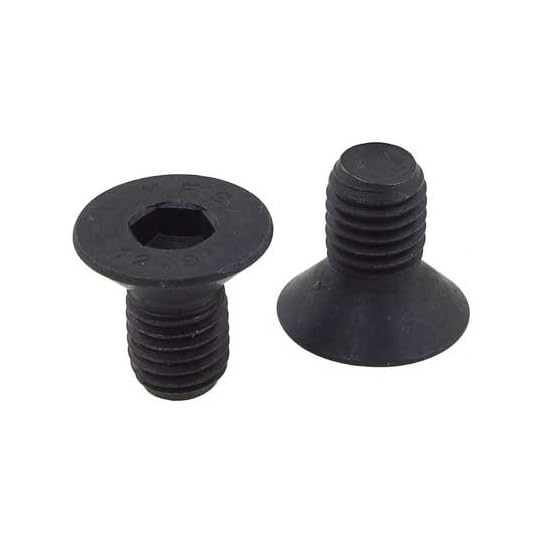
Or maybe something like these #10-32 cap screws maybe?
You could also go with Taper Head Phillips screws.
http://www.smallparts.com/Alloy-Steel-S ... B00365FKMOImage
Image
CRT vs LCD - Hardware Mods - HDAdvance - Custom Controllers - Game Storage - Wii Gamecube and other Guides:
CRTGAMER Guides in Board Guides Index: http://www.racketboy.com/forum/viewtopi ... 5#p1109425

Image
Image
sharp3D
16-bit
Posts: 81
Joined: Tue Mar 16, 2010 10:08 am

Re: Neo Geo MVS-2 mini 13 arcade monitor swap... HELP! :)

Post by sharp3D »

The monitor swap is "complete"!!!

So I disconnected to stock CRT, wired up the converter to the LCD with the help of a buddy of mine and after confirming that the visuals look AWESOME proceeded with the install.

I cut a small square wooden dowel sit the monitor on in order to center it vertically.
Image

Since the converter has all different kinds of settings that can be adjusted on the fly, I mounted it below the CP for easy access.
Image

I had no idea how I was going to mount the monitor, but once I got it inside it fit PERFECTLY! In front of the piece of plywood where the CRT used to sit, there is a gap that the monitor slid right into. It is kept from falling forward by the strips of wood used to hold the glass in place. I really didn't even need to secure it, it was wedge in there. I just bought a few hurricane ankers(Florida haha), but only ended up using one, keeping the monitor from leaning backwards. There is barely 1/8" on each side, crazy!
Image

Image
Image

Running at 1024 x 768
Image
Image

All I have to do know is get a piece of foamcore cut the frame the monitor and cover the bezel and opening and I can call this one complete.

:D :) :o 8) :lol: :P
User avatar
CRTGAMER
Next-Gen
Posts: 11933
Joined: Tue Jan 05, 2010 11:59 am
Location: Southern California

Re: Neo Geo MVS-2 mini 13 arcade monitor swap... HELP! :)

Post by CRTGAMER »

Looks great, super job! Looks like a perfect fit! Prepare for many sleepless nights.

Don't forget to sleep, eat something and bathe once in a while. :D
Image
CRT vs LCD - Hardware Mods - HDAdvance - Custom Controllers - Game Storage - Wii Gamecube and other Guides:
CRTGAMER Guides in Board Guides Index: http://www.racketboy.com/forum/viewtopi ... 5#p1109425

Image
Image
Post Reply