Sonofa... Why now?! My Xbox is dying :(

Gaming on the Playstation and Xbox Platforms
User avatar
Xonticus
128-bit
Posts: 755
Joined: Tue Jan 06, 2009 10:11 pm

Re: Sonofa... Why now?! My Xbox is dying :(

Post by Xonticus »

Niode wrote:2 red lights on the left hand side (1 + 2 when upright, or 1 + 3 when sideways) is overheating problem. It's not life threatening to the consoles --yet. You need to get some pressurised air and give those grills a good 'ol blast whilst using a vacuum on the outside of the system on low suction.

If this doesn't fix it you're going to need to take it apart and give the fan a clean and make sure you get rid of all the dust from the system (don't do this if your 360 is still under warranty). Use pressurised air to blast the dust away from the system. Don't use a vacuum inside the case, that's rookie mistake #1, it's way too easy to knock caps and sometimes suck them right off the board if you're really heavy handed with it.

I do the first type of maintenance on my 360 and PS3s every couple of weeks or so, sometimes more often if I've done a lot of playing that month. I've never had a single red ring on my launch unit.


The reason your old retro consoles are still functioning today is because they are, from an engineering standpoint, very simple piece of kit. They don't generate a lot of heat and are content to be cooled passively. Modern consoles kick out a phenomenal amount of heat due to the extreme amount of transistors in such a small space, simply put, the components used in modern consoles aren't designed to be put under such stressful conditions. The components are way too powerful to be put in such confined spaces. It will affect both the 360 and the PS3 the exact same, coupled with the new requirement of ROHS compliance means that these companies have to use inferior unleaded solder, which cracks under the extreme temps that these consoles can reach under normal use. The main reason the PS3 doesn't fail as much as the 360? It's bigger and has a larger, more efficient fan inside it. It still suffers from the same fundamental flaw though.

I fully endorse this message.

A good cleanout of your 360 after the warranty has expired is safe, fairly easy if you kind of know your way around it, and cheap/free. I do that kind o stuff all the time, and usually all it does is overheat from dust buildup. I do warn though, sometimes when I clean some of them, the overheating issue was not entirely caused by blocking dust, but a sort of pre-RROD. That was more prevalent on the older models, but it still happens.

Cheers!

Oh, and jut a side note. The regular warranty on those is one year, but the RROD warranty and e74 warranty are both 3 years, if the system has not been opened! If you have had your system over 3 years now, then have at it. IF NOT, I would highly suggest just using the compressed air cans until either:

A-the system RR's on you, or
B- 3 year warranty expires.

If you're not sure how old it is, go to support.xbox.com and register your xbox.

Got: Atari 2600, Atari 7800Pro, Commodore 64, Odyssey 2, Sega Master System, NES, Genesis Models 1-3, Nomad, Game Gear, Sega CD Model 1, Sega 32x, SuperNES, GameBoys, GameBoy Pocket, GBC, Sega Saturn Model 2, GBA, Nintendo 64, Playstation, Sega Dreamcast, Playstation 2 Slim, Nintendo DS Lite, Xbox 360, Gamecube, PS3 Slim
17DaysOlderThanNES
32-bit
Posts: 238
Joined: Thu Mar 04, 2010 1:31 am

Re: Sonofa... Why now?! My Xbox is dying :(

Post by 17DaysOlderThanNES »

A former Play N Trade repair technician says: dust ain't your problem.

If this happens immediately after turning it on (normal 2 light should take at least 5-10 minutes), your temperature sensor is toast. Normally 2 light DOES mean overheating, but when it happens immediately every time to a clean system, it's a dead temp sensor and is fairly common (though nowhere near as common as 3 light RROD or 1 light E-74).

To fix it (at least as good as you can fix this problem) you need to do the standard screw and washer fix (I may be making a video of it soon) and cut a trace on the motherboard to disable that sensor. I used to have a picture showing the trace to cut, but for the life of me I can't find it right now. I'll edit this post if I can track it down.

edit: found it

http://xbox-experts.com/tutorial/cut-th ... emp-trace/

the trace cut is in the lower left of that picture (I don't know why they didn't use red instead of black)

I've done this once or twice successfully, but I'm not sure of the long term side effects. At best, I would imagine this will buy you a few more months, but who knows, it may work indefinitely, just make sure to let it vent properly afterwards as it may not speed the fans up when it gets dirty/vent blocked.
User avatar
s1mplehumar
Next-Gen
Posts: 5143
Joined: Fri May 16, 2008 2:26 pm
Location: Ragol (FORREST 1)
Contact:

Re: Sonofa... Why now?! My Xbox is dying :(

Post by s1mplehumar »

jfe2 wrote:While playing some Mass Effect 2 today, my Xbox 360 decided to stop working. My TV acted as if nothing were connected to it, and the 360 itself had two red lights flashing on the left side of the circle. I read up on it a bit and found out that this problem is associated with overheating. Since my 360 hasn't changed places in over a year without failing me, I'm going to assume that whatever is wrong with it doesn't have to do with ventilation.

Sadly, my warranty expired at the end of last year and I have to either buy a new one or take this one up to the flea market to get it fixed... :(

At the risk of sounding ranty, I just wanted to mention that last year I bought an ancient Genesis that was literally caked in mud and dirt, and had hair and dust stuck in the pins. After cleaning it up a bit and plugging it in, it worked fine. How the hell does that work fine and a 360 dies after a few years of use?!
What's the date on your console?
Nintendo ID, PSN, XBL: Eronnicus * Steam ID: s1mplehumar * Switch Friend Code: SW-3270-7921-5525
jfe2
Next-Gen
Posts: 2348
Joined: Sat Sep 12, 2009 4:02 pm
Location: Michigan

Re: Sonofa... Why now?! My Xbox is dying :(

Post by jfe2 »

I had it repaired today for $20. I guess something was up with the heat sinks. The guy dusted it out, replaced something that I couldn't identify, and re-thermal pasted it. I'm just happy I can play Mass Effect 2 again! :D
User avatar
CRTGAMER
Next-Gen
Posts: 11933
Joined: Tue Jan 05, 2010 11:59 am
Location: Southern California

Re: Sonofa... Why now?! My Xbox is dying :(

Post by CRTGAMER »

Congrats, not a bad price for a quick fix.
Image
CRT vs LCD - Hardware Mods - HDAdvance - Custom Controllers - Game Storage - Wii Gamecube and other Guides:
CRTGAMER Guides in Board Guides Index: http://www.racketboy.com/forum/viewtopi ... 5#p1109425

Image
Image
17DaysOlderThanNES
32-bit
Posts: 238
Joined: Thu Mar 04, 2010 1:31 am

Re: Sonofa... Why now?! My Xbox is dying :(

Post by 17DaysOlderThanNES »

jfe2 wrote:I had it repaired today for $20. I guess something was up with the heat sinks. The guy dusted it out, replaced something that I couldn't identify, and re-thermal pasted it. I'm just happy I can play Mass Effect 2 again! :D
did he cut that trace I pointed out? It's possible you are one of the ultra-rare cases that just had the CPU heatsink slightly seperate from the board and causing overheating, but if your temp sensor really is on the fritz, it'll probably red ring again. If it 2 lights again, cut that trace, it's your only option.
User avatar
CRTGAMER
Next-Gen
Posts: 11933
Joined: Tue Jan 05, 2010 11:59 am
Location: Southern California

Re: Sonofa... Why now?! My Xbox is dying :(

Post by CRTGAMER »

17DaysOlderThanNES wrote:
jfe2 wrote:I had it repaired today for $20. I guess something was up with the heat sinks. The guy dusted it out, replaced something that I couldn't identify, and re-thermal pasted it. I'm just happy I can play Mass Effect 2 again! :D
did he cut that trace I pointed out? It's possible you are one of the ultra-rare cases that just had the CPU heatsink slightly seperate from the board and causing overheating, but if your temp sensor really is on the fritz, it'll probably red ring again. If it 2 lights again, cut that trace, it's your only option.
With thermal paste involved, probably did involve the main CPU, "jfe2" did that part the repair guy pulled look like a chip?

Curiosity, does cutting that trace prevent the cooling fans from kicking up when the board get hot? Understand the point behind it, but gotta be a way to put a new sensor or just bypass somehow to keep fans at full speed. Though noisy may prolong cooling effect to prevent overheat?
Image
CRT vs LCD - Hardware Mods - HDAdvance - Custom Controllers - Game Storage - Wii Gamecube and other Guides:
CRTGAMER Guides in Board Guides Index: http://www.racketboy.com/forum/viewtopi ... 5#p1109425

Image
Image
Niode
Next-Gen
Posts: 7831
Joined: Wed Jan 04, 2006 2:34 pm
Location: UK

Re: Sonofa... Why now?! My Xbox is dying :(

Post by Niode »

Yes cutting the trace will stop the 360 from regulating it's own temperature. So either the fans will be stuck at full speed all the time, or they will be stuck in idle mode and not provide the required cooling to the 360. I would advise against cutting the trace. It's a temporary hack job at best. You'd have better luck replacing the temp sensor unit with one from a broken 360 for a more permanent fix.
Marurun wrote:Don’t mind-shart your pants, guys
MentalMan
16-bit
Posts: 94
Joined: Wed Mar 03, 2010 5:12 pm

Re: Sonofa... Why now?! My Xbox is dying :(

Post by MentalMan »

CRTGAMER wrote:Understand the point behind it, but gotta be a way to put a new sensor or just bypass somehow to keep fans at full speed. Though noisy may prolong cooling effect to prevent overheat?
There is multiple ways to get the fan speed in control again. The really cheap ways, are just cutting the power wires of the huge fan, and wiring them up to a new source.

I assume usb would deliver around 3v-5v. There is also a spot you can feed the fan constantly 12v, without running into the fear of xbox live detection because of hardware modification.

But let me tell you, 12v is freaking noisy. It completly overlaps the dvd-drive noises as well, lol.

I once had my 360 die on me, the ANA chip set sail and gave me one ring. After some basic fixing trys, it gave me 3 rings right away when turning it on. Not good, but I already knew it wouldnt work, because the board needed a reflow. And thus I put the board into the good old oven, let it reflow, let it cool down again and put it back together with a lot of tiny mods for more airflow. As well as the aforementioned, nasty 12v.

What was also very important is replacing the shitty thermal paste from the factory with some silver compound thermal paste. Ever since I did that, the unit runs as well as before, or even better. The case barely gets warm, shovels out a lot of hot air concentrated. Cpu and Gpu flow have each their own and dont share it like in the ususal setup.

I just wish I could get myself to change fan speed on the CPU side down to 5v or something like that. The CPU is not the problem, it dosnt get as hot. Its the GPU that gets fryed, especially with the (really hot) DVD drive right on top of it.

So yeah, just thought i'd share that story. And as niode mentioned, cutting a trace on the motherboard permanently is a dirty hack and wont help you in the long run.

The whole debate of 360 and its RROD's has so many different perspectives and views. But the simple fact is, that the system just gets too hot, and has thanks to the US laws a bad solder used that dosnt take on the heat problem as well, and then just cracks after heating up and down for the thousanth time. So, without modding the cooling and airflow, every 360 is pretty much guranteed to die, pity. The system is very well designed in the architecture, but the actual case and how it all gets put together is just downright bad. (Not talking about looks here, talking about efficency.)
17DaysOlderThanNES
32-bit
Posts: 238
Joined: Thu Mar 04, 2010 1:31 am

Re: Sonofa... Why now?! My Xbox is dying :(

Post by 17DaysOlderThanNES »

Niode wrote:Yes cutting the trace will stop the 360 from regulating it's own temperature. So either the fans will be stuck at full speed all the time, or they will be stuck in idle mode and not provide the required cooling to the 360. I would advise against cutting the trace. It's a temporary hack job at best. You'd have better luck replacing the temp sensor unit with one from a broken 360 for a more permanent fix.
yeah, let's see you do that, it's integrated into the CPU. Could you please know WTF you're talking about before opening your mouth (typing a response)? Why are you a moderator again? All I've seen you do is misinform people and needlessly lock threads.

The best solution after cutting the trace would be to hard-mod the fans to make them run fairly high all the time http://www.instructables.com/id/Xbox-360-12v-fan-mod/

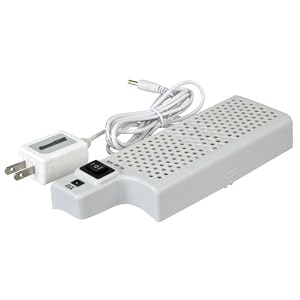
Alternatively, if that's too sketchy for you, you could buy one of those clip on fans that piggyback the stock fans. The Nyko unit sucks and has been known to even cause shorts/fires, so get one that uses its own power supply like this one: I don't know if that particular one is good, but get one that strictly clips to the back and doesn't interfere with the power input of the system (it is said the Nyko's parasitic drag on the power input can cause operation issues, though I don't know specifically as I never looked into it further than that because the fire thing was enough to keep me away).

Image


why you should avoid the Nyko Intercooler:

http://kotaku.com/214213/intercoolers-cruel-irony

Image

they might have fixed it now, but I don't see the point in chancing it.
Post Reply