Is this available on the Saturn?
If not, What is the best video output format? I removed the pinned output on the saturn, and I have just wired directly to the PCB... But I know there are many more video display options.
I have L and R audio and standard composite video. I want overscan on my screen and I dont want blury images as I am recording to my PC.
Cheers
*edit*
Also, I have mapped the full pinout of the pinned output onto the pcb... so if its on the pinout, its on the PCB obviously... so what pin/s are best to use?
Saturn Digital display output? VGA?
-
brendanraymond
- 24-bit
- Posts: 169
- Joined: Thu Mar 04, 2010 1:18 am

Re: Saturn Digital display output? VGA?
RGB Scart looks awesome. I'm pretty sure you'd need a box to convert that into VGA.




Re: Saturn Digital display output? VGA?
Indeed RGB-Scart output is the best you can get on the Saturn. It is the best RGB output I have seen on any system, and RGB is the only thing im playing under. I always want the best picture possible, and being in europe we got fully RGB wired tv's all over the place.
The picture quality is incredibly sharp and stable, colors are very vibrant. It really shows off Saturn's superiour 2D!
However, as far as I know the system only outputs 15kHz. So you need a CRT monitor accepting that. For the saturn being picked up under a VGA computer monitor connection like the Dreamcast, it would need to put out 31kHz. (The Dreamcast, awesome as it is, is able to output both rates.)
The only way I am aware of doing this properly are these expensive upscalers. I dont have much experience with them, or any at all.
The picture quality is incredibly sharp and stable, colors are very vibrant. It really shows off Saturn's superiour 2D!
However, as far as I know the system only outputs 15kHz. So you need a CRT monitor accepting that. For the saturn being picked up under a VGA computer monitor connection like the Dreamcast, it would need to put out 31kHz. (The Dreamcast, awesome as it is, is able to output both rates.)
The only way I am aware of doing this properly are these expensive upscalers. I dont have much experience with them, or any at all.
-
brendanraymond
- 24-bit
- Posts: 169
- Joined: Thu Mar 04, 2010 1:18 am
Re: Saturn Digital display output? VGA?
is this what I'm looking for???
:S
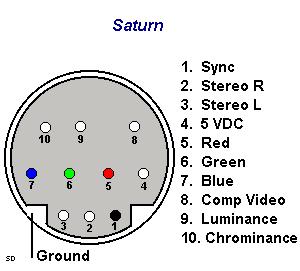
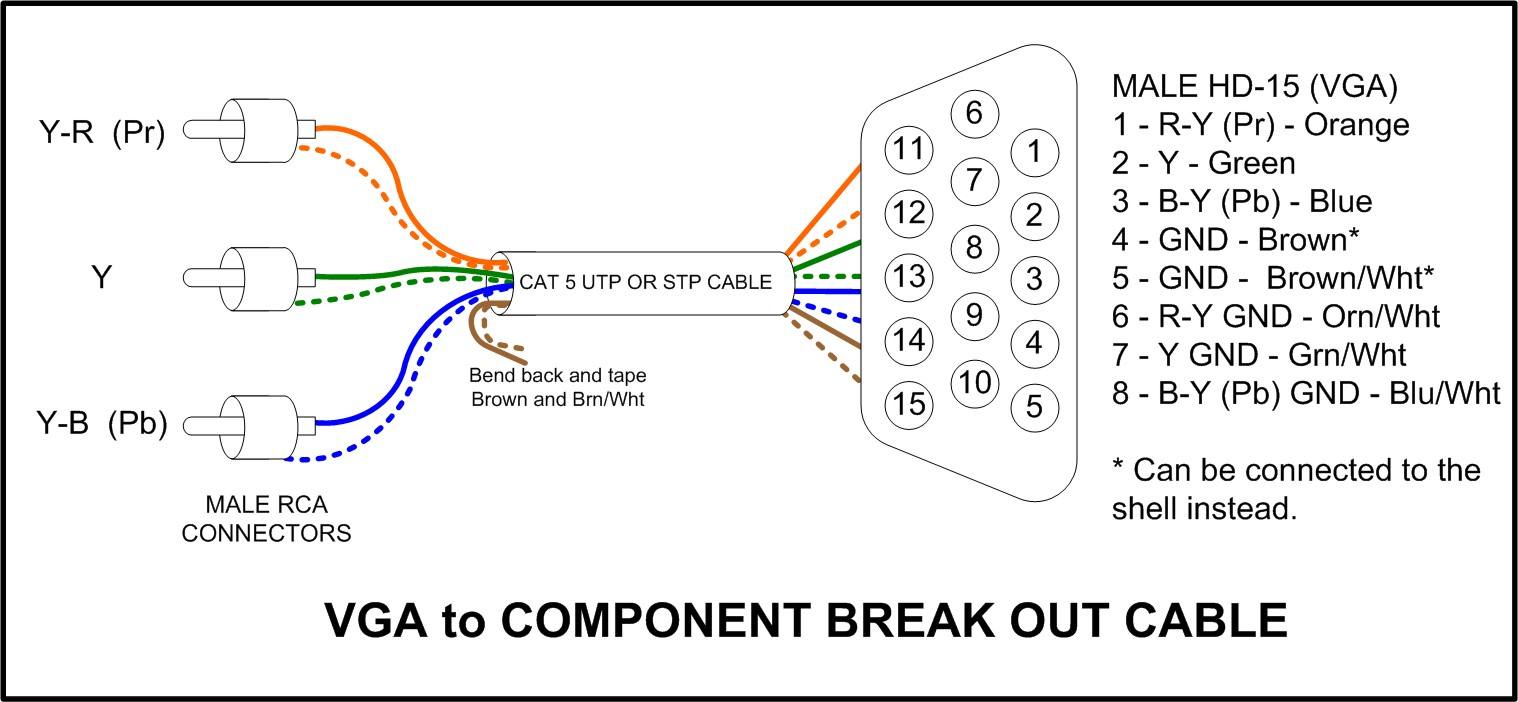
and also... what do i use pin 1,9 and 10 for?
:S
So i should just use Y as Red, Pb as Green and Pr as Blue??? The statement conflicts with the pic >_<What you need to determine is if you can setup your PS2 to output R, G, B rather than component Y, Pb, Pr hence making an RGB to VGA adapter.
and also... what do i use pin 1,9 and 10 for?

Re: Saturn Digital display output? VGA?
See this, tried with Dreamcast VGA to Component.

DOES NOT WORK. Unless you like an off center purple screen.
For VGA to Component you need a transcoder.
However you might be able to rig that Saturn Scart to VGA.
DOES NOT WORK. Unless you like an off center purple screen.
For VGA to Component you need a transcoder.
However you might be able to rig that Saturn Scart to VGA.
CRT vs LCD - Hardware Mods - HDAdvance - Custom Controllers - Game Storage - Wii Gamecube and other Guides:
CRTGAMER Guides in Board Guides Index: http://www.racketboy.com/forum/viewtopi ... 5#p1109425
-
brendanraymond
- 24-bit
- Posts: 169
- Joined: Thu Mar 04, 2010 1:18 am
Re: Saturn Digital display output? VGA?
How does one change between these formats? and what is the pinout for the Hi-vision or VGA support? What games support what display outputs?Quoted from Wikipedia
Programmable display resolution:
Horizontal sizes of 320, 352, 640, 704 pixels
Vertical sizes of 224, 240, 256 scanlines, non-interlaced
Vertical sizes of 448, 480, 512 scanlines, interlaced (only PAL consoles support 256 and 512 scanline displays)
Hi-Vision (EDTV) and 31 kHz (VGA) display support:
31 kHz: 320×480 or 640×480, non-interlaced (progressive scan)
Hi-Vision: 352×480 or 704×480, non-interlaced (progressive scan)
Uncharted territory?Also Quoted from Wikipedia but ofcourse to be taken with a grain of salt
The video resolution of video game consoles reached EDTV specifications starting with the Sega Saturn, with NiGHTS into Dreams..., Christmas NiGHTS, Panzer Dragoon II Zwei, and High Velocity being the only supported games.
*Edit*
Also I noticed that 峠キング・ザ・スピリッツ/Touge King the Spirits AKA High Velocity - Mountain Racing Challenge [T-14402H] Supports Wide Screen display
Whats the deal?
Re: Saturn Digital display output? VGA?
To get Component out of VGA you need a transcoder which changes the sync.
I wrote an extensive article concerning video inputs at my signature link.
I wrote an extensive article concerning video inputs at my signature link.
CRT vs LCD - Hardware Mods - HDAdvance - Custom Controllers - Game Storage - Wii Gamecube and other Guides:
CRTGAMER Guides in Board Guides Index: http://www.racketboy.com/forum/viewtopi ... 5#p1109425
-
brendanraymond
- 24-bit
- Posts: 169
- Joined: Thu Mar 04, 2010 1:18 am
Re: Saturn Digital display output? VGA?
im a little confused here...
component out of VGA? As it stands, the saturn already has component out so why would a need a box?
I am interested in these, and how do I obtain them? obviously through component video (RGB) but how do you control the output format?
component out of VGA? As it stands, the saturn already has component out so why would a need a box?
I am interested in these, and how do I obtain them? obviously through component video (RGB) but how do you control the output format?
I couldnt see anything about that on your thread posted in your sig :S what page is it on?Hi-Vision (EDTV) and 31 kHz (VGA) display support:
31 kHz: 640×480, non-interlaced (progressive scan)
Hi-Vision: 704×480, non-interlaced (progressive scan)
Re: Saturn Digital display output? VGA?
Do you mean Composite not Component? RGB Scart is not the same as Component. Scart is unique to European TVs. To make RGB or VGA to work on Component you need a transcoder which converts RGB/VGA to component.
I think out of the box without buying the transcoder (unless you have a RGB Scart TV) is using a S-Video Cable.
-------------------------------------------------
Here are a couple Component Transcoders for that better RGB Scart connection.
RGB to COMPONENT
http://www.jrok.com/hardware/RGB.html
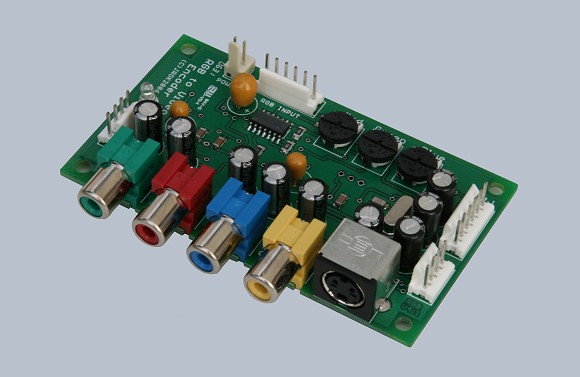
VGA to COMPONENT
http://www.ramelectronics.net/audio-vid ... 11200.html

I think out of the box without buying the transcoder (unless you have a RGB Scart TV) is using a S-Video Cable.
-------------------------------------------------
Here are a couple Component Transcoders for that better RGB Scart connection.
RGB to COMPONENT
http://www.jrok.com/hardware/RGB.html
VGA to COMPONENT
http://www.ramelectronics.net/audio-vid ... 11200.html
CRT vs LCD - Hardware Mods - HDAdvance - Custom Controllers - Game Storage - Wii Gamecube and other Guides:
CRTGAMER Guides in Board Guides Index: http://www.racketboy.com/forum/viewtopi ... 5#p1109425
-
brendanraymond
- 24-bit
- Posts: 169
- Joined: Thu Mar 04, 2010 1:18 am
Re: Saturn Digital display output? VGA?
ya, RGB = Component. that is a standard output on the saturn right? or do I have to program the saturn to use that output?
Composite video is also a standard output on the saturn... so why would a need a box to convert component to composite? (http://www.jrok.com/hardware/RGB.html)
And isn't that otherone for computer outputs to go into a TV monitor back in the day when graphic cards didnt support that??
(http://www.ramelectronics.net/audio-vid ... 11200.html)
sooo how do i change the display res again to 31 kHz: 640×480, non-interlaced (progressive scan) and Hi-Vision: 704×480, non-interlaced (progressive scan) ? I am presuming its just through the component outputs?
*EDIT*
Looking at pinouts... it looks like its not a big deal maybe apart from the sync :S
VGA connector pinout:
From http://pinouts.ru/Video/VGA15_pinout.shtml
Pin Name Dir Description
1 RED Red Video (75 ohm, 0.7 V p-p)
2 GREEN Green Video (75 ohm, 0.7 V p-p)
3 BLUE Blue Video (75 ohm, 0.7 V p-p)
4 ID2 Monitor ID Bit 2
5 GND Ground
6 RGND Red Ground
7 GGND Green Ground
8 BGND Blue Ground
9 KEY - Key (No pin)
10 SGND Sync Ground
11 ID0 Monitor ID Bit 0
12 ID1 or SDA Monitor ID Bit 1
13 HSYNC or CSYNC Horizontal Sync (or Composite Sync)
14 VSYNC Vertical Sync
15 ID3 or SCL Monitor ID Bit 3
Note: Direction is Computer relative Monitor. All VGA pinout signals except R, G, B are TTL level signals.
It seems possible as its just RGB comonents :S however I am sure there is more to it than that :S is it a case of I have to experement... id rather not waste my time if someone has already tried and failed >_<
*Edit*Edit*
It seems my firmware is version: PAL-C-V1.01a. I can't see any video options... is there some sort of advanced config boot mode or something or is there a way to update the firmware?
*Edit*Edit*Edit*
how do you change output format PAL, NTSC, NTSC-J PAL-60 etc etc
Composite video is also a standard output on the saturn... so why would a need a box to convert component to composite? (http://www.jrok.com/hardware/RGB.html)
And isn't that otherone for computer outputs to go into a TV monitor back in the day when graphic cards didnt support that??
(http://www.ramelectronics.net/audio-vid ... 11200.html)
sooo how do i change the display res again to 31 kHz: 640×480, non-interlaced (progressive scan) and Hi-Vision: 704×480, non-interlaced (progressive scan) ? I am presuming its just through the component outputs?
*EDIT*
Looking at pinouts... it looks like its not a big deal maybe apart from the sync :S
VGA connector pinout:
From http://pinouts.ru/Video/VGA15_pinout.shtml
Pin Name Dir Description
1 RED Red Video (75 ohm, 0.7 V p-p)
2 GREEN Green Video (75 ohm, 0.7 V p-p)
3 BLUE Blue Video (75 ohm, 0.7 V p-p)
4 ID2 Monitor ID Bit 2
5 GND Ground
6 RGND Red Ground
7 GGND Green Ground
8 BGND Blue Ground
9 KEY - Key (No pin)
10 SGND Sync Ground
11 ID0 Monitor ID Bit 0
12 ID1 or SDA Monitor ID Bit 1
13 HSYNC or CSYNC Horizontal Sync (or Composite Sync)
14 VSYNC Vertical Sync
15 ID3 or SCL Monitor ID Bit 3
Note: Direction is Computer relative Monitor. All VGA pinout signals except R, G, B are TTL level signals.
It seems possible as its just RGB comonents :S however I am sure there is more to it than that :S is it a case of I have to experement... id rather not waste my time if someone has already tried and failed >_<
*Edit*Edit*
It seems my firmware is version: PAL-C-V1.01a. I can't see any video options... is there some sort of advanced config boot mode or something or is there a way to update the firmware?
*Edit*Edit*Edit*
how do you change output format PAL, NTSC, NTSC-J PAL-60 etc etc