
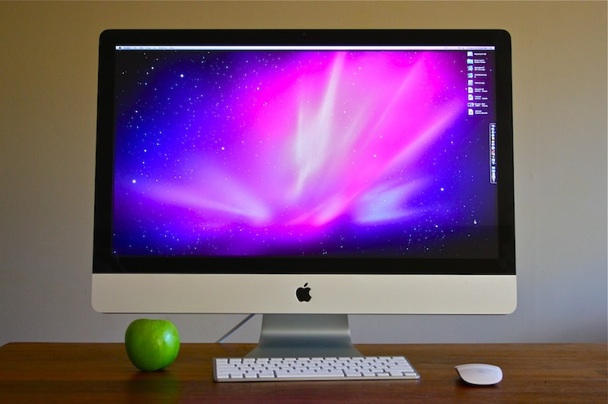
but I am extremely unhappy with it. I thought I had to color calibrate it , and I tried its no use. It seems like this is the display . For example, the apple wallpaper that looks like this:
http://www.crystalxp.net/galerie/img/im ... x-7820.jpg
on the display looks like this:
http://www.cultofmac.com/wordpress/wp-c ... 7inch1.jpg
but this is a picture of a display, my display put out colors like that but not as bad, though close.
It is also very hard to read from, the white are just TOO white it burns your eyes. Even on the dimmest levels its still too bright. I have to make the display yellowish to find it 'ok' .
I put in a DVD, and I can see mini blocks moving around like a really bad digital display. I am not sure if you get what I mean.
I tried to run games, WoW and Doom 3 , they look fine. Nothing is wrong with them, not beautiful and not amazing, but good no complaints.
I mean is there a problem with the display or is it shipped like this or what?
is there a firmware update, I don't know. I am using VGA
A problem in the display or not?
A problem in the display or not?
Last edited by RCBH928 on Sun Feb 25, 2018 11:23 am, edited 1 time in total.


Re: A problem in the display or not?
On both of my CRT and LCD computer monitors DVD's do display dot crawl or pixel shifting. I think it is limit of DVD image playing on a High Resolution Monitor.
You might go into Mac System Preferences and play around on OSX Display settings.
Click Display - Color - Calibrate.
You might go into Mac System Preferences and play around on OSX Display settings.
Click Display - Color - Calibrate.
CRT vs LCD - Hardware Mods - HDAdvance - Custom Controllers - Game Storage - Wii Gamecube and other Guides:
CRTGAMER Guides in Board Guides Index: http://www.racketboy.com/forum/viewtopi ... 5#p1109425
-
foulweather
- Newbie
- Posts: 13
- Joined: Thu Jul 02, 2009 8:26 pm
Re: A problem in the display or not?
I'm guessing your mac is using the wrong color profile with your extra monitor.
Open up display preferences and make sure you have the correct profile selected. If none of the auto-detected ones work, use the calibration tool to make up a color profile. Remember that the mac will have separate profiles for each monitor you have connected.
Games often bypass the system settings, so that might explain why they look ok.
Hope that fixes your problem.
Open up display preferences and make sure you have the correct profile selected. If none of the auto-detected ones work, use the calibration tool to make up a color profile. Remember that the mac will have separate profiles for each monitor you have connected.
Games often bypass the system settings, so that might explain why they look ok.
Hope that fixes your problem.
Re: A problem in the display or not?
http://gizmodo.com/search/faulty%20imac%20saga
Sorry man. All the new iMacs that have come out within the last year have come out wonky. Check out the above site for more info.
Sorry man. All the new iMacs that have come out within the last year have come out wonky. Check out the above site for more info.
Re: A problem in the display or not?
Read the topic. He's not talking about an iMac, he's talking about using his macbook on an external screen that is not functioning.Devezu wrote:http://gizmodo.com/search/faulty%20imac%20saga
Sorry man. All the new iMacs that have come out within the last year have come out wonky. Check out the above site for more info.
On topic: I suggest changing the colour profile in the system preferences as foulweather suggested.
Does this problem happen on any other computer that you own?
Marurun wrote:Don’t mind-shart your pants, guys
Re: A problem in the display or not?
I only own this computer, and I got no other VGA output system to test the display on.
The best thing I can do is to check it on windows XP that runs on my macbook too.
I did a color calibration and tried to change color profile.
I got slightly better results.
Is there like any software or online test to check if the display is working right?
The best thing I can do is to check it on windows XP that runs on my macbook too.
I did a color calibration and tried to change color profile.
I got slightly better results.
Is there like any software or online test to check if the display is working right?