
before i start this is what i got:
so i got it for Christmas mainly for an easy way of getting my ps2 games on my hard drive without using the lens of the ps2. so the first thing i did was try it on my normal ide hard drive which had data on it but hasn't been used for a bit. worked like a dream heard it boot up and it ran very fast afterward. so then i decided to try it with my ide 40gb ps2 hard drive. i could hear the hard drive (although it doesn't sound as fast as the other one) but the computer did not recognize it. it was no where to be found. i feel that it might have to do with the jumpers of the ps2 hard drive. the very small slip of paper states it needs to be in master. my problem is i can't tell what is master, CS, or slave on the hard drive because there is no documentation on the hard drive, online, and i don't own the manual. so can anyone help me on this? am i right about it being the jumpers and if so does anyone know the different jumper options? here is my jumper setting on the ps2 hard drive: i have the first jumper on the first line like this: []::: and the second jumper on it is on the next top two pins. both of them make the shape of an upside down L. sorry if i don't have any pics but my camera is on the flitz...
USB 2.0 to Sata/IDE cable help
USB 2.0 to Sata/IDE cable help
"ninja's wear clothing of every color so they can blend with the alphabet."-best friend concerning bushido blade 2.
my trade and sell list is right here: http://www.racketboy.com/forum/viewtopi ... 22&t=20601
N64, saturn model 2, ds, Dreamcast, ps1, ps2, GBC, GBA, GBA SP, xbox, 3DO, psp slim (v.3001.)
feel free to PM/IM me if you feel like talking to me.
my trade and sell list is right here: http://www.racketboy.com/forum/viewtopi ... 22&t=20601
N64, saturn model 2, ds, Dreamcast, ps1, ps2, GBC, GBA, GBA SP, xbox, 3DO, psp slim (v.3001.)
feel free to PM/IM me if you feel like talking to me.
-
gtmtnbiker
- Next-Gen
- Posts: 4320
- Joined: Fri Jan 09, 2009 1:14 pm
- Location: Massachusetts
Re: USB 2.0 to Sata/IDE cable help
That's the cable I have. You should google the model number/manufacturer of your drive to find what the pin-outs are for the jumpers.
Regarding your drive not being identified, keep in mind the the PS2 formatted drive will not be seen under MyComputer. It will only be seen using Disk Administrator or WinHiip.
Regarding your drive not being identified, keep in mind the the PS2 formatted drive will not be seen under MyComputer. It will only be seen using Disk Administrator or WinHiip.
-
Hobie-wan

- Next-Gen
- Posts: 21705
- Joined: Sat Aug 15, 2009 8:28 pm
- Location: Under a pile of retro stuff in H-town
- Contact:
Re: USB 2.0 to Sata/IDE cable help
If there's no label on top of the drive telling you what the jumper settings are, look on the controller board on the bottom next to the jumper area. Some will have MA for master, CS for cable select, etc. If you can't see that there either, Googling the manufacturer and model number number should get you somewhere. If you're still not getting anywhere, tell us what you've got as most HDs from the manufacturer of the same vintage will have the same jumpers.
I've never met a pun I didn't like. - Stark
My trade, sale and services - Rough want list - Shipping weight reference chart - AC Power Adapter reference list
My trade, sale and services - Rough want list - Shipping weight reference chart - AC Power Adapter reference list
Re: USB 2.0 to Sata/IDE cable help
i have googled the hard drive already previously and once agian now and have still turned up with nothing....gtmtnbiker wrote:That's the cable I have. You should google the model number/manufacturer of your drive to find what the pin-outs are for the jumpers.
i forgot about this little tidbit, but either way im still not detecting anything in either winhiip or disk admin.gtmtnbiker wrote:Regarding your drive not being identified, keep in mind the the PS2 formatted drive will not be seen under MyComputer. It will only be seen using Disk Administrator or WinHiip.
checked their already, nothingHobie-wan wrote:If there's no label on top of the drive telling you what the jumper settings are, look on the controller board on the bottom next to the jumper area.
i have a Sony 40GB ps2 HDD Scph-20401Hobie-wan wrote:If you're still not getting anywhere, tell us what you've got as most HDs from the manufacturer of the same vintage will have the same jumpers.
model # (i believe anyways):VAM51JJ0
"ninja's wear clothing of every color so they can blend with the alphabet."-best friend concerning bushido blade 2.
my trade and sell list is right here: http://www.racketboy.com/forum/viewtopi ... 22&t=20601
N64, saturn model 2, ds, Dreamcast, ps1, ps2, GBC, GBA, GBA SP, xbox, 3DO, psp slim (v.3001.)
feel free to PM/IM me if you feel like talking to me.
my trade and sell list is right here: http://www.racketboy.com/forum/viewtopi ... 22&t=20601
N64, saturn model 2, ds, Dreamcast, ps1, ps2, GBC, GBA, GBA SP, xbox, 3DO, psp slim (v.3001.)
feel free to PM/IM me if you feel like talking to me.
-
final fight cd

- Next-Gen
- Posts: 1357
- Joined: Tue Dec 08, 2009 5:16 pm
- Location: ohio
Re: USB 2.0 to Sata/IDE cable help
to the OP: why don't you want to use the ps2 lens to play your games?
if you took a shit, please put it back
Re: USB 2.0 to Sata/IDE cable help
well im gonna tell you but i hope this doesn't start a whole pirating feud because thats not why i put this post upfinal fight cd wrote:to the OP: why don't you want to use the ps2 lens to play your games?

it's not that i don't want to use the lens to play the game it's more that when using hdloader and putting game onto the hard drive that way it strains the lens. after so much use a ps2 lens can go bad (although it takes a lot of use). i enjoy using hdloader for several reasons:
1. it saves me money- instead of having to buy blanks all the time i can put a game on an existing hard drive.
2.saves me space- i have started to run out of room for my games.
3. the loading times are quite fast using hdloader.
4. the obvious, it saves the lens from some work.
"ninja's wear clothing of every color so they can blend with the alphabet."-best friend concerning bushido blade 2.
my trade and sell list is right here: http://www.racketboy.com/forum/viewtopi ... 22&t=20601
N64, saturn model 2, ds, Dreamcast, ps1, ps2, GBC, GBA, GBA SP, xbox, 3DO, psp slim (v.3001.)
feel free to PM/IM me if you feel like talking to me.
my trade and sell list is right here: http://www.racketboy.com/forum/viewtopi ... 22&t=20601
N64, saturn model 2, ds, Dreamcast, ps1, ps2, GBC, GBA, GBA SP, xbox, 3DO, psp slim (v.3001.)
feel free to PM/IM me if you feel like talking to me.
-
Hobie-wan
- Next-Gen
- Posts: 21705
- Joined: Sat Aug 15, 2009 8:28 pm
- Location: Under a pile of retro stuff in H-town
- Contact:
Re: USB 2.0 to Sata/IDE cable help
It looks like there are at least 2 kinds of official drives. I saw one listed as a seagate that had a smooth top and another with a raised section around the top of the spindle that could have been a Maxtor or something, but there was no info. Can you take a picture or scan of the top and bottom of the drive?
I've never met a pun I didn't like. - Stark
My trade, sale and services - Rough want list - Shipping weight reference chart - AC Power Adapter reference list
My trade, sale and services - Rough want list - Shipping weight reference chart - AC Power Adapter reference list
-
gtmtnbiker
- Next-Gen
- Posts: 4320
- Joined: Fri Jan 09, 2009 1:14 pm
- Location: Massachusetts
Re: USB 2.0 to Sata/IDE cable help
I would suggest trying different jumper settings. First note the current jumper setting which is likely for "master". Then move the jumper to a different set of pins and try it. The next set of pins is usually for cable-select. That's what I have my Seagate set to and it works in the PS2 and in my PC.
Here's a link that shows common settings for a Maxtor drive which I heard is what most of the re-badged sony drives.
http://eshop.macsales.com/Tech/manuals/ ... xtor72.pdf
So change the jumpers and plug it in again. Make sure you use Disk Administrator to verify that the drive is showing up.
Here's a link that shows common settings for a Maxtor drive which I heard is what most of the re-badged sony drives.
http://eshop.macsales.com/Tech/manuals/ ... xtor72.pdf
So change the jumpers and plug it in again. Make sure you use Disk Administrator to verify that the drive is showing up.
Re: USB 2.0 to Sata/IDE cable help
here you go. found a camera that worked thankfully.


"ninja's wear clothing of every color so they can blend with the alphabet."-best friend concerning bushido blade 2.
my trade and sell list is right here: http://www.racketboy.com/forum/viewtopi ... 22&t=20601
N64, saturn model 2, ds, Dreamcast, ps1, ps2, GBC, GBA, GBA SP, xbox, 3DO, psp slim (v.3001.)
feel free to PM/IM me if you feel like talking to me.
my trade and sell list is right here: http://www.racketboy.com/forum/viewtopi ... 22&t=20601
N64, saturn model 2, ds, Dreamcast, ps1, ps2, GBC, GBA, GBA SP, xbox, 3DO, psp slim (v.3001.)
feel free to PM/IM me if you feel like talking to me.
-
Hobie-wan
- Next-Gen
- Posts: 21705
- Joined: Sat Aug 15, 2009 8:28 pm
- Location: Under a pile of retro stuff in H-town
- Contact:
Re: USB 2.0 to Sata/IDE cable help
If its a WD drive, the current jumper settings agree with the master setting as shown here:
http://drivejumper.com/westerndigitaljumperchart.gif
If its a seagate, there's a little flash thing here that will tell you
http://support.seagate.com/rightnow/Fla ... IGr9a.html
http://drivejumper.com/westerndigitaljumperchart.gif
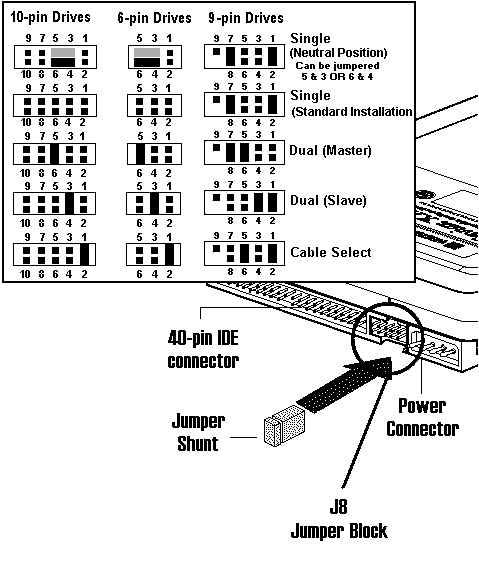
If its a seagate, there's a little flash thing here that will tell you
http://support.seagate.com/rightnow/Fla ... IGr9a.html
I've never met a pun I didn't like. - Stark
My trade, sale and services - Rough want list - Shipping weight reference chart - AC Power Adapter reference list
My trade, sale and services - Rough want list - Shipping weight reference chart - AC Power Adapter reference list