I did forget to mention one thing from my personal settings; change your default resolution for all emulation to 640x480. It will improve the emulation(s) performance. Don't worry your retropie will upscale it to your TV resolution though it still running 640x480 internally. See if that helps at your end.SuperDerpBro wrote:It's just way to laggy after playing on a PC with Hard Sync on. :/
Anyone use RetroPie here?
-
sevin0seven

- Next-Gen
- Posts: 8988
- Joined: Wed May 14, 2008 12:18 pm
- Location: Bay Area, CA
- Contact:
Re: Anyone use RetroPie here?
Visit my stores: Mercari Store, sevin0seven RacketBoy Marketplace
Bay Area Cali: Meet-up Thread
Custom Art Covers & Labels: Click here
Game Room: Click here
Bay Area Cali: Meet-up Thread
Custom Art Covers & Labels: Click here
Game Room: Click here
-
marlowe221
- Next-Gen
- Posts: 1137
- Joined: Wed Jan 25, 2012 7:34 pm
- Location: Mississippi
Re: Anyone use RetroPie here?
I've been considering building a RetroPie.
Just how much lag are we talking about here?
Personally, I'm only interested in games up through the 16-bit era, if that matters at all.
Just how much lag are we talking about here?
Personally, I'm only interested in games up through the 16-bit era, if that matters at all.
Have: Sega Genesis, SNES, Atari 2600, Atari 7800, Atari 800XL, PC, N3DS XL, Wii U, GBA, Xbox One, Switch
Want: Games!!!
Want: Games!!!
-
sevin0seven
- Next-Gen
- Posts: 8988
- Joined: Wed May 14, 2008 12:18 pm
- Location: Bay Area, CA
- Contact:
Re: Anyone use RetroPie here?
Anything from 8-16 bit era should be fine regarding compatibility with the emulation. Heck, you don't even have to overclock your pie if that's all your running. The lag part I assume will be hit or miss. Not all rasberry pie are created equal (from what I read from their community). Just make sure to set up your emulation resolution to 640x480 internally on the menu command to have better performance.marlowe221 wrote:I've been considering building a RetroPie.
Just how much lag are we talking about here?
Personally, I'm only interested in games up through the 16-bit era, if that matters at all.
Visit my stores: Mercari Store, sevin0seven RacketBoy Marketplace
Bay Area Cali: Meet-up Thread
Custom Art Covers & Labels: Click here
Game Room: Click here
Bay Area Cali: Meet-up Thread
Custom Art Covers & Labels: Click here
Game Room: Click here
-
marlowe221
- Next-Gen
- Posts: 1137
- Joined: Wed Jan 25, 2012 7:34 pm
- Location: Mississippi
Re: Anyone use RetroPie here?
When you say not all Raspberry Pi's are created equal... they aren't all made by the same company? Hmm... I had no idea about that.sevin0seven wrote: Anything from 8-16 bit era should be fine regarding compatibility with the emulation. Heck, you don't even have to overclock your pie if that's all your running. The lag part I assume will be hit or miss. Not all rasberry pie are created equal (from what I read from their community). Just make sure to set up your emulation resolution to 640x480 internally on the menu command to have better performance.
If I set my internal resolution to 640x480, how is that going to interact with my 1080p television?
Have: Sega Genesis, SNES, Atari 2600, Atari 7800, Atari 800XL, PC, N3DS XL, Wii U, GBA, Xbox One, Switch
Want: Games!!!
Want: Games!!!
-
sevin0seven
- Next-Gen
- Posts: 8988
- Joined: Wed May 14, 2008 12:18 pm
- Location: Bay Area, CA
- Contact:
Re: Anyone use RetroPie here?
They are made by one brand (as far as I know); what I meant to say is that the Raspberry pie are made for tinkering; Some pi are more sturdy than others (overclocking wise). One pie could go up to 1400mhz, another can only go up to 1300mhz for example. 1200mhz is the default for Pi 3.marlowe221 wrote:When you say not all Raspberry Pi's are created equal... they aren't all made by the same company? Hmm... I had no idea about that.
The only thing your changing is the internal resolution of the emulator. Retropie should be able to upscale to your TV settings with the options provided.If I set my internal resolution to 640x480, how is that going to interact with my 1080p television?
Visit my stores: Mercari Store, sevin0seven RacketBoy Marketplace
Bay Area Cali: Meet-up Thread
Custom Art Covers & Labels: Click here
Game Room: Click here
Bay Area Cali: Meet-up Thread
Custom Art Covers & Labels: Click here
Game Room: Click here

Re: Anyone use RetroPie here?
The Super Smart Joy has noticeably more lag compared to the iBuffalo SNES controller, just from my own observations. It wouldn't hurt to try your other options. Or better yet, if you have a way to compare the response time between them to see if there even IS a difference.SuperDerpBro wrote:I have an official USB Saturn pad and an iBuffalo SNES pad to try but i really doubt its the pad.
-
SuperDerpBro

- 128-bit
- Posts: 503
- Joined: Wed Sep 16, 2015 8:03 pm
- Location: Victoria B.C. Canada
Re: Anyone use RetroPie here?
Just came across this and thought id add it in case anyone finds this thread in the future. Wow, no wonder it felt so laggy to me at stock settings.
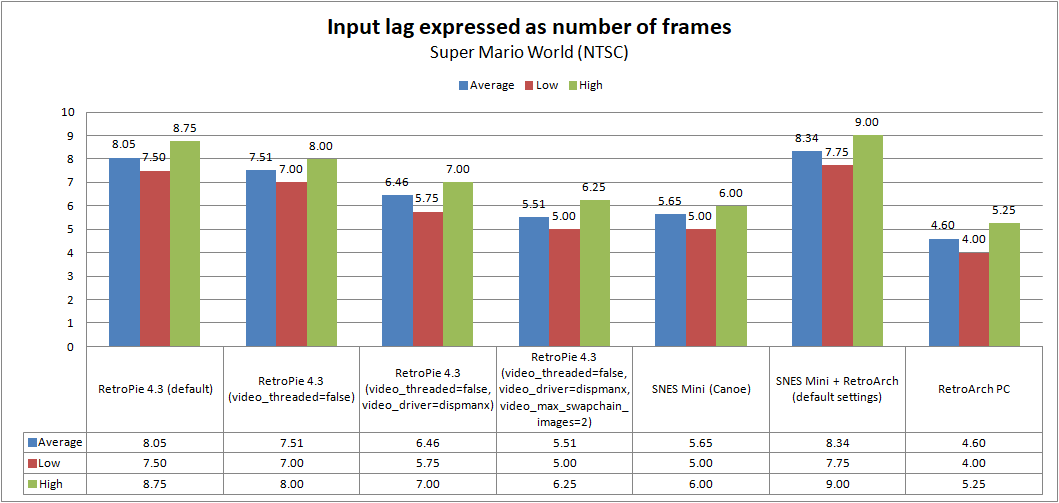
Those numbers include the 1 frame of lag his TV is adding. Looks like you can get it much lower if you futz around a bit. But i'll stick to PC/RetroArch (love me some shaders and retro achievements!) and my S/NES classics (just cuz they are neetoh).
https://forums.libretro.com/t/an-input- ... n/4407/583
There's also this which i have not tried yet.
Those numbers include the 1 frame of lag his TV is adding. Looks like you can get it much lower if you futz around a bit. But i'll stick to PC/RetroArch (love me some shaders and retro achievements!) and my S/NES classics (just cuz they are neetoh).
https://forums.libretro.com/t/an-input- ... n/4407/583
There's also this which i have not tried yet.
Child owned from a INTERNET GAS filled home.