Good timing, fired up offerup and there was a free multicade being offered. It's free because it has no screen to it, but a $7 pick up of a 15" LG screen at goodwill solved that and proved to me it worked, mostly.
Maybe someone here has some ideas? Audio off the board to the speaker in the base is not functioning, but the old owner said he felt it did and was loud. When I looked one wire was popped off the speaker and replacing it did nothing. I traced the wires across to pin10 on the harness jack and nothing seems jacked up there either. The chinese board in there has a phones jack, bypassing that way there is audio.
iCade 60in1 is the little modern-ish board inside there from the sticker 2013.
Problem? Audio. I can not get the speaker inside to work at all, but he said it did for him when I asked after I got home and wrote the dude. The board has a phones jack on it, I could halfass it with some headphones/pc speakers that don't use an AC adapter as that may work but I'd rather get the speaker in there doing its thing. I traced the two wires back from the speaker to the long jamma harness set to both pins on Row #10, which I could find online is correct for the audio (located manual in PDF format.) I'm stumped.
Second to that, I want to get a correct screen for this. Best I can see you need a 19" LCD. I could go the $170-200 shipped route for the original panel, or I could track down a PC LCD for like 25% of that about as the multicade uses a VGA jack anyway along with a monitor power cable.
I'd really like to get this thing working right, as of now it's jury rigged with a monitor bent back sitting on a board and a piece of drywall to keep it level under the open view space and I have to run a wire from some speakers outside for the sound which isn't convenient at all.
Got a free multicade cocktail, need help repair/restoring it

Re: Got a free multicade cocktail, need help repair/restorin
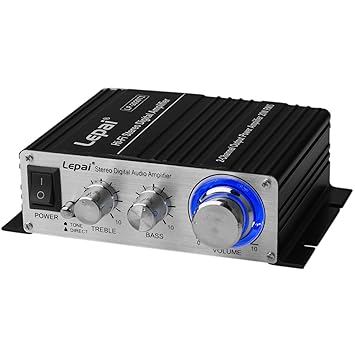
Wow! Congrats on that cocktail cab, very nice. I would be careful experimenting with the on board sound for the following reason. If a replacement speaker does not work just maybe them phono jack contact is stuck leaving the on board audio turned off? If that cannot be fixed, a simple matter of adding a small amp such as a $20 Lepai and a couple stereo speakers mounted inside for a sound upgrade.Tanooki wrote:Good timing, fired up offerup and there was a free multicade being offered. iCade 60in1 is the little modern-ish board inside there from the sticker 2013.
Audio off the board to the speaker in the base is not functioning, but the old owner said he felt it did and was loud. When I looked one wire was popped off the speaker and replacing it did nothing. There has a phones jack, bypassing that way there is audio.
Second to that, I want to get a correct screen for this. Best I can see you need a 19" LCD. I could go the $170-200 shipped route for the original panel, or I could track down a PC LCD for like 25% of that about as the multicade uses a VGA jack anyway along with a monitor power cable.
Since an easy hookup to VGA, just hit up local thrift stores or electronics recycler outlets. Plenty of used inexpensive local LCD VGA monitors out there. Please update this thread once you do the mods, maybe include pictures of mod in progress?
-------------------------
Concerning your large pictures; I prefer the original Racketboy Theme. Any large pictures require using the sideways scroll bar to read your post, a pain going back and forth. I'm reading you post by first clicking the Quote!
To prevent your post text from extending forcing a sideways scroll read, please edit your OP by including the attachment command for your large picture uploads.
{attachment=0}Picture.JPG{/attachment}
Best to keep JPGs under 725 wide for smaller file size to speed the page load anyways. Newer themes auto size shrink images, no reason to upload large pictures unless a right click zoom detail needed such as a PCB solder job.
CRT vs LCD - Hardware Mods - HDAdvance - Custom Controllers - Game Storage - Wii Gamecube and other Guides:
CRTGAMER Guides in Board Guides Index: http://www.racketboy.com/forum/viewtopi ... 5#p1109425
Re: Got a free multicade cocktail, need help repair/restorin
Well I could poke around and see if there is a recycler in the area that would have a working 19" wide flat panel LCD with a VGA jack as that would be an ideal fit and be far cheaper than the original.
I have an idea or two to trace back from a post over on atariage mirroring this I need to attempt to check the audio.
I don't follow you on this part, but sounds interesting: adding a small amp such as a $20 Lepai and a couple stereo speakers mounted inside
I have a pair of altec lansing VS2220 speakers https://www.newegg.com/Product/Product. ... 6836113157
If I put a power strip within, mount that, then lash down the 2 speakers within the cabinet that would be a VERY ideal situation for some really rich stereo sound as they're excellent speakers I picked up at a thrift a couple years back. With the power strip I could just plug the VGA monitor and the speakers into that, then stuff its plug into the jack on the power supply directly as a work around. I'm aware of this and it would work well with no expense but a power strip as I have none to spare.
That would work too now wouldn't it?
I have an idea or two to trace back from a post over on atariage mirroring this I need to attempt to check the audio.
I don't follow you on this part, but sounds interesting: adding a small amp such as a $20 Lepai and a couple stereo speakers mounted inside
I have a pair of altec lansing VS2220 speakers https://www.newegg.com/Product/Product. ... 6836113157
If I put a power strip within, mount that, then lash down the 2 speakers within the cabinet that would be a VERY ideal situation for some really rich stereo sound as they're excellent speakers I picked up at a thrift a couple years back. With the power strip I could just plug the VGA monitor and the speakers into that, then stuff its plug into the jack on the power supply directly as a work around. I'm aware of this and it would work well with no expense but a power strip as I have none to spare.
That would work too now wouldn't it?
Re: Got a free multicade cocktail, need help repair/restorin
You got it, an easy inexpensive fix and audio upgrade!Tanooki wrote:Well I could poke around and see if there is a recycler in the area that would have a working 19" wide flat panel LCD with a VGA jack as that would be an ideal fit and be far cheaper than the original.
I have an idea or two to trace back from a post over on atariage mirroring this I need to attempt to check the audio. I don't follow you on this part, but sounds interesting: adding a small amp such as a $20 Lepai and a couple stereo speakers mounted inside
I have a pair of altec lansing VS2220 speakers. If I put a power strip within, mount that, then lash down the 2 speakers within the cabinet that would be a VERY ideal situation for some really rich stereo sound as they're excellent speakers. With the power strip I could just plug the VGA monitor and the speakers into that, then stuff its plug into the jack on the power supply directly as a work around.
That would work too now wouldn't it?
There is the small issue if the LCD will auto rotate "SHMUP" the image to match the cab video output. Be sure the monitor has BUILT IN CONTROLS to manually rotate the image just in case, not too many VGA monitors have the built in controls.
Your test with the smaller 15" monitor should give an idea if a rotation control monitor needed
If a manual video rotation needed; part of the fun is access to the monitor buttons since it will be mounted in the table position. Once set if 90 degree rotated need, you should be fine that is until power is killed to the monitor. Leave it in sleep mode to retain the rotation settings if needed. The cabinet PCB will auto rotate the image 180 degrees for the second player at the other end.
Sound Upgrade
Since the phono jack works, best to use that instead of risks tinkering with the Arcade PCB and frying something. If you went the separate amp instead of amplified speakers, the amp could be mounted in a way that the controls can be easily accessed while sitting at the game controls.
Something as small as the Lepai could even be mounted under the CPanel. This way you can kick the volume, bass and treble depending on which game played. I use different version Lepai amps for my tower and laptop PCs.

Lepai LP-220A+ vs Lepy LP-2020A-3A vs Lepy LP-2020TI Review
http://www.racketboy.com/forum/viewtopi ... 7#p1108527
CRT vs LCD - Hardware Mods - HDAdvance - Custom Controllers - Game Storage - Wii Gamecube and other Guides:
CRTGAMER Guides in Board Guides Index: http://www.racketboy.com/forum/viewtopi ... 5#p1109425
Re: Got a free multicade cocktail, need help repair/restorin
I appreciate the help but I solved and not the problem. Someone jacked up the board slightly on the inside. See that image I supplied, that black power supply. It's attached on the side with a screw to a little black piece. The piece screwed to the heat sink says UTC TDA20003L 82PFT8 on top of each other on the side.
I wiggled it when messing with the screwdriver pot for audio and I got faint audio, then I noticed 3 of the leads (of 5) were snapped. Wobbling it more I hit this sweet spot and it was loud, very loud even at 50%, but if I removed my hand it failed again because the other 2 leads were almost gone. I tried to figure it further but it came off in my hand.
Right now that part is detached, board and phones audio works fine still, but my lack of knowing I have no idea if that's safe or a fire hazard. But I do know the speaker is just fine. At this rate I can either get a cheap power stripe and mount it inside and just run a piece of nice stereo speakers or replace the board. I just want to know if it's a hazard or safe with that gone since I know that was a heat sink as it got warm as the machine stayed on for awhile.
Edit -- Monitor control isn't an issue, my standard PC cheapo LG in there does just fine vertical in both directions when set to cocktail mode. There's nothing special that needs to be done at all. Quite frankly if it fit in there properly and I had a nice border(easily made with black construction paper or matte) I could just leave it as it is and be fine.
I wiggled it when messing with the screwdriver pot for audio and I got faint audio, then I noticed 3 of the leads (of 5) were snapped. Wobbling it more I hit this sweet spot and it was loud, very loud even at 50%, but if I removed my hand it failed again because the other 2 leads were almost gone. I tried to figure it further but it came off in my hand.
Right now that part is detached, board and phones audio works fine still, but my lack of knowing I have no idea if that's safe or a fire hazard. But I do know the speaker is just fine. At this rate I can either get a cheap power stripe and mount it inside and just run a piece of nice stereo speakers or replace the board. I just want to know if it's a hazard or safe with that gone since I know that was a heat sink as it got warm as the machine stayed on for awhile.
Edit -- Monitor control isn't an issue, my standard PC cheapo LG in there does just fine vertical in both directions when set to cocktail mode. There's nothing special that needs to be done at all. Quite frankly if it fit in there properly and I had a nice border(easily made with black construction paper or matte) I could just leave it as it is and be fine.
Re: Got a free multicade cocktail, need help repair/restorin
Got your PM, responded there concerning that link.
Looked good, but don't you need a wide screen to accommodate the "SHMUP" aspect of the cabinet?
Looked good, but don't you need a wide screen to accommodate the "SHMUP" aspect of the cabinet?
CRT vs LCD - Hardware Mods - HDAdvance - Custom Controllers - Game Storage - Wii Gamecube and other Guides:
CRTGAMER Guides in Board Guides Index: http://www.racketboy.com/forum/viewtopi ... 5#p1109425
-
samsonlonghair

- Next-Gen
- Posts: 5188
- Joined: Tue Feb 17, 2009 2:11 pm
- Location: Now: Newport News, VA. Formerly: Richmond. Before that: Near the WV/VA border
Re: Got a free multicade cocktail, need help repair/restorin
Awesome score for sure!
Looking for a widescreen 19" LCD? Let me see what I have handy...
Just checked the man cave. I have a 19" Lenovo monitor, but it's a 4:3 ratio. I have a 20" widescreen LCD, but I guess that's a little bit too big for your cabinet. I will hit the thrift store tomorrow after work; they always have a dozen different LCD monitors. I will let you know if I see the monitor you need.
Looking for a widescreen 19" LCD? Let me see what I have handy...
Just checked the man cave. I have a 19" Lenovo monitor, but it's a 4:3 ratio. I have a 20" widescreen LCD, but I guess that's a little bit too big for your cabinet. I will hit the thrift store tomorrow after work; they always have a dozen different LCD monitors. I will let you know if I see the monitor you need.
Re: Got a free multicade cocktail, need help repair/restorin
CRTGAMER wrote:Got your PM, responded there concerning that link.
Looked good, but don't you need a wide screen to accommodate the "SHMUP" aspect of the cabinet?
I've got a pick up setup for tomorrow a Dell 1908FP screen 5:4 aspect ratio and 19". Going by the spec of the multicade kit, this is the perfect sized panel for it and fits the viewing area around the mspacman upper bezerl under the glass almost perfectly. It also has the optional sound bar Dell made, this will allow me to use the phones port on the PCB to get stereo audio bypassing the broken on board audio (the AMP fell off so the good speaker won't work.)
I found it on ebay, got to talking with the guy and he lives like 5mi from my place so I"ll pick up it before dinner tomorrow if all goes well. I don't pay shipping, he won't pay the ebay fees, everyone wins.
And CRT -- the shump aspect is fine, the software itself within corrects the panel for tall screen games (like 1942/43) on there leaving some black space to the left/right of the play area so the aspect isn't fouled up as the board is setup to deal with it.
-
samsonlonghair
- Next-Gen
- Posts: 5188
- Joined: Tue Feb 17, 2009 2:11 pm
- Location: Now: Newport News, VA. Formerly: Richmond. Before that: Near the WV/VA border
Re: Got a free multicade cocktail, need help repair/restorin
So did you get your monitor hooked up?
And most importantly, we need to see some pics, brother!
And most importantly, we need to see some pics, brother!
Re: Got a free multicade cocktail, need help repair/restorin
Yeah actually I did a lot of work on it last night later than I would have liked but it's functionally ready for use now.
I basically had to do a few things. A board had come with it already (a little thicker than peg board, but without holes, and someone had already thankfully measured/sketched out lines for mounting a screen to it.) This board I dug out the holes on it clean, then took 2 of the screws out of the back of the 19" LCD (diagonally) and then found some mismatched spares I had with washers/nuts for spacers and spun that into the holes to tightly lock it in against that board. Then I had to measure along the 2 wood boards in there to get the screen entirely centered with the Ms Pac-Man bezel it came with.
Removing all those layers again to open space, drew a few lines, made a few holes, spun some screws into those boards and locked it in tight. Attached all the wiring, and ran the speaker cable from the stereo sound bar down to the working phones jack. Put the top back on the cocktail again and black paint touched up something on that top that was slightly visible under the bezel after thoroughly cleaning all the tinted plastic and upper layer of tempered glass. The top also had only 1 stripped screw remaining I was able to pull out, and due to some recent remodel/repair here I found that my (conveniently) black drywall screws were a perfect fit for the 8 spots to secure the top with the smaller I had, and the access on the side was missing both and my longer drywall screws (also black to match the body) secured the side too.
After that basically just had to turn it on to get the games up for some sound, and closed the side up unscrewed to get the right good volume level on the knob on the bar (very easily reached too.) The 1P side has this loud rubbing of the metal joystick plate against a piece of black plastic that drove me nuts so I hand sanded that for like an hour watching some TV until it didn't do it anymore and re-attached that to the machine. That was where I stopped after getting covered in black/silver metal dust/sand paper grit.
I need to measure up the edges of the Dell 1908FP screen along with the open space in general from the MPM bezel. I'll head to Michaels and get some black poster board or perhaps stiffer matte depending on price and xacto knife it to the right dimensions and somehow/somehwere attach that in there so you only see the play area of the game and not the monitor. Also will need to unscrew the lock (no key came with it) and get a new key for it or just replace it for a 1:1 style lock.
That should finish it.
I basically had to do a few things. A board had come with it already (a little thicker than peg board, but without holes, and someone had already thankfully measured/sketched out lines for mounting a screen to it.) This board I dug out the holes on it clean, then took 2 of the screws out of the back of the 19" LCD (diagonally) and then found some mismatched spares I had with washers/nuts for spacers and spun that into the holes to tightly lock it in against that board. Then I had to measure along the 2 wood boards in there to get the screen entirely centered with the Ms Pac-Man bezel it came with.
Removing all those layers again to open space, drew a few lines, made a few holes, spun some screws into those boards and locked it in tight. Attached all the wiring, and ran the speaker cable from the stereo sound bar down to the working phones jack. Put the top back on the cocktail again and black paint touched up something on that top that was slightly visible under the bezel after thoroughly cleaning all the tinted plastic and upper layer of tempered glass. The top also had only 1 stripped screw remaining I was able to pull out, and due to some recent remodel/repair here I found that my (conveniently) black drywall screws were a perfect fit for the 8 spots to secure the top with the smaller I had, and the access on the side was missing both and my longer drywall screws (also black to match the body) secured the side too.
After that basically just had to turn it on to get the games up for some sound, and closed the side up unscrewed to get the right good volume level on the knob on the bar (very easily reached too.) The 1P side has this loud rubbing of the metal joystick plate against a piece of black plastic that drove me nuts so I hand sanded that for like an hour watching some TV until it didn't do it anymore and re-attached that to the machine. That was where I stopped after getting covered in black/silver metal dust/sand paper grit.
I need to measure up the edges of the Dell 1908FP screen along with the open space in general from the MPM bezel. I'll head to Michaels and get some black poster board or perhaps stiffer matte depending on price and xacto knife it to the right dimensions and somehow/somehwere attach that in there so you only see the play area of the game and not the monitor. Also will need to unscrew the lock (no key came with it) and get a new key for it or just replace it for a 1:1 style lock.
That should finish it.
Last edited by Tanooki on Thu Feb 01, 2018 11:33 pm, edited 1 time in total.