PC build thread


-
noiseredux

- Next-Gen
- Posts: 38148
- Joined: Fri Nov 14, 2008 1:09 pm
- Contact:
Re: PC build thread
well, is $400 out of your range? I basically have the 27" version of this:Xeogred wrote:Dang. Should I hold off then if it's worth it?
and I love it.


Re: PC build thread
You may want to see if you can look at it in person, as it's a TN panel. Color is not the strong suit of that panel type (speed and cost are). Could still look good on-axis though.Xeogred wrote:Dang. Should I hold off then if it's worth it?
I have a 27" Acer Predator (XB271HU, so IPS), but it's quite pricey.
-
noiseredux
- Next-Gen
- Posts: 38148
- Joined: Fri Nov 14, 2008 1:09 pm
- Contact:
Re: PC build thread
Good point. Mine is IPS as well.
Mine is XB270HU - I'm not sure the differences between that and your Predator.
Mine is XB270HU - I'm not sure the differences between that and your Predator.
Re: PC build thread
My friend was telling me to go with an IPS, they do look pricey though.

Re: PC build thread
IPS = Truer Color.Xeogred wrote:My friend was telling me to go with an IPS, they do look pricey though.
TN = Faster Response Times (also cheaper)

Re: PC build thread
Another question for the cheaper side...
Are all newer mouse and keyboards only USB? That's all I'm finding on Amazon searching around. Are modern motherboards not even supporting the old inputs? I'd rather use up the old plugs so I still have 1-2 USB slots open.
I'm using a wireless mouse/keyboard right now which is fine, but for perfect latency and all that at my desktop I'd like some wired devices. The old mouse was dying and the keyboard was getting sticky and crap. Time for some replacements.
Like the looks of these:
https://amzn.com/B003ELVLKU
(my wireless one is similar and the side buttons have been pretty nifty haha)
But if you guys know of equivalents that use the old inputs I'd be curious.
Are all newer mouse and keyboards only USB? That's all I'm finding on Amazon searching around. Are modern motherboards not even supporting the old inputs? I'd rather use up the old plugs so I still have 1-2 USB slots open.
I'm using a wireless mouse/keyboard right now which is fine, but for perfect latency and all that at my desktop I'd like some wired devices. The old mouse was dying and the keyboard was getting sticky and crap. Time for some replacements.
Like the looks of these:
https://amzn.com/B003ELVLKU
(my wireless one is similar and the side buttons have been pretty nifty haha)
But if you guys know of equivalents that use the old inputs I'd be curious.
Re: PC build thread
For mice, they are all USB as there is no real benefit to using PS/2. USB offers all that lighting jazz people love, etc. Most new Mobo's don't even have the second PS/2 socket for a mouse, just one for the keyboard for reasons outlined below.
For Keyboards, USB is limited to 6 input strokes in a packet during polling (it sends all 6 in a single packet, thus most USB keyboards can only detect when 6 keys are pressed at one time and will ignore the others, not that you will press more than at any given time), while PS/2 only sends a packet when a key is pressed. My mechanical keyboard is USB, but when using a PS/2 adapter supports NKRO, thus does not have the limit.
In reality though, the difference is nothing anyone will notice, despite how much people love arguing about USB vs PS/2 for higher end keyboards.
If you are just wanting to free up a USB slot, just buy a USB to PS/2 adapter, they cost about $1-2. Then you can just buy whatever you want.
For Keyboards, USB is limited to 6 input strokes in a packet during polling (it sends all 6 in a single packet, thus most USB keyboards can only detect when 6 keys are pressed at one time and will ignore the others, not that you will press more than at any given time), while PS/2 only sends a packet when a key is pressed. My mechanical keyboard is USB, but when using a PS/2 adapter supports NKRO, thus does not have the limit.
In reality though, the difference is nothing anyone will notice, despite how much people love arguing about USB vs PS/2 for higher end keyboards.
If you are just wanting to free up a USB slot, just buy a USB to PS/2 adapter, they cost about $1-2. Then you can just buy whatever you want.
-
noiseredux
- Next-Gen
- Posts: 38148
- Joined: Fri Nov 14, 2008 1:09 pm
- Contact:
Re: PC build thread
well this is interesting, and supposedly shipping next month:
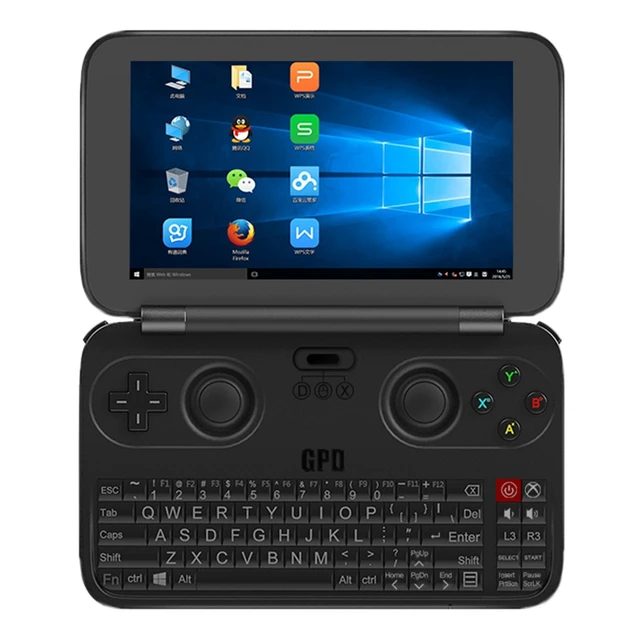
https://www.aliexpress.com/item/GPD-Win ... 67c4db7819
https://www.aliexpress.com/item/GPD-Win ... 67c4db7819
It's selling for $330. I'm tempted AF, though it's *slightly* higher than I'd have wanted. ($250 would've been pretty perfect). Plus, I have been considering saving for an Oculus Rift so this would kind of throw that off. Hmm.GPD Win Game Console is the World's First 5.5 Inch Handheld PC / Gaming Console Based on Windows 10 System. Equipped with a 5.5 inch capacitive touch display that supports 1280 x 720 pixels. Powered by Atom X5 Z8500 64 bits Quad Core 1.44GHz(up to 2.24GHz) processor, and 12 units HD Graphics. Besides, it has larger storage (4GB RAM and 64GB ROM) for your using, all features provide you wonderful gaming and using experience.
Microsoft Windows 10 64bits OS
Windows 10 brings back the popular Start Menu from Windows 7 and introduces new features, like the Edge Web browser that lets you mark up Web pages on your screen.
Atom X5 Z8500 64bit Quad Core 1.44GHz, Up to 2.24GHz CPU
Ultra-low-voltage platform and quad-core processing provide maximum high-efficiency power to go. Turbo Boost Technology delivers dynamic extra power when you need it.
HD Graphic GPU
On-processor graphics with shared video memory provide high image quality for Internet use, basic photo editing and casual gaming. Optimized to use less power.
5.5 inch Capacitive Touch Screen with 1280 x 720 Resolution
Natural finger-touch screen with 1280 x 720 resolution at 267 ppi boasts impressive color and clarity, Gorilla Glass 3 material and In-cell full-lamination technology provides wonderful viewing experience.
RAM + ROM: 4GB + 64GB
Offers ultra-fast surfing online, video playing and 3D gaming experience enhanced with LPDDR3 memory which makes all applications faster and has 20 percent lower power consumption saving, it will suit your all needs for work, study or play.
TF Card Expansion
Accepts compatible cards up to 128GB (not included) for easy expansion.
6000mAh battery
Can multi-manage the current, power and the temperature and increase the performance dynamically.
USB Type-C, HDMI, Bluetooth 4.1, WiFi
Simplify connections to a compatible mouse, external keyboard or other accessories with the speed and convenience of Bluetooth. Or sync up some compatible Bluetooth speakers for great sound without the wires.
Supports Multi-format Games
Support full screen touch games, gravity sensor direction games, web multi-player games. Support Simulator games, DC, MD, Android, ARCADE, PS1, PSP, XBOX games, Flash games, PC games, Steam games, etc.
Main Features
Portable and light, perfect operation feel. A mouse keyboard and joystick intergration laptop fitting in your pocket.
Specification
General
Launch Time:2016
Model:GPD Win
Item Type:UMPC, MID, Game Console
Features:indows 10 system + Touch panel + Joystick +
Fully functional keyboard
Color:Black
Display
Touch Panel:Capacitive panel, multi-touch support
Screen Size:5.5 Inch
Screen Resolution:1280 x 720 pixels
Screen Ratio:16 : 9
Pixels per inch (PPI):267 ppi
Screen Technology:Gorilla Glass 3, In-cell
full-lamination technology
Processor
Operating System:Windows 10 Home
CPU:Intel Atom X5 Z8500, 64 bits Quad Core,
1.44GHz~2.24GHz
L1 Cache:32KB*2
L2 Cache:2MB
Thread:4
Processor technology:14nm
Graphics
Graphics Type:Core graphics
Graphics Chipset: HD Graphics
Graphics Frequency:200MHz~600MHz
Execution unit:12
Memory size:Shard memory capacity
Storage
RAM:LPDDR3-1600, 4GB
ROM:eMMC 4.51, 64GB
External memory:Micro SD card ( Support 128GB max)
Communication
Wireless:802.11 a/ac/b/g/n WLAN
Bluetooth version:V4.1
HDMI:Yes, HDMI D type
Interfaces
I/O Interfaces:1 x USB Type-C 3.0 slot, 1 x USB 3.0 slot, 1 x TF Card slot, 1 x HDMI D type slot, 1 x 3.5mm Earphone port
Input Device
Joystick:Double 3G joysticks, originally provided by Japan Apls
Function Buttons:A/B/X/Y, Double character print
Accessories buttons:L1/L2/L3/R1/R2/R3, OMRON microswitch
Start/Select button, power button
Other button:Volume + / - button
D-Pad:Game D-Pad
Keyboard:67 standard PC keys + 10 expanded function keys
Power
Battery Type:Non-removeable Li-ion battery
Battery Capacity:6000mAh
Battery Life:About 6~8 hours (It should be depending on the actual working conditions)
Multimedia
Audio System:Realtek ALC5645
Speaker / MIC:Built-in Stereo Speakers/Built-in Microphone
Audio Format:MP3,MP4,3GP,WMA,OGG,AMR,AAC,FLAC,APE,WAV,MIDI,RA
Video Format:MP4,3GP,WMA,RM,RMVB,ASF,AVI,MOV
Picture Format:JPG,PNG,GIF,BMP,JPEG,WEBP,WBMP
Appearance
Shell Material:ABS+PC
Sensor Type:Gravity sensor, Hall sensor
Dimension(L*W*H):155*96*20mm
Net Weight:300g
Package Contents
1 x GPD WIN Game Console
1 x 5V 2A US plug Charger (A right plug of adapter will be sent as your shipping country)
1 x User Manual, 1 x Warranty Card
-
noiseredux
- Next-Gen
- Posts: 38148
- Joined: Fri Nov 14, 2008 1:09 pm
- Contact:
Re: PC build thread
to anyone who has done any research on the matter, what is the general thought process behind GTX 900 series in SLI versus the 1000 series? I don't actually feel a need to upgrade but just keeping this knowledge in the back of my head. I could add a 2nd Zotac 970 to my rig for ~$200... but how would that perform compared to a 1070?