@Ziggy587--"Another idea I had was to take the YPrPb from the (re)inputs rather than from the outputs. I actually thought of this early on, but for whatever reason I put it in the back of my mind. The reason being is that the S-ENC outputs the YPrPb signals and passes them through a circuit before inputting them again, perhaps making the lines more TV-ready. It's worth a shot since it's so easy to just move the wires to different legs of the IC. I'm definitely gonna try it next time I mess around with that SNES. I'm thinking of moving the Pr and Pb lines and leaving the Y where it is and seeing how that looks first."
I tried this tonight and the image I got was green, and still bouncing up and down. Went back to my original soldering job and it was back to normal colours with bouncing.
My idea is to get a scaler and try to cram it all inside the SNES along with the digital audio out mod and have one HDMI cable outlet on the back of my SNES.
So.... Some SNESes output YPbPr.....
-
marvelus10
- 8-bit
- Posts: 21
- Joined: Sun May 13, 2012 8:54 pm
- Location: Nanaimo, Canada

Re: So.... Some SNESes output YPbPr.....
I finally got around to modding mine. The Component output is noticeably brighter. Both my component input, and my s-video input were calibrated using Digital Video Essentials on DVD, so they are to the ISF standard. The S-video is much darker, especially on Super Castlevania. I didn't notce the colors being washed out or off. They were different, but afterall they're supposed to be. Component is supposed to be a closer representation of the original source.
Here are my screenshots.
Super Mario World S-video

Super Mario World YPbPr

Super Castlevania IV S-video

Super Castlevania IV YPbPr

S-video

YPbPr

Super Mario RPG S-video

Super Mario RPG YPbPr

Here are my screenshots.
Super Mario World S-video
Super Mario World YPbPr
Super Castlevania IV S-video
Super Castlevania IV YPbPr
S-video
YPbPr
Super Mario RPG S-video
Super Mario RPG YPbPr

Re: So.... Some SNESes output YPbPr.....
The brightness's improved background detail is plain as day. Is it just me, or are the edges of tiles sharper too? Looking at those bushes...
I've said before I find svideo overrated. This YPbPr mod being as good as the format's potential, would turn my opinion into fact.
I've said before I find svideo overrated. This YPbPr mod being as good as the format's potential, would turn my opinion into fact.
Lum fan.
Re: So.... Some SNESes output YPbPr.....
I still think it might be a little too bright. I might try pulling the Luma from the Y output on the multi AV. This is the luma intended for the s-video. Ziggy did so and found he got much better results.
I did try increasing the brightness on s-video input. I never found it added the detail component did. All increasing the brightness did was wash out the video. Decreasing the brightness on the component input did not take away from the detail.
It seems the from Ziggy's findings its better to use the Luma that is going into s-video. This makes sense to me, after all its gone through a circuit intended for connection to a TV. The Luma in S-video is the same as the Luma in Component. After all S-video is also known as Y/C, and component is known as YPbPr.
You'll notice in the last screenshot of mine that the colors are slightly washed out. Look at the carpet mario is standing on. We'll see if a reduced Luma counteracts this. We are very close to get this mod to a reccoomended level.
So far its appears to mod your SNES to YPbPr output connect:
Pin 7 on MultiAV output to Component GREEN (This is Y or Luma)
Pin 24 on Video Chip to Component BLUE (This is Pb or the Blue signal)
Pin 1 on Video Chip to Component RED (This is Pr or Red Signal)
Note: This only works on SNESes with video chips prior to the S-RGB. It does appear there exists some variation between the quality of the component with the different chipsets.
Some have noted that the green color is weak. A quick refresher on how YPbPr works. The genius of YPbPr over RGB is that it saves bandwidth by not sending the color green. The color green makes up the majority of colors we humans perceive. YPbPr sens luma + sync, blue, and red, and the TV fills the rest in with green. If the color green is weak, it can only be because Red and Blue are too strong. Its certainly possible the Pb and Pr lines require some additional refinements.
I did try increasing the brightness on s-video input. I never found it added the detail component did. All increasing the brightness did was wash out the video. Decreasing the brightness on the component input did not take away from the detail.
It seems the from Ziggy's findings its better to use the Luma that is going into s-video. This makes sense to me, after all its gone through a circuit intended for connection to a TV. The Luma in S-video is the same as the Luma in Component. After all S-video is also known as Y/C, and component is known as YPbPr.
You'll notice in the last screenshot of mine that the colors are slightly washed out. Look at the carpet mario is standing on. We'll see if a reduced Luma counteracts this. We are very close to get this mod to a reccoomended level.
So far its appears to mod your SNES to YPbPr output connect:
Pin 7 on MultiAV output to Component GREEN (This is Y or Luma)
Pin 24 on Video Chip to Component BLUE (This is Pb or the Blue signal)
Pin 1 on Video Chip to Component RED (This is Pr or Red Signal)
Note: This only works on SNESes with video chips prior to the S-RGB. It does appear there exists some variation between the quality of the component with the different chipsets.
Some have noted that the green color is weak. A quick refresher on how YPbPr works. The genius of YPbPr over RGB is that it saves bandwidth by not sending the color green. The color green makes up the majority of colors we humans perceive. YPbPr sens luma + sync, blue, and red, and the TV fills the rest in with green. If the color green is weak, it can only be because Red and Blue are too strong. Its certainly possible the Pb and Pr lines require some additional refinements.
Re: So.... Some SNESes output YPbPr.....
I'm going to try this mod later today. To use luma from the multi-pin connector seems like a great idea rather than tapping from the encoder circuit.Jamisonia wrote:It seems the from Ziggy's findings its better to use the Luma that is going into s-video. This makes sense to me, after all its gone through a circuit intended for connection to a TV. The Luma in S-video is the same as the Luma in Component. After all S-video is also known as Y/C, and component is known as YPbPr.
...
Its certainly possible the Pb and Pr lines require some additional refinements.
From the datasheet it looks like 1k resistors need to be connected from the B-Y and R-Y outputs to ground for proper chroma levels and to avoid adding noise from some accounts. I haven't checked to see if the SNES rev I have with the S-ENC encoder has the 1k resistors to ground on the chroma pins or not. Should be interesting!

Re: So.... Some SNESes output YPbPr.....
Correct me if I'm wrong, but electrically couldn't one simply put a resistor going from the positive lead on the RCA jack, to the ground?

Re: So.... Some SNESes output YPbPr.....
Yeah, I was just gonna say the same thing. That's what I did. I put the 1K resistor between the line and ground tabs on the RCA connector, but it didn't make a difference at all in the picture. I can't see how putting the resistor there would be different then putting it in the middle of the wire and grounding it. But I'm not an electrical engineer.
I took the Y line from pin 7 on the AV multi out, and now my picture looks MUCH better. Pretty much all of the colors are spot on. The only real difference I'm seeing is in greens, like the world map in DKC3 (from the screen shots I linked earlier). Jam and I have a couple theories about it. One, ideally the component input on a TV should be calibrated a little differently than S-Video. So that will explain some difference in color right off the bat. Also, just due to the nature of how YPrPb works, the greens should naturally look a little different. Lastly, I think my greens might be a little washed because the Pr and Pb lines need to be cut a little (possibly by adding the 1K pull down resistor).
But after taking Y from the AV output, I can see a huge difference. I played a bunch of different levels in DKC3. The snow levels, for example, you really don't notice a difference (in color tone) at all. Even the green robo bees, the green looks the way it should (comparing it to S-Video). Overall, I'd say the picture is excellent. I think the Pr and Pb lines just need to be tweaked slightly.
I took the Y line from pin 7 on the AV multi out, and now my picture looks MUCH better. Pretty much all of the colors are spot on. The only real difference I'm seeing is in greens, like the world map in DKC3 (from the screen shots I linked earlier). Jam and I have a couple theories about it. One, ideally the component input on a TV should be calibrated a little differently than S-Video. So that will explain some difference in color right off the bat. Also, just due to the nature of how YPrPb works, the greens should naturally look a little different. Lastly, I think my greens might be a little washed because the Pr and Pb lines need to be cut a little (possibly by adding the 1K pull down resistor).
But after taking Y from the AV output, I can see a huge difference. I played a bunch of different levels in DKC3. The snow levels, for example, you really don't notice a difference (in color tone) at all. Even the green robo bees, the green looks the way it should (comparing it to S-Video). Overall, I'd say the picture is excellent. I think the Pr and Pb lines just need to be tweaked slightly.
Re: So.... Some SNESes output YPbPr.....
Okay YPbPr from the SNES using Pin 7 for Luma. This made it look a lot better. Its not so washed out but the detail is there. Is so much more enjoyable to play with YPbPr. Its still a little reder. I think I'll add in the 1K Pulldown resistor when I install permanant jacks.
S-video

YPbPr

S-video

YPbPr

S-video

YPbPr

S-video

YPbPr

S-Video

YPbPr

S-video
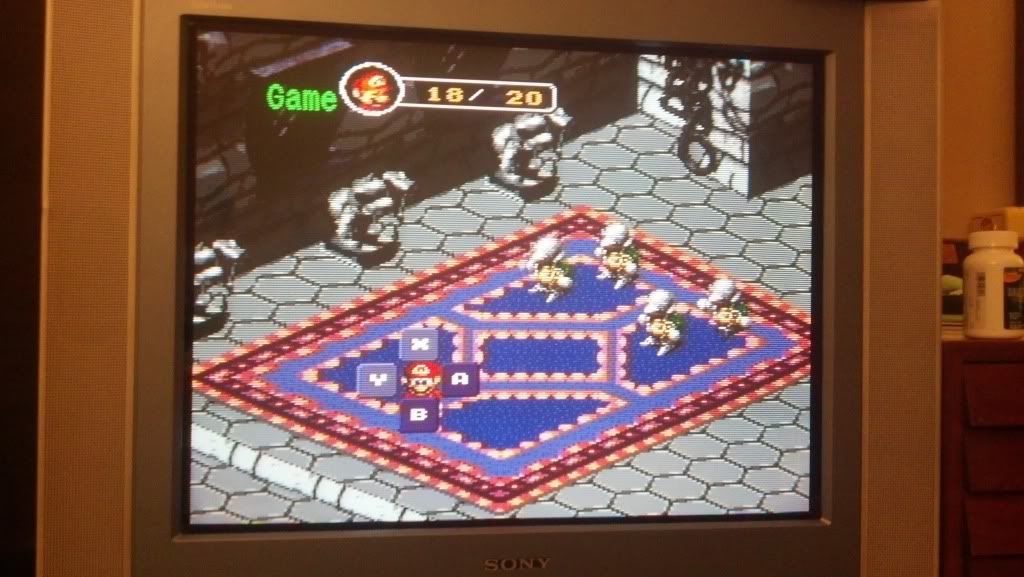
YPbPr
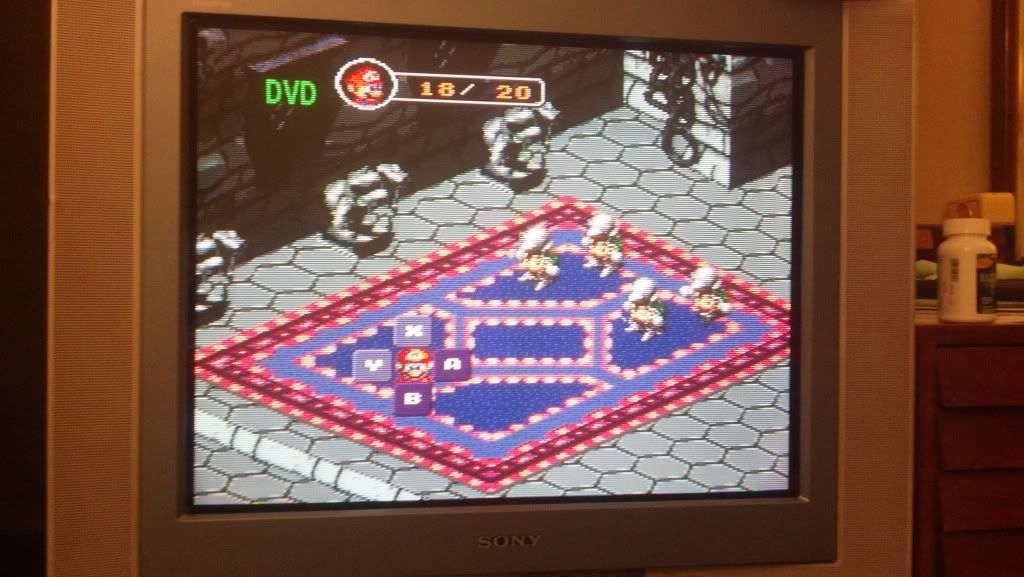
I'd say this mod is essentially there. I believe the pics speak for themselves. YPbPr looks crisper, and better.
S-video
YPbPr
S-video
YPbPr
S-video
YPbPr
S-video
YPbPr
S-Video
YPbPr
S-video
YPbPr
I'd say this mod is essentially there. I believe the pics speak for themselves. YPbPr looks crisper, and better.
-
marvelus10
- 8-bit
- Posts: 21
- Joined: Sun May 13, 2012 8:54 pm
- Location: Nanaimo, Canada
Re: So.... Some SNESes output YPbPr.....
I was able to try a different TV and the mod worked fine, so it is definitely my TV not liking the low resolution component signal.
I got an old CRT today with component inputs, a Toshiba 35AF44. The mod works great, I changed it to use A/V pin 7 and that helped a lot with the colours.
I got an old CRT today with component inputs, a Toshiba 35AF44. The mod works great, I changed it to use A/V pin 7 and that helped a lot with the colours.
Last edited by marvelus10 on Mon May 21, 2012 1:07 am, edited 1 time in total.
Re: So.... Some SNESes output YPbPr.....
Thats going to be a problem from many. 240p just was never sent over component outputs.