Bacteria's project: "Project Unity"

Discuss all hardware and software modifications
User avatar
bacteria
Next-Gen
Posts: 1524
Joined: Fri Jun 20, 2008 7:05 am
Location: Hampshire, England

Re: Bacteria's project: "Project Unity"

Post by bacteria »

Yes, yet another update!

This isn't in place yet, but I wanted to see how it would fit into the system. Answer is I have about 5mm from the top of the board (when the cart slot is relocated) to the board that will house the cable for the switch to move along and then the top of the system. Yes, that tight.

Image

The Jaguar will have to be at the very back of the Unity system, suspended to the back of the system; there is literally no more space.

With the TurboGrafx, i'll have to use long cable for the cart relocation, probably about a metre long. That's a lot of cables for the cart relocation.
I am the Bacman
User avatar
bacteria
Next-Gen
Posts: 1524
Joined: Fri Jun 20, 2008 7:05 am
Location: Hampshire, England

Re: Bacteria's project: "Project Unity"

Post by bacteria »

Having problems. Relocated the cart slot for the TurobGrafx as planned, and a couple of games booted, not quite ok though, clearly interference on lines even though used shielded cable, although the cable I used only used that thin metal material and I couldn't solder to it to make the grounding better, also there are many wires in the cables so probably isn't getting enough grounding in there anyway to get rid of cross-talk. I have only two choices left, as there is no-where on the case for the cart than the designated place, no where at all. One choice is to remove all the wiring for the TurboGrafx's relocation and start it again (wasting a day's work in the process), if that doesn't work, only option left is to use my CoreGrafx which has a small board, and I think I can squeeze that behind the Colecovision motherboard ok, which will solve the issue, however I didn't want to use that board for this project really.

------------------

Right, worked out even if I had succeeded, or in fact did it again with about half a dozen other shielded cables, I actually don't have the space in the system to move them into position. Seriously.

With that in mind, I am putting the TurboGrafx to the side for my future project, as that will use much shorter wires and be no problem.

Got my CoreGrafx and the quite rare Tennokoe 2 unit (which is a memory card in effect) from the loft. You can see how small the console is, probably the smallest commercial console ever made, it's about the size of a CD case, and about 1" thick roughly. At the top of the photo on the right is the Tennoke 2 unit. The TurboGrafx isn't that large, but as you see, it is twice the size of it. The CoreGrafx was basically a Japanese model, but unlike the PCengine, it has native A/V output not just RF; handy, shouldn't need an amp circuit built for RGB therefore.

Image

With my TurboGrafx card, when i'm going to do my future project, I will relocate literally everything to get it flat, and also can remove about 20% of the board too.

I have some knowledge on the TurboGrafx/PCengine as it's actually one of my favourite consoles - it is quite unknown but guys, it is worth playing! I have 30 game carts for this format.

I put up some guides a while back on TurboGrafx, although notice some didn't transpose from the old forum to this new one; also as i'm working on the CoreGrafx now, i'll get more guides uploaded for that too when done.

As you see in the pic, the space I had reserved originally for the Jaguar cart, master controller port and main on/off switch (no longer need space for the Jaguar cart as hardwiring it), so the space now is for the master controller port, on/off switch (which now is going to be from the GX4000 I kept), the CoreGrafx and it's game port. As you see, there is space, just.

Image

Had I not reserved that space originally, i'd have not been able to put in this system into Project Unity, which i'd not have been happy about.

Image

So, a day and a half's work wasted on the TurboGrafx, going to work on the CoreGrafx now. I need also to check the A/V pinout on the net as it is different from the TurboGrafx one I seem to recall.

BTW, seems ok to use that music track in my final videos for the Project Unity, the track from the Burnin' Rubber game for the GX4000 as in a previous post, I got my reply back, seems fine! ;)
I am the Bacman
User avatar
bacteria
Next-Gen
Posts: 1524
Joined: Fri Jun 20, 2008 7:05 am
Location: Hampshire, England

Re: Bacteria's project: "Project Unity"

Post by bacteria »

This is the CoreGrafx back casing, a perfect fit! Taking into account the motherboard and the cart slot, will probably fill up around 2/3 of the space in there, or thereabouts.

Image

Anyway, some other pics, which i'll make into a guide or two later:

The CoreGrafx console

Image

Back - takes the Nintendo type screws. Says 9v DC on the back on the side.

Image

Opened up, uses IDE wire to connect the cart slot to the motherboard.

Image

Image

Cart slot inside

Image

Here's the Tennokoe 2

Image

Image

3v to run it

Image

Board

Image

Image
I am the Bacman
fastbilly1
Site Admin
Posts: 13775
Joined: Tue Apr 17, 2007 7:08 pm

Re: Bacteria's project: "Project Unity"

Post by fastbilly1 »

Bac,
So you know Tennokoe 2's are not as rare as they use to be. The go for $50ish USD on Ebay often, and can be found for $40ish sometimes:
http://www.ebay.com/itm/TENNOKOE-BANK-2 ... 4608097dc8

Just incase something goes wrong with yours.
User avatar
bacteria
Next-Gen
Posts: 1524
Joined: Fri Jun 20, 2008 7:05 am
Location: Hampshire, England

Re: Bacteria's project: "Project Unity"

Post by bacteria »

I have a sneaky feeling that part of the problem I had with the TurboGrafx at the end was I was still using a set of AA cells to power it, as was getting some garbled graphics or black screen. I'm thinking that because when I just tested my CoreGrafx, I got a white screen; changed two of the AA batteries and the game booted. Knowing the console worked (first time i'd tested it since buying it over a year ago on ebay), and seeing a 7805 on the system, put one of my trusty PSone power supplies to the board, booted up fine. I like using the PSone power supply where I can because the power is regulated (ie stable voltage not reliant on load) and has a good amperage rating that works for retro systems fine. At least it means the console works fine 7.4v - 9v, so can put onto my 8.5v line in the Unity system no issues.

Downside though, not exactly unexpected, is the composite output from the Japanese unit is NTSC and so shows B&W on my old CRT television. It might show fine on modern televisions, however may as well just RGB mod the console.

RGB on the PCengine (or derivatives like CoreGrafx unit) sometimes needs amplification; so I have the following work to do on the console:

* RGB mod to the chip pins

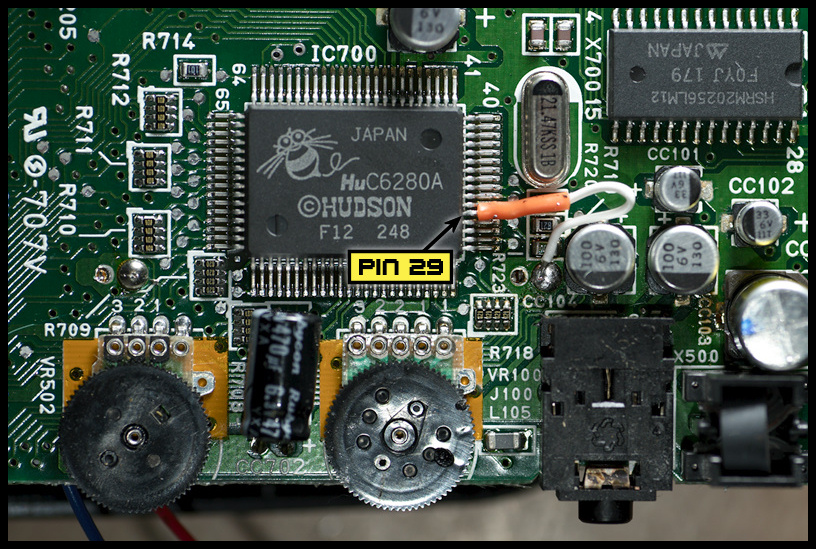
* Lift pin 29 on chip C6280A which will allow the Japanese console to run USA/Europe carts after the 4 pairs of cart pins are swapped on a switch

* Replace the IDE cable with normal wires as the IDE cable is very inflexible so will make mounting the cart slot into place harder, although might not need to depending on if I can move into position anyway.

*Mod the game cart to switch for this region free facility, to an 8P8T switch

* Connect the console to the Unity system and test, before installing the unit into place

* If need to amplify the RGB, make a circuit to do that

So, quite a bit to do.

-------------

Tested on my main televisions - both showed the CoreGrafx working in composite mode with good colours, but the noise/lack of definition/muckiness on the screen you usually get with composite on many systems was present - not a problem, still looked a good picture, however of course RGB will get rid of those issues. and make the screen image much nicer as a result.

Fortunately, you can tap off the multi-port on these units for the RGB (and other things) so no need to solder to dainty chip legs, so that isn't hard, and i'll make it so when I get my finished Unity system downstairs to do final testing, if i'm not happy with the brightness, i'll make it easy to get to the connections to add the RGB amp circuit; if I don't need it, no point doing it, right?

I will have to relocate the memory add-on unit though as otherwise the CoreGrafx will be too long to fit in my case; which is more work, something like about 150 pins to relocate wires to.

Quite a bit to do on this system, so probably won't get it all done until something like the middle of next week or thereabouts, especially as I have managed to secure job interviews for next week (yay!), so time will of course be a little more limited for modding in the next days.

----------

So, looking at the CoreGrafx board, came to two conclusions that will save me a lot of time; one is that I do need to relocate the game port, which is no issue, just has about 42 pins to do this to; and as the cart relocation was originally done with rigid IDE cable, I literally just bent the two cables back and forth a few times until the metal wires broke off leaving the pin connections (that saved a lot of work!), also, there is an inch or so clearance above where the console board is going to, enough space for the Tennokoe 2 female port to connect to the motherboard, if I just score and fold the board at a right angle (like I did with the N64 jumper and expansion packs); that saves relocating 69 pin connections!

When I mentioned before about the pin connections for the RGB and audio, easily to tap off the main connector of the board - SNDL and SNDR are the audio channels, and on the right in orange, are the RGB points. Saves delicate soldering to the chips themselves, although need to lift that pin 29 or it won't work with USA/Europe games to be region free when do the pin-swap for the cart slot for that mod.
I am the Bacman
User avatar
bacteria
Next-Gen
Posts: 1524
Joined: Fri Jun 20, 2008 7:05 am
Location: Hampshire, England

Re: Bacteria's project: "Project Unity"

Post by bacteria »

Did relocation of cart slot, standard stuff; but got a white screen. Turned out i'd wired the two rows the wrong way around (happens to all of us), anyway, did the wires again and the system works fine. Now going to see if the console likes the region free modding and the 8P8T switch, or if it's going to throw a wobbler.

Lifted pin 29 on the chip; this was a pic from information on Gamesx.com . There are different revisions of the board, so the photo they provided won't be the same often, but shows what it needs to.

Image

Here is how mine came out, wired to the ground of a nearby capacitor for convenience, as that lifted pin needs to be connected to ground:

Image

Only one chip leg, yes?; yes, but it was hard to lift, I use a thin needle when lifting up chip legs to gently pry them up when applying a soldering iron to the leg in question; on this one, my needle couldn't get in properly, had to do a bit on one side and then left gently the other side until the leg was free. The chip legs are so very thin and small that I needed a magnifying glass and torch to even check the leg was lifted. Not fun.

Tested, works, now need to get the 8P8T switch wired up, and test with non Japanese games.
I am the Bacman
User avatar
Majors
128-bit
Posts: 819
Joined: Mon Mar 06, 2006 1:58 am
Location: N. Carolina

Re: Bacteria's project: "Project Unity"

Post by Majors »

bacteria wrote: I have some knowledge on the TurboGrafx/PCengine as it's actually one of my favourite consoles - it is quite unknown but guys, it is worth playing! I have 30 game carts for this format.
Truth! Saving the best for last on this behemoth. Core sounds like perfect fit for this build: compact size and the ribbon cable for the card slot!

Best updates(s) yet!
Majors -=- Wedoca '22
User avatar
bacteria
Next-Gen
Posts: 1524
Joined: Fri Jun 20, 2008 7:05 am
Location: Hampshire, England

Re: Bacteria's project: "Project Unity"

Post by bacteria »

Relocated the cart slot and removed the ribbon cable as it was so rigid as to be an issue; I needed the wires flexible.

Yes, the TurboGrafx is an excellent console, in my top 3 systems for sure. It is a shame it's a niche console system as it deserves more people knowing about it.

The last system in the "behemoth" as you put it, will be Jaguar, single game only as that's the only game i'm interested in; Wolfenstein 3D. After that, i'll be making the GameCube controller (only one not made so far), then the system casing, which will take a fair bit of time to make the front.
I am the Bacman
User avatar
bacteria
Next-Gen
Posts: 1524
Joined: Fri Jun 20, 2008 7:05 am
Location: Hampshire, England

Re: Bacteria's project: "Project Unity"

Post by bacteria »

Did the region free mod, had to be careful, there are extra pins before the first "pin 1", connected to ground.

Wired up the 8P8T switch so when the button is out it plays Japanese games, when button is in in plays USA/Europe titles. Tested it, works fine. Obviously the image is still B&W on my old television as it doesn't like NTSC signals, and as the Japanese console is NTSC, it shows B&W. Doesn't matter - i'm RGB modding it anyway.

Image

close-up

Image

One good thing might have forgotten to mention - the UK version (TurboGrafx) is nice because it has the CTX chip so you can tap off RGB directly, however it runs Japanese titles a bit slower than should; whereas a PCengine/CoreGrafx,etc will play at full speed irrespective, however you don't have a CTX chip so have to use the RGB connections, and you may/may not need to amplify the signal depending on your television.

Anyway, going to connect to RGB, then spend quite a while connecting the rather fiddly wires to the switch unit, connect it to power; then after testing and all is fine, start working on the controller. With any luck, i'll have CoreGrafx system completed today.
I am the Bacman
fastbilly1
Site Admin
Posts: 13775
Joined: Tue Apr 17, 2007 7:08 pm

Re: Bacteria's project: "Project Unity"

Post by fastbilly1 »

bacteria wrote:will be Jaguar, single game only as that's the only game i'm interested in; Wolfenstein 3D.
Check out Tempest 2000 and Flip Out when you get a chance.
Post Reply