If you are using the mobile version the "view new posts" can be found the menu hamburger in the gray bar.MrPopo wrote:For those asking, is "View Active Posts" different from "View New Posts", which is what I always used? That still exists on the top bar. "View Your Posts" is hidden under a rollover on your name.
Test-Drive Our New Responsive Forum Theme!
-
SpaceBooger

- Moderator
- Posts: 4420
- Joined: Mon Mar 10, 2008 6:40 am
- Location: The AK-Rowdy
- Contact:
Re: Test-Drive Our New Responsive Forum Theme!

Re: Test-Drive Our New Responsive Forum Theme!
Cause stretching out the tables looks wonderful!Segata wrote:God no. It's not 2001 with dial-up members to worry about. Minimum should be 120X120. 80x80 is reserved for icon boards from the year 2001. I like to make my own avatars and always use PNG format. getting them to 80 and less is a pain.Xeogred wrote:Yikes, now Ziggy is a giant Bobbomb.
I think the avatars should be kept at 80x80.
Is it just me that thinks this looks hilarious and bad? Not sure what you guys are seeing on this new theme or others.
- Untitled-1.png (173.29 KiB) Viewed 1023 times

-
BogusMeatFactory

- Next-Gen
- Posts: 6770
- Joined: Mon Jan 26, 2009 3:16 pm
- Location: Farmington Hills, MI
- Contact:
Re: Test-Drive Our New Responsive Forum Theme!
On mobile, I just hit the little document icon with the topic and it takes me to the most recent post.
-I am the idiot that likes to have fun and be happy.Ack wrote:I don't know, chief, the haunting feeling of lust I feel whenever I look at your avatar makes me think it's real.
-
SpaceBooger
- Moderator
- Posts: 4420
- Joined: Mon Mar 10, 2008 6:40 am
- Location: The AK-Rowdy
- Contact:
Re: Test-Drive Our New Responsive Forum Theme!
I have been playing with the avatars... The new theme automatically scales them to fit the current view (ie desktop, mobile, or tablet).Xeogred wrote:Cause stretching out the tables looks wonderful!Segata wrote:God no. It's not 2001 with dial-up members to worry about. Minimum should be 120X120. 80x80 is reserved for icon boards from the year 2001. I like to make my own avatars and always use PNG format. getting them to 80 and less is a pain.Xeogred wrote:Yikes, now Ziggy is a giant Bobbomb.
I think the avatars should be kept at 80x80.
Is it just me that thinks this looks hilarious and bad? Not sure what you guys are seeing on this new theme or others.
I like the avatar, but I agree the changes to the other theme are not cool.
EDIT: Out of the three main themes, Glossy Blue is the only one where the avatar messes up the forum tables. Acidtech and V3 all resize the avatars.
Re: Test-Drive Our New Responsive Forum Theme!
Updated software can autoscale them.Xeogred wrote:Cause stretching out the tables looks wonderful!Segata wrote:God no. It's not 2001 with dial-up members to worry about. Minimum should be 120X120. 80x80 is reserved for icon boards from the year 2001. I like to make my own avatars and always use PNG format. getting them to 80 and less is a pain.Xeogred wrote:Yikes, now Ziggy is a giant Bobbomb.
I think the avatars should be kept at 80x80.
Is it just me that thinks this looks hilarious and bad? Not sure what you guys are seeing on this new theme or others.

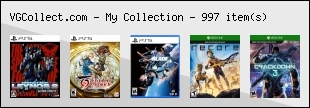

Re: Test-Drive Our New Responsive Forum Theme!
They need to not be hidden!MrPopo wrote:For those asking, is "View Active Posts" different from "View New Posts", which is what I always used? That still exists on the top bar. "View Your Posts" is hidden under a rollover on your name.

Re: Test-Drive Our New Responsive Forum Theme!
A simple resize and or JPG convert using tools such as PC freeware Infraview or Apple built in photo program.Segata wrote:God no. It's not 2001 with dial-up members to worry about. Minimum should be 120X120. 80x80 is reserved for icon boards from the year 2001. I like to make my own avatars and always use PNG format. getting them to 80 and less is a pain.Xeogred wrote:Yikes, now Ziggy is a giant Bobbomb.
I think the avatars should be kept at 80x80.
Agree with Xeogred, the avatar maybe should be 80x80. I see on the replies above (compare top two replies), larger avatars 320x320 decrease the text box width and now Increase the size height of each reply especially when only a sentence or two causing wasted blank space in the reply. The large avatar defeats the whole point of the theme for the smaller cell phone screen. If the larger avatar will stay, perhaps an auto resize to 80x80 for older themes? The avatar should not be the focus of a reply, the reply itself should be the largest section.
Just like large spoiler pictures even if auto resized, the larger avatar picture files still load and adds to band width and page load speed. Something to consider especially with larger animated avatars (larger files) in repeat replies.
EDIT
Looks like the auto resize 80x80 is working now for Glossy Blue. However the larger avatars with larger file size (see Xeogred's screenshot above) still use band width. Whatever the resize limit is decided for all themes, that should also be the size restriction in creating an avatar.
Last edited by CRTGAMER on Thu Aug 03, 2017 9:23 am, edited 1 time in total.
CRT vs LCD - Hardware Mods - HDAdvance - Custom Controllers - Game Storage - Wii Gamecube and other Guides:
CRTGAMER Guides in Board Guides Index: http://www.racketboy.com/forum/viewtopi ... 5#p1109425

Re: Test-Drive Our New Responsive Forum Theme!
On mobile, it's not really the size of the avatars that I find odd, but rather that the new theme puts them at the top of each post. It really stretches things out vertically.
In general, I'd agree that larger pixel dimensions for avatars are better - they don't need to be 1:1 scale, and can simply look nicer on higher PPI displays. 80x80 is smaller than most forums standardize on, as is/was the file size requirement.
Generally though, on a desktop browser the new theme seems to feel a bit sparse due to spacing. It mostly seems nice on mobile, were it not for vastly increasing the amount of scrolling via the vertical arrangement.
A couple other things...
Switching back to the glossyblue theme seems to no longer toggle to the (generally nice) mobile layout for me on my phone. Is that on my end, or is that a different setting?
Also, clicking thread titles now seems to always direct to the first post instead of the latest.
In general, I'd agree that larger pixel dimensions for avatars are better - they don't need to be 1:1 scale, and can simply look nicer on higher PPI displays. 80x80 is smaller than most forums standardize on, as is/was the file size requirement.
Generally though, on a desktop browser the new theme seems to feel a bit sparse due to spacing. It mostly seems nice on mobile, were it not for vastly increasing the amount of scrolling via the vertical arrangement.
A couple other things...
Switching back to the glossyblue theme seems to no longer toggle to the (generally nice) mobile layout for me on my phone. Is that on my end, or is that a different setting?
Also, clicking thread titles now seems to always direct to the first post instead of the latest.
-
noiseredux

- Next-Gen
- Posts: 38148
- Joined: Fri Nov 14, 2008 1:09 pm
- Contact:
Re: Test-Drive Our New Responsive Forum Theme!
Yeah toggling back made me lose the mobile version oc glossy blue as well. Which sucks. That worked much better on my phone.


Re: Test-Drive Our New Responsive Forum Theme!
I agree. I like them on the iPad -- especially in "laptop orientation", but when it's a narrow screen, I think we need very small avatars so it donesn't increase vertical space.isiolia wrote:On mobile, it's not really the size of the avatars that I find odd, but rather that the new theme puts them at the top of each post. It really stretches things out vertically.
In general, I'd agree that larger pixel dimensions for avatars are better - they don't need to be 1:1 scale, and can simply look nicer on higher PPI displays. 80x80 is smaller than most forums standardize on, as is/was the file size requirement.
Generally though, on a desktop browser the new theme seems to feel a bit sparse due to spacing. It mostly seems nice on mobile, were it not for vastly increasing the amount of scrolling via the vertical arrangement.
A couple other things...
Switching back to the glossyblue theme seems to no longer toggle to the (generally nice) mobile layout for me on my phone. Is that on my end, or is that a different setting?
Also, clicking thread titles now seems to always direct to the first post instead of the latest.
I'm also wondering if we should hide signatures on small/narrow screens as they often look like another message, which makes for a weird experience --- especially those with quotes in the signature.
Support Racketboy on Patreon
Follow Racketboy on Social: Instagram / Twitter / Facebook
Subscribe to Email Newsletter (Blog / Guide Updates Every Week or Two)
Follow Racketboy on Social: Instagram / Twitter / Facebook
Subscribe to Email Newsletter (Blog / Guide Updates Every Week or Two)