Sega Saturn on LCD UPDATE

Need help with your PC or Modding Projects?
User avatar
elvis
128-bit
Posts: 910
Joined: Sun Oct 05, 2008 1:20 am
Location: Brisbane, Queensland, Australia
Contact:

Re: Sega Saturn on LCD

Post by elvis »

CRTGAMER wrote:Another probably better route. Your Saturn can put out RGB. Keep the video separated.
Maybe try for RGB to Component Transcoder for the best pic on your Saturn.
We covered that half a dozen posts back.

The TV model stated is a Samsung LN22C350D1D. A quick Google reveals it has two inputs: VGA and HDMI. No component, no SCART/RGB.

The only option here is an upscaler of some description that can spit out either of the two signal types required.
MerRocher wrote:But what about the XRGB-2? I might be able to find a decent price on that on yahoo in the coming months.
If you can find a cheap XRGB-2, go for it. They are one of the best and fastest (i.e.: lag free) scalers on the market. They are well known for their quality and consistently get great reviews on places like shmups.com and shoryuken.com (communities who are VERY picky about lag-free gaming).

As mentioned, the downside is the price. But if you can find yourself a cheap second-hand one, grab it quick smart.
MerRocher
8-bit
Posts: 46
Joined: Mon Mar 29, 2010 10:48 pm

Re: Sega Saturn on LCD

Post by MerRocher »

elvis wrote:
CRTGAMER wrote:Another probably better route. Your Saturn can put out RGB. Keep the video separated.
Maybe try for RGB to Component Transcoder for the best pic on your Saturn.
We covered that half a dozen posts back.

The TV model stated is a Samsung LN22C350D1D. A quick Google reveals it has two inputs: VGA and HDMI. No component, no SCART/RGB.

The only option here is an upscaler of some description that can spit out either of the two signal types required.
MerRocher wrote:But what about the XRGB-2? I might be able to find a decent price on that on yahoo in the coming months.
If you can find a cheap XRGB-2, go for it. They are one of the best and fastest (i.e.: lag free) scalers on the market. They are well known for their quality and consistently get great reviews on places like shmups.com and shoryuken.com (communities who are VERY picky about lag-free gaming).

As mentioned, the downside is the price. But if you can find yourself a cheap second-hand one, grab it quick smart.
That's incorrect, the TV does have component and composite.

Image

If I can find a job in the next couple of months and have the extra cash, I might obtain one. But the thing is huge and I don't know where to put it. I pride myself in having a "clean" setup, so if the HUpSC2 works well enough I probably won't bother with it.
User avatar
CRTGAMER
Next-Gen
Posts: 11933
Joined: Tue Jan 05, 2010 11:59 am
Location: Southern California

Re: Sega Saturn on LCD

Post by CRTGAMER »

MerRocher wrote:
elvis wrote:
CRTGAMER wrote:Another probably better route. Your Saturn can put out RGB. Keep the video separated.
Maybe try for RGB to Component Transcoder for the best pic on your Saturn.
We covered that half a dozen posts back.

The TV model stated is a Samsung LN22C350D1D. A quick Google reveals it has two inputs: VGA and HDMI. No component, no SCART/RGB.

The only option here is an upscaler of some description that can spit out either of the two signal types required.
MerRocher wrote:But what about the XRGB-2? I might be able to find a decent price on that on yahoo in the coming months.
If you can find a cheap XRGB-2, go for it. They are one of the best and fastest (i.e.: lag free) scalers on the market. They are well known for their quality and consistently get great reviews on places like shmups.com and shoryuken.com (communities who are VERY picky about lag-free gaming).

As mentioned, the downside is the price. But if you can find yourself a cheap second-hand one, grab it quick smart.
That's incorrect, the TV does have component and composite.

Image

If I can find a job in the next couple of months and have the extra cash, I might obtain one. But the thing is huge and I don't know where to put it. I pride myself in having a "clean" setup, so if the HUpSC2 works well enough I probably won't bother with it.
There is a PDF manual on the previous page.

Did you read my signature link?

Here are your RGB pinouts on that Retro Saturn.
RGB to transcoder will give you the best pic.
The top pic. Keep those video lines separate.

The Bottom Pic is if you go SCART to XRBG-3 route.
Attachments
Saturn RGB.jpg
Saturn RGB.jpg (16 KiB) Viewed 2568 times
Saturn RGB SCART.png
Saturn RGB SCART.png (3.18 KiB) Viewed 2568 times
Image
CRT vs LCD - Hardware Mods - HDAdvance - Custom Controllers - Game Storage - Wii Gamecube and other Guides:
CRTGAMER Guides in Board Guides Index: http://www.racketboy.com/forum/viewtopi ... 5#p1109425

Image
Image
MerRocher
8-bit
Posts: 46
Joined: Mon Mar 29, 2010 10:48 pm

Re: Sega Saturn on LCD

Post by MerRocher »

CRTGAMER wrote: Geeze I was upset my HD didn't have VGA for Dreamcast. But no S-Video for Retro Consoles that bites.

Okay found your owners manual, if you want the PDF click below. Samsung LN22C350 Owners Manual
http://downloadcenter.samsung.com/conte ... 2_0203.pdf

The first two pics tell me you would definitely don't want to go that route. See all the "sharp" dots that look like a comic book? That on moving video results in "Dot Crawl", really looks bad. I would stick with composite over that.

First two pics look to be from a LCD with Dot Crawl. The second set of pics look great, is that LCD or CRT?

Another probably better route. Your Saturn can put out RGB. Keep the video separated.
Maybe try for RGB to Component Transcoder for the best pic on your Saturn.
Did you get a chance to read my signature link?

Definitely don't want to go what route?

1st pic - "Marl Kingdom" (PS1 game via PS2?) done by Hori Upscan Converter 2
2nd pic - Same by XRGB-2 Plus
3rd pic - Sakura Taisen Monogatari (PS2) done by HUpSC2
4th pic - Same by XRGB-2 Plus

The website does not say what screens were used, but here it is
http://ta3.jp/game/upscan/

An RGB to Component Transcoder is about $200 out of my price range. Btw, I have my owners manual and I've looked at it extensively. As for your signature link, I already took a look at it before posting. The link suggests either a "Video Game Jockey" (which is a piece of crap, apparently. Or the XRGB-3. I'm aware of the RGB output of the Saturn and if it wouldn't cost me upwards of $300 I might go that route.
User avatar
CRTGAMER
Next-Gen
Posts: 11933
Joined: Tue Jan 05, 2010 11:59 am
Location: Southern California

Re: Sega Saturn on LCD

Post by CRTGAMER »

MerRocher wrote:Definitely don't want to go what route?

1st pic - "Marl Kingdom" (PS1 game via PS2?) done by Hori Upscan Converter 2
2nd pic - Same by XRGB-2 Plus
3rd pic - Sakura Taisen Monogatari (PS2) done by HUpSC2
4th pic - Same by XRGB-2 Plus

The website does not say what screens were used, but here it is
http://ta3.jp/game/upscan/

An RGB to Component Transcoder is about $200 out of my price range. Btw, I have my owners manual and I've looked at it extensively. As for your signature link, I already took a look at it before posting. The link suggests either a "Video Game Jockey" (which is a piece of crap, apparently. Or the XRGB-3. I'm aware of the RGB output of the Saturn and if it wouldn't cost me upwards of $300 I might go that route.
Questionable how scaled graphics would come out using S-Video or Composite as the initial source. The dot crawl issues with LCD monitors.

I was thinking of this one, I believe its cheaper.
Link for a RGB to Component Transcoder
http://www.jrok.com/hardware/RGB.html

Image
Image
CRT vs LCD - Hardware Mods - HDAdvance - Custom Controllers - Game Storage - Wii Gamecube and other Guides:
CRTGAMER Guides in Board Guides Index: http://www.racketboy.com/forum/viewtopi ... 5#p1109425

Image
Image
User avatar
CRTGAMER
Next-Gen
Posts: 11933
Joined: Tue Jan 05, 2010 11:59 am
Location: Southern California

Re: Sega Saturn on LCD

Post by CRTGAMER »

The JROK schematic.
Attachments
JROK RGB v4 pinout small.jpg
JROK RGB v4 pinout small.jpg (79.4 KiB) Viewed 2552 times
Image
CRT vs LCD - Hardware Mods - HDAdvance - Custom Controllers - Game Storage - Wii Gamecube and other Guides:
CRTGAMER Guides in Board Guides Index: http://www.racketboy.com/forum/viewtopi ... 5#p1109425

Image
Image
User avatar
elvis
128-bit
Posts: 910
Joined: Sun Oct 05, 2008 1:20 am
Location: Brisbane, Queensland, Australia
Contact:

Re: Sega Saturn on LCD

Post by elvis »

MerRocher wrote:That's incorrect, the TV does have component and composite.
Hrm... that's not what the "D1D" specs say. Weird.

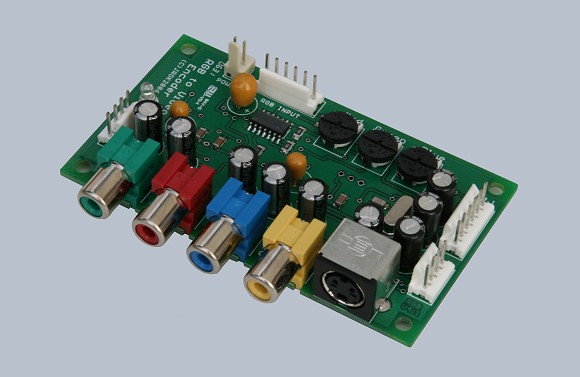
Well, CRTGamer has a point - Component output upscalers are cheap and plentiful. The JROK ones mentioned above are very popular with arcade owners and supergun makers for quality and price. Plus there are plenty of Chinese made units appearing all over the place that do similarly well:

http://www.welink.cc/e/product/product_ ... brand_id=4

Fast converters in those, with very decent picture quality outputs. Can't argue with the price, either.
MerRocher
8-bit
Posts: 46
Joined: Mon Mar 29, 2010 10:48 pm

Re: Sega Saturn on LCD

Post by MerRocher »

So basically the Upscan Converter might not work so well with Upscaling?

But what is that, just a naked piece of computer hardware that sits outside of my TV? Wouldn't that be sensitive to it's surroundings and need some sort of protective box? And how much would one of those things cost?

Btw the link gives me this:

Microsoft OLE DB Provider for ODBC Drivers ��~ '80040e14'

[Microsoft][ODBC SQL Server Driver][SQL Server]Invalid column name 'name_'.

/e/include/i_util.asp, �C428
User avatar
CRTGAMER
Next-Gen
Posts: 11933
Joined: Tue Jan 05, 2010 11:59 am
Location: Southern California

Re: Sega Saturn on LCD

Post by CRTGAMER »

MerRocher wrote:So basically the Upscan Converter might not work so well with Upscaling?

But what is that, just a naked piece of computer hardware that sits outside of my TV? Wouldn't that be sensitive to it's surroundings and need some sort of protective box? And how much would one of those things cost?

Btw the link gives me this:

Microsoft OLE DB Provider for ODBC Drivers ��~ '80040e14'

[Microsoft][ODBC SQL Server Driver][SQL Server]Invalid column name 'name_'.

/e/include/i_util.asp, �C428
You could get a plastic electronics case at electrical suppliers.
The JROK, I believe is around 80 bucks, Contact the seller.

Not sure what's happening on your reply just click below.

Link for JROK RGB to Component Transcoder
http://www.jrok.com/hardware/RGB.html
Image
CRT vs LCD - Hardware Mods - HDAdvance - Custom Controllers - Game Storage - Wii Gamecube and other Guides:
CRTGAMER Guides in Board Guides Index: http://www.racketboy.com/forum/viewtopi ... 5#p1109425

Image
Image
MerRocher
8-bit
Posts: 46
Joined: Mon Mar 29, 2010 10:48 pm

Re: Sega Saturn on LCD

Post by MerRocher »

It was for the Chinese item being listed, not what you listed. But thank you for your help.

An unexpected expense just came up, and I have a number of expenses in my immediate future so I'll have to make a decision based on my budget for the moment. The RGB to Component converter looks like an interesting (and quite possibly the best) solution, but it also looks like a summer project.
Post Reply