I was wondering if there was a best option for those boxes that you can plug A/V cables from multiple consoles into. I have an old one that I think is actually a GameStop brand that I used to use, and it seemed functional enough, but I've had it for 10+ years and I wasn't sure if there was something better or if they're all about the same. Link below to a similar one if I'm not being quite clear enough. Thanks
Game Switch
-
Snatch1414
- Next-Gen
- Posts: 1279
- Joined: Mon Aug 31, 2009 8:33 pm
Game Switch
Subscribe to the Snatch Gaming podcast on iTunes!
SnatchGaming.com
Twitter: @SnatchGames
SnatchGaming.com
Twitter: @SnatchGames

Re: Game Switch
It will help if you list out all the consoles you plan on hooking up. Keep in mind you will likely need more then one switch box due to the different types of connections on both the consoles and the back of the TV. Research the best output of each console and match to the inputs of the TV.
CRT vs LCD - Hardware Mods - HDAdvance - Custom Controllers - Game Storage - Wii Gamecube and other Guides:
CRTGAMER Guides in Board Guides Index: http://www.racketboy.com/forum/viewtopi ... 5#p1109425

Re: Game Switch
I've found that powered ones are much more effective (cleaner signal) than mechanical switched ones. If you can afford it, getting a full AV receiver is even better since they will always use proper shielding to prevent interference from the amp.
Before I switched to VGA and HDMI for all my consoles I used 2 Phillips PH61150 chained together - tho I got them for a lot cheaper than amazon's price. The best part about that model is they automatically switch to whichever device is turned on (tho they don't come with a remote)
There's a topic about AV Switches in the Game Room & Home Theater forum here.
Before I switched to VGA and HDMI for all my consoles I used 2 Phillips PH61150 chained together - tho I got them for a lot cheaper than amazon's price. The best part about that model is they automatically switch to whichever device is turned on (tho they don't come with a remote)
There's a topic about AV Switches in the Game Room & Home Theater forum here.




Re: Game Switch
Really depends on your needs. How many consoles are you looking to hook up? Are they older ones using Composite/S-Video or are they capable of Component or HDMI? Like Anapan mentioned above powered switches and full AV receivers are your best bet to keep your signal clean and strong.
I personally use an old JVC JX S700. It's got 7 inputs, powered, has a remote, but only does S-Video and Composite. It's great if you're only using it for older consoles though.
I personally use an old JVC JX S700. It's got 7 inputs, powered, has a remote, but only does S-Video and Composite. It's great if you're only using it for older consoles though.
-
Snatch1414
- Next-Gen
- Posts: 1279
- Joined: Mon Aug 31, 2009 8:33 pm
Re: Game Switch
Right now it would be a DC, a Genesis, and basically nothing older than that. Would just like to have those plus an NES and SNES and Saturn all hooked up in my basement. I'll poke around some of these suggestions you've given me, thanks everyone.
Subscribe to the Snatch Gaming podcast on iTunes!
SnatchGaming.com
Twitter: @SnatchGames
SnatchGaming.com
Twitter: @SnatchGames

Re: Game Switch
I use two of these daisy chained together:

Studio 1 VS-16 video switcher. That gives me 31 inputs. I also use two of these for s-video:

That gives me 8-svideo connections, with one being fed from this:

An atlona CDM-660 PAL->NTSC converter. Feeding into this is yet another S-video switcher, with one s-video slot feeding from this:

That's an RGB->S-Video converter. The input is being fed from this:
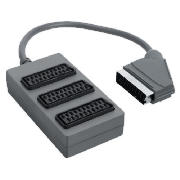
With each head being fit with one of these:
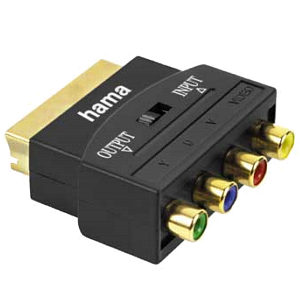
Finally, I also have one of these:

Tiny and cheap VGA->S-video converter.
Between all these switches, that gives me 31 AV inputs, 8 S-Video inputs, 4 PAL inputs, 3 RGB inputs, and a VGA input, all running to my plain-jane NTSC TV. lol I can take anything!
Studio 1 VS-16 video switcher. That gives me 31 inputs. I also use two of these for s-video:
That gives me 8-svideo connections, with one being fed from this:
An atlona CDM-660 PAL->NTSC converter. Feeding into this is yet another S-video switcher, with one s-video slot feeding from this:
That's an RGB->S-Video converter. The input is being fed from this:
With each head being fit with one of these:
Finally, I also have one of these:
Tiny and cheap VGA->S-video converter.
Between all these switches, that gives me 31 AV inputs, 8 S-Video inputs, 4 PAL inputs, 3 RGB inputs, and a VGA input, all running to my plain-jane NTSC TV. lol I can take anything!

-
AppleQueso
Re: Game Switch
What's the point of all the RGB and VGA stuff if you're just converting it all to s-video anyway?TheSonicRetard wrote: Between all these switches, that gives me 31 AV inputs, 8 S-Video inputs, 4 PAL inputs, 3 RGB inputs, and a VGA input, all running to my plain-jane NTSC TV. lol I can take anything!
Re: Game Switch
To play games that output in RGB on my 32" TV instead of my 13" RGB monitor. Going from RGB->Svideo will also yield much better results than composite or *yuk* attempting to go from composite -> svideo.AppleQueso wrote:What's the point of all the RGB and VGA stuff if you're just converting it all to s-video anyway?TheSonicRetard wrote: Between all these switches, that gives me 31 AV inputs, 8 S-Video inputs, 4 PAL inputs, 3 RGB inputs, and a VGA input, all running to my plain-jane NTSC TV. lol I can take anything!
-
AppleQueso
Re: Game Switch
Could always buy a good comb filter to get really decent results from composite to svideo.TheSonicRetard wrote:To play games that output in RGB on my 32" TV instead of my 13" RGB monitor. Going from RGB->Svideo will also yield much better results than composite or *yuk* attempting to go from composite -> svideo.AppleQueso wrote:What's the point of all the RGB and VGA stuff if you're just converting it all to s-video anyway?TheSonicRetard wrote: Between all these switches, that gives me 31 AV inputs, 8 S-Video inputs, 4 PAL inputs, 3 RGB inputs, and a VGA input, all running to my plain-jane NTSC TV. lol I can take anything!
I guess I'm just sitting here wondering why you invested in all those s-video transcoders when you could've just invested in a bigger RGB monitor instead.
Re: Game Switch
Go with SVideo for the Dreamcast, SNES and Saturn. Use Composite for the NES. If your TV supports it the Dreamcast can also output VGA for a higher resolution picture.Snatch1414 wrote:Right now it would be a DC, a Genesis, and basically nothing older than that. Would just like to have those plus an NES and SNES and Saturn all hooked up in my basement. I'll poke around some of these suggestions you've given me, thanks everyone.
Maybe upgrade your 32" TV to support Component? The larger screen can really show off the capabilities of each console, especially if you utilize the best possible output of each console.TheSonicRetard wrote:To play games that output in RGB on my 32" TV instead of my 13" RGB monitor. Going from RGB->Svideo will also yield much better results than composite or *yuk* attempting to go from composite -> svideo.AppleQueso wrote:What's the point of all the RGB and VGA stuff if you're just converting it all to s-video anyway?TheSonicRetard wrote:Between all these switches, that gives me 31 AV inputs, 8 S-Video inputs, 4 PAL inputs, 3 RGB inputs, and a VGA input, all running to my plain-jane NTSC TV. lol I can take anything!
CRT vs LCD - Hardware Mods - HDAdvance - Custom Controllers - Game Storage - Wii Gamecube and other Guides:
CRTGAMER Guides in Board Guides Index: http://www.racketboy.com/forum/viewtopi ... 5#p1109425