I just received my Microvision in the mail today. Everything seems to work, except one problem, some of the buttons won't work. I press "Go" and nothing happens. But other buttons on it work perfectly fine.
I've tried to Google troubleshooting on this system, and there really is very little to go on.
Does anyone know if this is repairable?
Microvision Help
-
BurningDoom

- Next-Gen
- Posts: 5953
- Joined: Thu Jan 13, 2011 12:14 am
Microvision Help
Game Trade/Want List:
http://www.racketboy.com/forum/viewtopi ... 22&t=28206
Consoles Owned: Atari 2600, NES, SNES, Super GB, N64, Gamecube, GB Player, Wii, Sega Power Base Converter, Genesis, Saturn, Dreamcast, TurboGrafx-16, PlayStation, PS2 Slim, XBox, XBox 360, Game Boy, GBC, GBA-SP, DS, Game Gear, GG Master Converter
http://www.racketboy.com/forum/viewtopi ... 22&t=28206
Consoles Owned: Atari 2600, NES, SNES, Super GB, N64, Gamecube, GB Player, Wii, Sega Power Base Converter, Genesis, Saturn, Dreamcast, TurboGrafx-16, PlayStation, PS2 Slim, XBox, XBox 360, Game Boy, GBC, GBA-SP, DS, Game Gear, GG Master Converter
-
Hobie-wan

- Next-Gen
- Posts: 21705
- Joined: Sat Aug 15, 2009 8:28 pm
- Location: Under a pile of retro stuff in H-town
- Contact:
Re: Microvision Help
There's probably just gunk in there that needs to be cleaned out.
I've never met a pun I didn't like. - Stark
My trade, sale and services - Rough want list - Shipping weight reference chart - AC Power Adapter reference list
My trade, sale and services - Rough want list - Shipping weight reference chart - AC Power Adapter reference list

Re: Microvision Help
If it's like most systems, just open it up and clean it with some qtips and rubbing alcohol. It's not the BEST way to do it but unless you have more proper supplies it works.
-
BurningDoom
- Next-Gen
- Posts: 5953
- Joined: Thu Jan 13, 2011 12:14 am
Re: Microvision Help
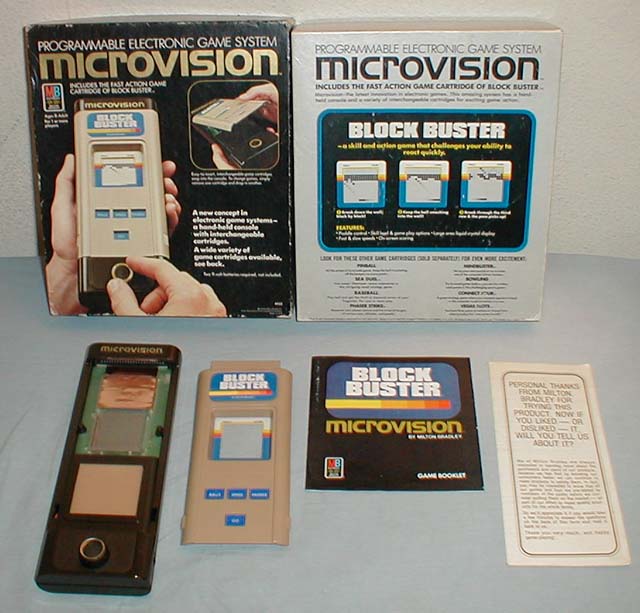
Not your average buttons. There's this sensor pad. The cartridges fit over the system, like the entire faceplate is a cartridge. The buttons are basically overlays that are fit into the cartridge to lay over the sensor pad (I believe it's a sensor pad, it's just this brown square.
I was hoping someone here, of all places, had some experience with these things since I'm finding very little on Google.
I was hoping someone here, of all places, had some experience with these things since I'm finding very little on Google.
Game Trade/Want List:
http://www.racketboy.com/forum/viewtopi ... 22&t=28206
Consoles Owned: Atari 2600, NES, SNES, Super GB, N64, Gamecube, GB Player, Wii, Sega Power Base Converter, Genesis, Saturn, Dreamcast, TurboGrafx-16, PlayStation, PS2 Slim, XBox, XBox 360, Game Boy, GBC, GBA-SP, DS, Game Gear, GG Master Converter
http://www.racketboy.com/forum/viewtopi ... 22&t=28206
Consoles Owned: Atari 2600, NES, SNES, Super GB, N64, Gamecube, GB Player, Wii, Sega Power Base Converter, Genesis, Saturn, Dreamcast, TurboGrafx-16, PlayStation, PS2 Slim, XBox, XBox 360, Game Boy, GBC, GBA-SP, DS, Game Gear, GG Master Converter
-
Hobie-wan
- Next-Gen
- Posts: 21705
- Joined: Sat Aug 15, 2009 8:28 pm
- Location: Under a pile of retro stuff in H-town
- Contact:
Re: Microvision Help
I last saw and played one when I was maybe 10? Soooo yeah.
I've never met a pun I didn't like. - Stark
My trade, sale and services - Rough want list - Shipping weight reference chart - AC Power Adapter reference list
My trade, sale and services - Rough want list - Shipping weight reference chart - AC Power Adapter reference list

Re: Microvision Help
Looks like the cart button overlays are just flexible plastic? Maybe similar design to the Atari 5200 overlays? The 5200 controller buttons have carbon that would rub off onto the PCB contacts and needed continual cleaning. In the case of your Microvision it looks like the box between the LCD screen and paddle spinner. Maybe buttons and contacts underneath that flexible surface of the box?
http://www.handheldmuseum.com/MB/uVUS.htm
Interesting trivia: the console itself is nothing more than controls, LCD panel and a controller chip for the LCD panel. Each cartridge contains the microprocessor, which happens to have a small amount of ROM space on it that MB loaded the game code onto. Makes it a bit more dificult to make a multi-cart for this...
CRT vs LCD - Hardware Mods - HDAdvance - Custom Controllers - Game Storage - Wii Gamecube and other Guides:
CRTGAMER Guides in Board Guides Index: http://www.racketboy.com/forum/viewtopi ... 5#p1109425
-
DinnerX
- Next-Gen
- Posts: 1537
- Joined: Fri May 06, 2011 7:57 pm
- Location: Trapped in a Karate Kid cartridge
Re: Microvision Help
I've got one. Welcome to the club. Yeah the pad is weird.
Open up the microvision with a screw driver and look under the brown pad. There is an ultra worthless looking plastic pocket under the pad. The top and bottom of the pocket have electrical contacts. See if they are dirty.


I suppose the pad could be removed and replaced with something sturdier if you have soldering skills and feel like it.
Dumbest button design I've ever seen.
Open up the microvision with a screw driver and look under the brown pad. There is an ultra worthless looking plastic pocket under the pad. The top and bottom of the pocket have electrical contacts. See if they are dirty.
I suppose the pad could be removed and replaced with something sturdier if you have soldering skills and feel like it.
Dumbest button design I've ever seen.
Since this signature affects old posts, I'm leaving a message here in case anyone searches for my username. This account died in early 2013. I am no longer a fundamentalist.
Don't add to my problems by pretending my past views are still held in the present. I do not have any patience for that. Feel free to ask me what I think now.
Don't add to my problems by pretending my past views are still held in the present. I do not have any patience for that. Feel free to ask me what I think now.
-
BurningDoom
- Next-Gen
- Posts: 5953
- Joined: Thu Jan 13, 2011 12:14 am
Re: Microvision Help
I was thinking that, but I'm afraid of lifting the thing up. The sticker that holds it doesn't look like it's gonna go back. I could use scotch tape to put it back I suppose, but imagine how awful that will look.CRTGAMER wrote:Looks like the cart button overlays are just flexible plastic? Maybe similar design to the Atari 5200 overlays? The 5200 controller buttons have carbon that would rub off onto the PCB contacts and needed continual cleaning. In the case of your Microvision it looks like the box between the LCD screen and paddle spinner. Maybe buttons and contacts underneath that flexible surface of the box?
http://www.handheldmuseum.com/MB/uVUS.htm
Interesting trivia: the console itself is nothing more than controls, LCD panel and a controller chip for the LCD panel. Each cartridge contains the microprocessor, which happens to have a small amount of ROM space on it that MB loaded the game code onto. Makes it a bit more dificult to make a multi-cart for this...
But I guess if I can't find a better solution, it's worth a shot since it doesn't work right anyways.
Game Trade/Want List:
http://www.racketboy.com/forum/viewtopi ... 22&t=28206
Consoles Owned: Atari 2600, NES, SNES, Super GB, N64, Gamecube, GB Player, Wii, Sega Power Base Converter, Genesis, Saturn, Dreamcast, TurboGrafx-16, PlayStation, PS2 Slim, XBox, XBox 360, Game Boy, GBC, GBA-SP, DS, Game Gear, GG Master Converter
http://www.racketboy.com/forum/viewtopi ... 22&t=28206
Consoles Owned: Atari 2600, NES, SNES, Super GB, N64, Gamecube, GB Player, Wii, Sega Power Base Converter, Genesis, Saturn, Dreamcast, TurboGrafx-16, PlayStation, PS2 Slim, XBox, XBox 360, Game Boy, GBC, GBA-SP, DS, Game Gear, GG Master Converter
-
BurningDoom
- Next-Gen
- Posts: 5953
- Joined: Thu Jan 13, 2011 12:14 am
Re: Microvision Help
Thank you, very much. I will definitely try this. What did you use to put the pad back with? The original adhesive clear-sticker thingie doesn't look like it will reseal.DinnerX wrote:I've got one. Welcome to the club. Yeah the pad is weird.
Open up the microvision with a screw driver and look under the brown pad. There is an ultra worthless looking plastic pocket under the pad. The top and bottom of the pocket have electrical contacts. See if they are dirty.
I suppose the pad could be removed and replaced with something sturdier if you have soldering skills and feel like it.
Dumbest button design I've ever seen.
Game Trade/Want List:
http://www.racketboy.com/forum/viewtopi ... 22&t=28206
Consoles Owned: Atari 2600, NES, SNES, Super GB, N64, Gamecube, GB Player, Wii, Sega Power Base Converter, Genesis, Saturn, Dreamcast, TurboGrafx-16, PlayStation, PS2 Slim, XBox, XBox 360, Game Boy, GBC, GBA-SP, DS, Game Gear, GG Master Converter
http://www.racketboy.com/forum/viewtopi ... 22&t=28206
Consoles Owned: Atari 2600, NES, SNES, Super GB, N64, Gamecube, GB Player, Wii, Sega Power Base Converter, Genesis, Saturn, Dreamcast, TurboGrafx-16, PlayStation, PS2 Slim, XBox, XBox 360, Game Boy, GBC, GBA-SP, DS, Game Gear, GG Master Converter
-
DinnerX
- Next-Gen
- Posts: 1537
- Joined: Fri May 06, 2011 7:57 pm
- Location: Trapped in a Karate Kid cartridge
Re: Microvision Help
The pad doesn't need to be removed to open up the console or anything. The rest of the black case just slides off around it when you open up the microvision. The pad stays on the plastic pocket. All the electrical stuff is on the plastic under the pad so the pad shouldn't need to be removed.BurningDoom wrote: Thank you, very much. I will definitely try this. What did you use to put the pad back with? The original adhesive clear-sticker thingie doesn't look like it will reseal.
EDIT:You're talking about the brown pad on the microvision right?
Since this signature affects old posts, I'm leaving a message here in case anyone searches for my username. This account died in early 2013. I am no longer a fundamentalist.
Don't add to my problems by pretending my past views are still held in the present. I do not have any patience for that. Feel free to ask me what I think now.
Don't add to my problems by pretending my past views are still held in the present. I do not have any patience for that. Feel free to ask me what I think now.