Hello. I've ran into some problems for my TV (I believe its resolution is 704×480), it just won't receive signals from my PS2. It stopped receiving them after I had a short-lived eureka moment, when I thought I could hook my PS2 up to it via PS3 component cables. I was disappointed to see that nothing happened, but I was shocked when nothing happened when I plugged the composite cables in and booted up my PS2. I tested both the PS2 and the cables on other TVs and they work fine, so I'm certain its a problem with the TV itself.
What did I do wrong? And more importantly, how can I fix it?
Oh, and here's the specs of the TV: http://www.manualowl.com/m/RCA/20F424T/Manual/38943
RCA TruFlat SDTV - Not receiving signals from AV Cables
-
DomitorInvictus

- 24-bit
- Posts: 126
- Joined: Sun Jul 31, 2011 12:38 pm

Re: RCA TruFlat SDTV - Not receiving signals from AV Cables
A direct link or even a quote copied here will save all the clicking and searching. Did the work for you:DomitorInvictus wrote:Hello. I've ran into some problems for my TV (I believe its resolution is 704×480), it just won't receive signals from my PS2. It stopped receiving them after I had a short-lived eureka moment, when I thought I could hook my PS2 up to it via PS3 component cables. I was disappointed to see that nothing happened, but I was shocked when nothing happened when I plugged the composite cables in and booted up my PS2. I tested both the PS2 and the cables on other TVs and they work fine, so I'm certain its a problem with the TV itself.
What did I do wrong? And more importantly, how can I fix it?
Oh, and here's the specs of the TV: http://www.manualowl.com/m/RCA/20F424T/Manual/38943
http://www.specsserver.com/CACHE/FRKMKAWNTILK.PDF
The right input selected?
Your TV supports RF, Component and three Composite inputs. Try the different Composite inputs, be sure to press the TV remote so the input is matched. Even better use the Component input for your PS2. Even though the tube is 480i, Component will give the best pic on this TV.
CRT vs LCD - Hardware Mods - HDAdvance - Custom Controllers - Game Storage - Wii Gamecube and other Guides:
CRTGAMER Guides in Board Guides Index: http://www.racketboy.com/forum/viewtopi ... 5#p1109425
-
DomitorInvictus
- 24-bit
- Posts: 126
- Joined: Sun Jul 31, 2011 12:38 pm
Re: RCA TruFlat SDTV - Not receiving signals from AV Cables
Thanks for the help. Unfortunately, I tried all of the inputs but none of them seem to work, for any of the cables. Also, I do not have the remote control to the TV.
Re: RCA TruFlat SDTV - Not receiving signals from AV Cables
I think that is the problem. You have to match the input of the cable by pressing input on the remote. Maybe get an inexpensive universal remote? Most cable remotes can also be programmed to the TV. Select TV and try the input button to change RF, Component or one of the three Composite inputs.DomitorInvictus wrote:Thanks for the help. Unfortunately, I tried all of the inputs but none of them seem to work, for any of the cables. Also, I do not have the remote control to the TV.
CRT vs LCD - Hardware Mods - HDAdvance - Custom Controllers - Game Storage - Wii Gamecube and other Guides:
CRTGAMER Guides in Board Guides Index: http://www.racketboy.com/forum/viewtopi ... 5#p1109425
-
DomitorInvictus
- 24-bit
- Posts: 126
- Joined: Sun Jul 31, 2011 12:38 pm
Re: RCA TruFlat SDTV - Not receiving signals from AV Cables
That could very well be the problem. I will try this ASAP. Thanks!
-
DomitorInvictus
- 24-bit
- Posts: 126
- Joined: Sun Jul 31, 2011 12:38 pm
Re: RCA TruFlat SDTV - Not receiving signals from AV Cables
Okay so I got a universal remote and programmed it to my TV. But there is no input button on the remote and no matter what I try, the TV only shows a blue screen and says "No signal". The only buttons on the remote that seem to actually do anything are the volume, mute, channel and power buttons. Did I just buy ineffective remote or is my TV hopeless? I'm really getting tired of this.
-
Hobie-wan

- Next-Gen
- Posts: 21705
- Joined: Sat Aug 15, 2009 8:28 pm
- Location: Under a pile of retro stuff in H-town
- Contact:
Re: RCA TruFlat SDTV - Not receiving signals from AV Cables
There has to be a way to set up an input selector on the remote. TVs have always had multiple inputs since universal remotes came out.
I've never met a pun I didn't like. - Stark
My trade, sale and services - Rough want list - Shipping weight reference chart - AC Power Adapter reference list
My trade, sale and services - Rough want list - Shipping weight reference chart - AC Power Adapter reference list
Re: RCA TruFlat SDTV - Not receiving signals from AV Cables
TV is set to RF inputDomitorInvictus wrote:Okay so I got a universal remote and programmed it to my TV. But there is no input button on the remote and no matter what I try, the TV only shows a blue screen and says "No signal". The only buttons on the remote that seem to actually do anything are the volume, mute, channel and power buttons. Did I just buy ineffective remote or is my TV hopeless? I'm really getting tired of this.
The TV won't work with off the air digital broadcast, but if you have cable you can verify. This doesn't help the PS2 unless you have an RF adaptor or get the remote to change the input. Do you have Cable TV or Satellite? Both should have a remote that can be programmed to operate your TV.
THIS. Try a different code for the programmable remote. Any manufacturer has several codes to choose from in the Universal Remote. Maybe the remote is a basic universal without the extra buttons?Hobie-wan wrote:There has to be a way to set up an input selector on the remote. TVs have always had multiple inputs since universal remotes came out.

@ DomitorInvictus - What is the make and model number of the Universal Remote?
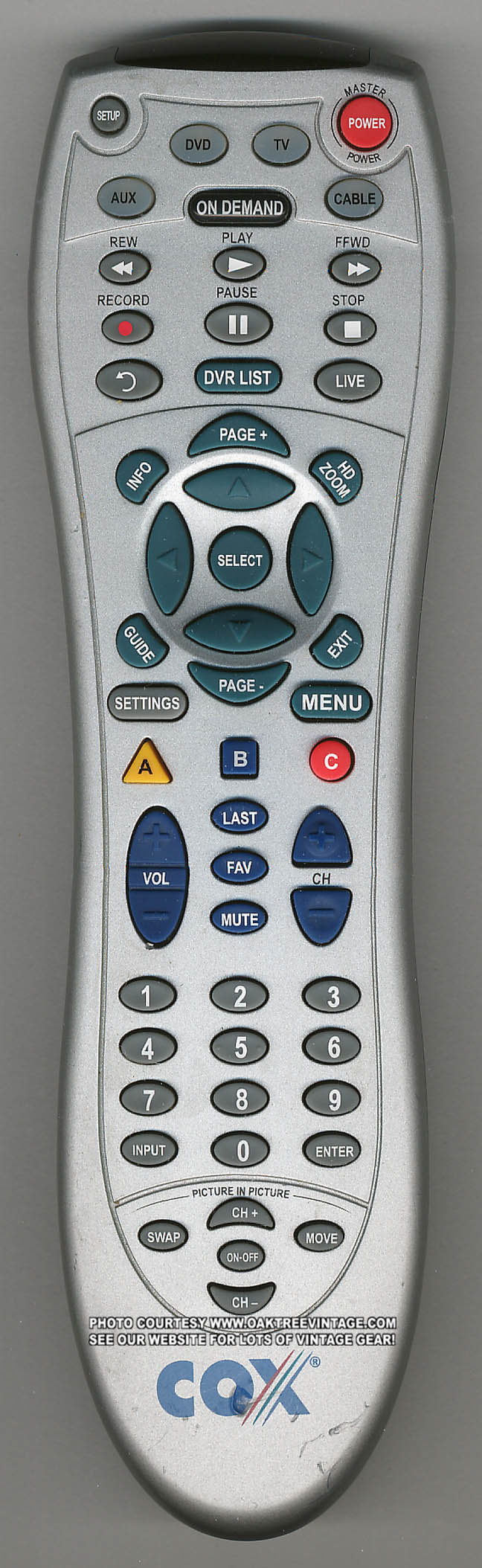
My Cox Cable Remote will change TV Input, but only when I hold the TV button while pressing the Input button.
CRT vs LCD - Hardware Mods - HDAdvance - Custom Controllers - Game Storage - Wii Gamecube and other Guides:
CRTGAMER Guides in Board Guides Index: http://www.racketboy.com/forum/viewtopi ... 5#p1109425
-
DomitorInvictus
- 24-bit
- Posts: 126
- Joined: Sun Jul 31, 2011 12:38 pm
Re: RCA TruFlat SDTV - Not receiving signals from AV Cables
EDIT: Problem solved. Although I have one last question. I only have a component cable that is split into three ends for the 3 current generation systems, and I figured that it would be possible to hook the PS3 end into my PS2 and play games that have HD support. On my SDTV it does not receive signal even when its on CVideo. Do I have to have an official Sony component cable to play PS2 games at higher resolution? Or it may be a problem with the component input, because there is no video (but there is sound) when I plug my 360 into it.
Re: RCA TruFlat SDTV - Not receiving signals from AV Cables
Sony, Mad Catz, Pelican, ETC. Any brand Component cable will work as long as it fits. I don't like the multiple system octopus cables, the extra plugs hanging open might cause feedback.DomitorInvictus wrote:EDIT: Problem solved. Although I have one last question. I only have a component cable that is split into three ends for the 3 current generation systems, and I figured that it would be possible to hook the PS3 end into my PS2 and play games that have HD support. On my SDTV it does not receive signal even when its on CVideo. Do I have to have an official Sony component cable to play PS2 games at higher resolution? Or it may be a problem with the component input, because there is no video (but there is sound) when I plug my 360 into it.
READ PREVIOUS REPLIES
I mentioned earlier your SDTV will only do 480i, all the PS2 games will work but not in 480p. Don't select the 480p option in the game, won't work on your TV. Also did you get a remote with an input button to select which port? A REMOTE MODEL NUMBER?
CRT vs LCD - Hardware Mods - HDAdvance - Custom Controllers - Game Storage - Wii Gamecube and other Guides:
CRTGAMER Guides in Board Guides Index: http://www.racketboy.com/forum/viewtopi ... 5#p1109425