
Retaining the old taskbar context menu?
Retaining the old taskbar context menu?
Whenever I right-click to close a window/app in the taskbar I'm greeted with the bloated rectangle that MS decided to stuff down our throats in place of the classical and more simple one used in XP and earlier. Is there a way to revert to that without having to travel 50 pixels to close a damn window?
Thy ban hammer shalt strike 

Re: Retaining the old taskbar context menu?
I guess you'll be wanting to disable "jump lists".
Right-click on the taskbar itself and choose "properties".
Click the "Start Menu" tab.
Uncheck "Store and display recently opened items in the start menu and the taskbar".
Click "Apply", then "OK".
Voila, a much shorter menu for you without having to travel all those extra pixels.
As for getting rid of it altogether/substituting the old way, I don't know. Many of Windows 7 most annoying "features" are a hard and fast part of the system.
Right-click on the taskbar itself and choose "properties".
Click the "Start Menu" tab.
Uncheck "Store and display recently opened items in the start menu and the taskbar".
Click "Apply", then "OK".
Voila, a much shorter menu for you without having to travel all those extra pixels.
As for getting rid of it altogether/substituting the old way, I don't know. Many of Windows 7 most annoying "features" are a hard and fast part of the system.
Re: Retaining the old taskbar context menu?
thanks the menu is much smaller now, but lots of redundant pixels remain. Too bad I can't just right-click and rapid-close windows like the old days.
Thy ban hammer shalt strike

Re: Retaining the old taskbar context menu?
Close is the first thing up on the menu, how is that any slower than older versions?Pulsar_t wrote:thanks the menu is much smaller now, but lots of redundant pixels remain. Too bad I can't just right-click and rapid-close windows like the old days.
Blizzard Entertainment Software Developer - All comments and views are my own and not representative of the company.
Re: Retaining the old taskbar context menu?
 vs
vs 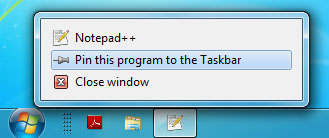
Actually by holding Shift I can get the classical context menu, found that out through the image search
Still, wish I could get it always.Thy ban hammer shalt strike